Documents Tab in Product Catalog
Learn how to use the Documents tab in O2VEND product catalog to attach certificates, specification files, and operational documents linked directly to catalog products for internal teams and vendors.
The Documents tab allows attaching supporting files directly to a catalog product.
These documents stay linked to the product throughout its lifecycle and support internal, vendor, and operational workflows.
Purpose of the Documents Tab
This section is used to:
- Attach product-specific reference files
- Maintain compliance and audit documentation
- Share technical or commercial information with vendors
- Keep all product-related documents centralized
Common Document Types
Documents uploaded here may include:
- Product specification sheets
- Certificates and compliance documents
- Vendor data files
- Pricing or cost reference files
- Import/export reference documents
- Internal operational notes
How to Add Documents
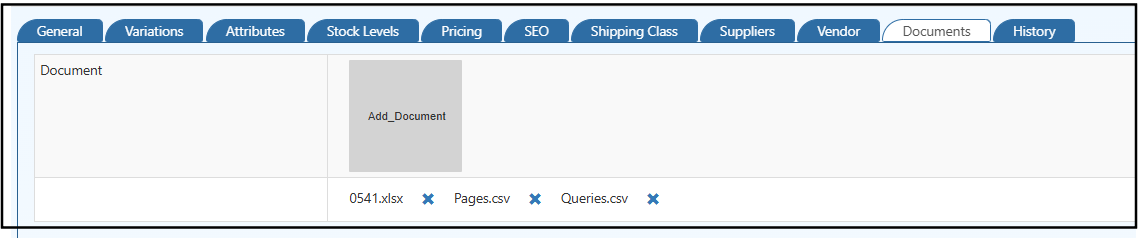
- Click Add Document
- Upload the required file (supported formats include
.xlsx,.csv,.pdf) - The document is attached to the product immediately
- Uploaded files appear in the document list
- Use the delete (✕) option to remove outdated files
Access & Visibility
- Documents remain associated with the specific product
- Assigned vendors can view relevant documents from their backoffice
- Internal teams can access documents during pricing, inventory, and order operations
Note
Documents added here are for operational and reference purposes only and do not impact pricing, inventory, or storefront visibility.