O2VEND Documentation
  • Tutorials
  • Back Office
  • Point Of Sale(POS)
  • Agent App
  • Developer Guide
Search Results for

    Show / Hide Table of Contents
    • Getting Started
    • O2VEND Store
      • My Stores
        • Create Store
      • My Account
        • My Profile
        • Manage Billing
        • Support Desk
    • backofficeindex
    • Dashboard
      • Dashboard
    • Orders
      • Quotation
      • Request For Quotation
      • Sales Order
        • Create Sales Order
        • Edit Sales Order
        • Goods Issue in Sales Order
      • Work Order
      • Purchase Order
      • Subscription
      • ActiveCarts
    • Vouchers
      • Sales
        • Manage Sales
        • Create Sales Invoice
        • Cancel Sales Invoice
        • How to create GDN(Goods Delivered Note)
        • How to add lot for products in GDN
        • How to view sales details
      • Services
        • Services
      • Purchase
        • Manage purchase
        • Create Purchase Invoice
        • Cancel purchase Invoice
        • How to create GRN(Goods Received Note)
        • How to add lot for products in GRN
        • How to print a barcode label in purchase
        • How to view purchase details
      • Credit Note
      • Debit Note
      • Receipt
      • Payment
      • Journal
      • Contra
    • Inventory
      • Stock Quantity (Alt+I)
      • Stock History
      • Print Barcode Label
      • Delivery Challan
      • Receipt Challan
      • Stock Transfer
      • Manufacturing Voucher
      • Stock Take
      • Incoming Packages
      • Outgoing Packages
    • Catalog
      • Product
        • Product
        • General
        • Variations
        • Attributes
        • Stock Levels
        • Pricing
        • SEO
        • Shipping Class
        • Online Analytics
        • suppliers
        • Vendor
        • Documents
        • History
      • Brand
      • Categories
      • Option
      • Attributes
      • Attributes Categories
      • Attributes Templates
      • Price List
      • Bulk Product Price update
      • Bulk Product Updates
      • Sku Rules
      • Pricing Rules
      • Create Product
        • Combination
        • Donation
        • Generic
        • Manufacturing
        • Membership
        • Recharge
        • Service
        • Subscription
    • Parties
      • Customers
      • Customer Groups
      • Supplier
      • Supplier Group
    • Beat Route
      • beats
      • Routes
      • Beat Runs
    • Inbox
      • SMS
      • E-Mail
      • Whatsapp
      • Configuration Template Setup
    • Accounting Books
      • Ledgers
      • Chart of Accounts
      • Day Book
      • Cash Book
      • Sales Book
      • Purchase Book
      • Account Group Book
    • Reports
      • Order Reports
        • Web Orders Progress Report
        • Back Order Items Report
        • Purchase Order Pending Item Report
        • Sales Order Pending Item Summary
        • Sales Shipping Status Report
        • Sales Order Summary
        • Sales Order Progress Report
        • Purchase Order Progress Report
        • Sales Order with Product Line Item Report
        • Sales Order Packing Sheet Report
        • Back Order Report
        • Purchase Order Summary
        • Sales Order Shipment Report
        • Sales Order Shipping Address Report
      • Sales/Purchase Reports
        • Sales Invoice Report
        • Sales Invoice Summary
        • Sales Items Summary
        • Purchase Invoice Report
        • Purchase Invoice Summary
        • Purchase Items Summary
        • Receipt Report
        • Daily Settlement Report
        • Contribution Margin Report
        • Agent Sales Report
        • Agent Report
        • Employee Sales Report
        • Employee Report
        • Employee Product Sales & Commission Report
      • Supplier Reports
        • Supplier Report
        • Supplier Purchase Report
        • Supplier Detail Report
      • Inventory Reports
        • Stock Summary
        • Stock Valuation Summary
        • Stock Ageing Report
        • Location Summary
        • Stock Ledger Report
        • Stock/Location Summary
        • Stock Movement And Valuation Summary
        • Stock Movement Summary Report
      • Products
        • Sold Product Categories
        • Product Category Summary
        • Product Sale Summary
        • Category Sale Summary
        • Brand Sale Summary
        • Reordering Stock Summary
        • Price Movement
        • Product Seasonal Demand
        • Product Stock Analysis Report
        • Stock Projection Report
      • Pos Reports
        • Cash Register Summary
        • Current Cash Registers
      • Account Reports
        • Day Book
        • Ledger
        • Cash Book
        • Sales Books
        • Purchase Books
        • Daily Sales and Payment Report
        • Balance Sheet
        • Profit and Loss Report
        • Trial Balance
      • Miscellaneous Reports
        • Output Detailed Tax Report
        • Output Tax Report Summary
        • Account Receivable Report
        • Account Payable Report
        • Gross Profit Report
        • Daily Tax Report
        • GSTR-1 Report
        • External API Logs
        • Benefit Usage
        • Offers Usage
        • Coupon Usage
        • Configuration Change History
        • VisitLog
    • Tools
      • Import
      • Export
    • OnlineStore
      • Themes
      • Theme Data
      • Shipping Methods
      • Payment Methods
      • Currency
      • Reviews
      • Zones
      • Delivery Zones
      • webstoreContentsSettings
        • Site Pages
        • Site Menus
          • Main Menu
          • Site Menus
        • Home Page Components
        • Page Header
        • Blog Categories
        • Blog
        • News Letter Subscription
        • menus
          • Main Menu
          • Site Menus
    • Analytics
      • Visitor Analytics
      • E-commerce Analytics
      • Product Analytics
      • Campaigns Analytics
    • Settings
      • Settings
      • Business Settings
        • Business Details
        • Tax Classes
        • Tax Rates
        • Operating Countries
        • Operating State or Province
        • Branches
        • Sales Channels
        • Return Rule
        • Backoffice Print Detail
        • Download Template
      • Point Of Sale
        • Quick Add Buttons
        • Print Settings
        • Payment Methods
        • Delivery Settings
        • Language
        • POS Offline Mode
      • Agent App
        • Agent App Print Details
      • Inventory
        • Unit Of Measure
        • Location
        • Unit Of Measure Conversions
        • Stock Levels
        • Sub Location
        • Print Barcode Label Settings
        • Package Material
      • userSettings
        • vendors
        • User Date Setup
        • Employees
          • Set Up Employee Roles
          • Ecommerce
          • Point Of Sale
          • Back Office
          • Sales App
        • Vendors Commission
        • Credit Rules
        • Automatic User Code
      • Loyalty and Promotions
        • Reward Points
        • Coupons
        • Gift Vouchers
        • Offers and Discounts
        • Benefits
        • Affiliate
        • Coupon Print Setting
      • Account
        • Financial Year
        • Voucher Numbering
        • Sales Account Map
        • Voucher Numbering Rules
    • Features
      • General
      • POS
      • Webstore
      • Integration
      • Notification
        • Notification
      • Push Notification
        • Web Notification
      • Order
        • Order
      • Voucher
        • Voucher
      • Date
        • Date
      • Tax
        • Additional Tax
      • GST
        • Product Tax
      • Product
        • Product
      • Payment
        • Credit sales invoice return items
      • Outstanding
        • Outstanding
      • POS
        • Point Of Sales
      • Lot
        • Disable lot popup
      • URL
        • URL
      • Schema
        • Schema
      • Segmentation
        • Segmentation
      • SEO
        • SEO
      • General
        • General
      • Inventory
        • Inventory
      • GDN
        • GDN
      • GRN
        • GRN
      • SKU
        • SKU length for variation
      • Price
        • Price
      • Cost
        • Cost
      • Email
        • Email
      • Margin
        • Margin
      • Stock
        • Stock
      • Login
        • Guest Checkout
      • IP
        • IP
      • White Listing
        • White listing
      • App
        • App
      • Print
        • Print
      • Option
        • Option
      • Attributes
        • Attributes
      • Variation
        • variation
      • Communication
        • Communication
    • New Features
      • Sales
        • Sales
      • Display
        • Display
      • Web Store
        • Webstore
      • Affiliate
        • affiliate
      • Refer
        • Refer
      • GeoIP
        • GeoIP
      • Currency
        • currency
      • Video
        • Video
      • Invoice
        • Invoice
      • SMS
        • SMS
      • Whatsapp
        • Whatsapp
      • Menu
        • Menu
      • GTIN
        • GTIN
      • Checkout
        • checkout
      • Coupon
        • coupon
      • Delivery Zone
        • Delivery Zone
      • Shipment
        • Shipment
      • Marketing
        • Marketing
      • Vendor
        • Vendor
      • Sub Location
        • Sub Location
      • Discount
        • Discount
      • Return
        • Return
      • BackOffice
        • backoffice
      • Pricing Rule
        • Pricing Rule
      • Purchase
        • Purchase
    • Integration
      • General
      • O2VEND Gateway
        • O2VEND Webhook
      • Integration
        • reCAPTCHA
        • Send Grid
      • API Key Management
        • Storefront Api Keys
      • Storefront Settings
        • storefront
      • Shipment Gateways
        • Shipway
        • Shiprocket
        • Amazon Shipping
        • XpressBees
        • eShipper
        • GetDelivered
      • Email Configuration
        • Email
      • Communication Settings
        • Amazon SES
      • GST Configuration
        • E-invoice
        • E-Way
      • Tax Settings
        • Tax
      • Invoice Settings
        • invoice
      • eWay Bill Integration
        • eWay
      • SMS Configuration
        • MSG91
      • WhatsApp Integration
        • Whatsapp
        • Bhashsms
      • Payment Gateways
        • Paytm
        • Paypal
        • Cashfree
        • PayU
        • Stripe
        • Razorpay
        • Phonepe
      • Security Settings
        • security
      • Product Management
        • Shopify
      • Search
        • Type Sense
      • Images
        • Your own CDN domain
      • Inventory Management
        • Inventory Management
      • Orders Management
        • order
        • Myntra
        • Unicommerce
        • Amazon
        • Flipkart
        • HubSpot
      • Display
        • display
    • Profile
      • My Profile
    • POS App
    • Manage Physical Stores
      • Login
      • Sales Bill
        • Manage sales orders
        • How to add products to a customer's shopping cart
        • How to apply discounts/coupons
        • How to search products in Sales Screen
        • How to add products quickly to the Cart
        • How to add serial and lot number
        • How to Print sales bills in POS
      • Receive Payments (Receipts)
      • Delivery
      • Invoice Receipts
      • Manage Cash Register
      • Reprint
      • Dashboard
      • POS Offline
      • Stock Transfer
    • Agent App
    • O2VEND App
      • Install O2VEND App
      • Home
      • Customers
      • Orders
      • Products
      • Receipts
      • Stock Movement
      • Employee Authorize
    • Webhooks
      • Webhook
      • Examples of JSON format data via webhook
      • Testing webhook
    • Developer Guide

    Service Product in Product Catalog

    A Service Product represents a non-physical offering such as professional work, support, or operational services.
    Service products do not require inventory, shipping, or warehouse management and are primarily used for billing, taxation, and reporting.

    Service products are also commonly used for GST e-Invoicing, where services require a separate HSN/SAC code from physical products.


    Purpose of Service Product

    Service products are created to:

    • Bill customers for non-physical services
    • Maintain standardized service pricing
    • Separate service revenue from physical inventory
    • Support GST and e-Invoice compliance
    • Assign service-specific HSN / SAC codes
    • Add services to orders, invoices, and subscriptions

    GST & e-Invoice Usage

    In GST-compliant businesses, Service Products are required for e-Invoicing because:

    • Services use a separate HSN / SAC code (Service Accounting Code)
    • Tax calculation differs from physical goods
    • e-Invoice systems require clear classification between goods and services

    Using a Service Product ensures:

    • Correct HSN/SAC mapping in invoices
    • Accurate GST tax reporting
    • Smooth e-Invoice generation and IRN submission
    • Compliance with government regulations

    How to Create a Service Product

    Navigation Path

    Backoffice → Catalog → Create Product → Service
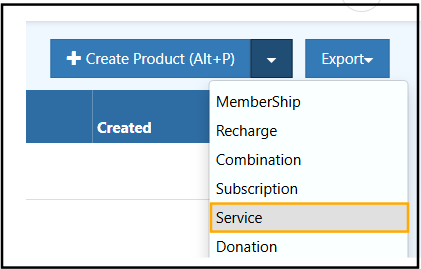
    serviceproduct

    Creation Steps

    1. Navigate to Catalog in the O2VEND Backoffice.
    2. Click Create Product.
    3. Select Service from the product type dropdown.
    4. Enter the Service Name.
    5. Assign the HSN / SAC code specific to the service.
    6. Configure GST tax rates and pricing.
    7. Add a clear service description.
    8. Save the product to enable usage in orders and e-Invoices.

    When to Use a Service Product

    A Service Product should be used when:

    • The offering is non-physical
    • GST e-Invoice generation is required
    • A separate HSN / SAC code must be applied
    • Inventory and shipping should not be affected
    • The service must appear correctly in tax reports

    Key Characteristics

    • No stock or quantity tracking
    • No shipping or delivery process
    • Supports GST tax configuration
    • Uses separate HSN / SAC codes for services
    • Fully compatible with e-Invoice generation
    • Can be one-time or recurring

    Common Use Cases

    Business & Operations

    • Consultation Service
    • Accounting or Compliance Service
    • Audit or Process Review Service

    IT & Technical Services

    • Software Installation Service
    • System Configuration Service
    • API Integration Service
    • Data Migration Service

    Sales & After-Sales

    • Installation Service
    • Maintenance Service
    • Warranty Support Service
    • Repair or Diagnostic Service

    eCommerce & Platform Services

    • Store Setup Service
    • Theme Customization Service
    • Product Upload Service
    • Payment Gateway Setup Service

    GST & Billing Charges

    • Service Fee
    • Labor Charge
    • Handling or Processing Fee

    Related Topics

    Explore other product types in O2VEND:

    • Combination Product – Create products with multiple variants or options.
    • Donation Product – Setup donation-based products for your catalog.
    • Generic Product – Standard product creation and management.
    • Manufacturing Product – Manage products produced in-house.
    • Recharge Product – Setup prepaid or recharge-based products.
    • Service Product – Add service-based offerings to your catalog.

    Related Blogs

    Learn more about product management, optimization, and selling strategies with these related blog articles:

    • Maximize Sales and Efficiency: The Power of Combination Products
      Discover how combination products can boost sales, simplify inventory management, and improve customer buying experience.

    • Sprouting Your Success: Organic Products to Sell Online
      Explore trending organic product ideas, sourcing tips, and best practices for selling organic goods online.

    • Smart Ways to Take Professional Product Photos
      Learn proven techniques for capturing high-quality product photos that improve conversions and customer trust.

    • Effective Methods for Organizing Retail Products by Category
      Understand how proper product categorization improves navigation, inventory control, and sales performance.

    • AI Optimization for Product Visibility in 2025
      Learn how AI-driven optimization helps products rank better in search results and increases online visibility.


    💡 Tip:
    Combining strong product setup with smart categorization, high-quality visuals, and AI optimization can significantly improve both operational efficiency and sales performance.

    🛠 Add Service Product
    • Edit this page
    In this article
    © 2019–2026 Jeyan Technologies Private Limited • www.o2vend.com • Create your own store