O2VEND Documentation
  • Tutorials
Search Results for

    Show / Hide Table of Contents
    • Getting Started
    • O2VEND Store
      • My Stores
        • Create Store
      • My Account
        • My Profile
        • Manage Billing
        • Support Desk
    • Dashboard
      • Dashboard
    • Orders
      • Quotation
      • Request For Quotation
      • Sales Order
        • Create Sales Order
        • Edit Sales Order
        • Goods Issue in Sales Order
      • Work Order
      • Purchase Order
      • Subscription
      • ActiveCarts
    • Vouchers
      • Sales
        • Manage Sales
        • Create Sales Invoice
        • Cancel Sales Invoice
        • How to create GDN(Goods Delivered Note)
        • How to add lot for products in GDN
        • How to view sales details
      • Services
        • Services
      • Purchase
        • Manage purchase
        • Create Purchase Invoice
        • Cancel purchase Invoice
        • How to create GRN(Goods Received Note)
        • How to add lot for products in GRN
        • How to print a barcode label in purchase
        • How to view purchase details
      • Credit Note
      • Debit Note
      • Receipt
      • Payment
      • Journal
      • Contra
    • Inventory
      • Stock Quantity (Alt+I)
      • Stock History
      • Print Barcode Label
      • Delivery Challan
      • Receipt Challan
      • Stock Transfer
      • Manufacturing Voucher
      • Stock Take
      • Incoming Packages
      • Outgoing Packages
    • Catalog
      • Product
      • Brand
      • Categories
      • Option
      • Attributes
      • Attributes Categories
      • Attributes Templates
      • Price List
      • Bulk Product Price update
      • Bulk Product Updates
      • Sku Rules
      • Pricing Rules
      • Create Product
        • Combination
        • Donation
        • Generic
        • Manufacturing
        • Membership
        • Recharge
        • Service
        • Subscription
    • Parties
      • Customers
      • Customer Groups
      • Supplier
      • Supplier Group
    • Beat Route
      • beats
      • Routes
      • Beat Runs
      • Route Runs
    • Inbox
      • SMS
      • E-Mail
      • Whatsapp
      • Configuration Template Setup
    • Accounting Books
      • Ledgers
      • Chart of Accounts
      • Day Book
      • Cash Book
      • Sales Book
      • Purchase Book
      • Account Group Book
    • Reports
      • Order Reports
        • Web Orders Progress Report
        • Back Order Items Report
        • Purchase Order Pending Item Report
        • Sales Order Pending Item Summary
        • Sales Shipping Status Report
        • Sales Order Summary
        • Sales Order Progress Report
        • Purchase Order Progress Report
        • Sales Order with Product Line Item Report
        • Sales Order Packing Sheet Report
        • Back Order Report
        • Purchase Order Summary
        • Sales Order Shipment Report
        • Sales Order Shipping Address Report
      • Sales/Purchase Reports
        • Sales Invoice Report
        • Sales Invoice Summary
        • Sales Items Summary
        • Purchase Invoice Report
        • Purchase Invoice Summary
        • Purchase Items Summary
        • Receipt Report
        • Daily Settlement Report
        • Contribution Margin Report
        • Agent Sales Report
        • Agent Report
        • Employee Sales Report
        • Employee Report
        • Employee Product Sales & Commission Report
      • Supplier Reports
        • Supplier Report
        • Supplier Purchase Report
        • Supplier Detail Report
      • Inventory Reports
        • Stock Summary
        • Stock Valuation Summary
        • Stock Ageing Report
        • Location Summary
        • Stock Ledger Report
        • Stock/Location Summary
        • Stock Movement And Valuation Summary
        • Stock Movement Summary Report
      • Products
        • Sold Product Categories
        • Product Category Summary
        • Product Sale Summary
        • Category Sale Summary
        • Brand Sale Summary
        • Reordering Stock Summary
        • Price Movement
        • Product Seasonal Demand
        • Product Stock Analysis Report
        • Stock Projection Report
      • Pos Reports
        • Cash Register Summary
        • Current Cash Registers
      • Account Reports
        • Day Book
        • Ledger
        • Cash Book
        • Sales Books
        • Purchase Books
        • Daily Sales and Payment Report
        • Balance Sheet
        • Profit and Loss Report
        • Trial Balance
      • Miscellaneous Reports
        • Output Detailed Tax Report
        • Output Tax Report Summary
        • Account Receivable Report
        • Account Payable Report
        • Gross Profit Report
        • Daily Tax Report
        • GSTR-1 Report
        • External API Logs
        • Benefit Usage
        • Offers Usage
        • Coupon Usage
        • Configuration Change History
        • VisitLog
    • Tools
      • Import
      • Export
    • OnlineStore
      • Themes
      • Theme Data
      • Shipping Methods
      • Payment Methods
      • Currency
      • Reviews
      • Zones
      • Delivery Zones
      • webstoreContentsSettings
        • Site Pages
        • Site Menus
          • Main Menu
          • Site Menus
        • Home Page Components
        • Page Header
        • Blog Categories
        • Blog
        • News Letter Subscription
        • menus
          • Main Menu
          • Site Menus
    • Analytics
      • Visitor Analytics
      • E-commerce Analytics
      • Product Analytics
      • Campaigns Analytics
    • Settings
      • Settings
      • Business Settings
        • Business Details
        • Tax Classes
        • Tax Rates
        • Operating Countries
        • Operating State or Province
        • Branches
        • Sales Channels
        • Return Rule
        • Backoffice Print Detail
        • Download Template
      • Point Of Sale
        • Quick Add Buttons
        • Print Settings
        • Payment Methods
        • Delivery Settings
        • Language
        • POS Offline Mode
      • Agent App
        • Agent App Print Details
      • Inventory
        • Unit Of Measure
        • Location
        • Unit Of Measure Conversions
        • Stock Levels
        • Sub Location
        • Print Barcode Label Settings
        • Package Material
      • userSettings
        • vendors
        • User Date Setup
        • Employees
          • Set Up Employee Roles
          • Ecommerce
          • Point Of Sale
          • Back Office
          • Sales App
        • Vendors Commission
        • Credit Rules
        • Automatic User Code
      • Loyalty and Promotions
        • Reward Points
        • Coupons
        • Gift Vouchers
        • Offers and Discounts
        • Benefits
        • Affiliate
        • Coupon Print Setting
      • Account
        • Financial Year
        • Voucher Numbering
        • Sales Account Map
        • Voucher Numbering Rules
    • Features
      • General
      • POS
      • Webstore
      • Integration
    • Integration
      • General
      • O2VEND Gateway
        • O2VEND Webhook
      • Integration
        • reCAPTCHA
        • Send Grid
      • API Key Management
        • Apikey
      • Storefront Settings
        • storefront
      • Shipment Gateways
        • Shipway
        • Shiprocket
        • Amazon Shipping
        • XpressBees
        • eShipper
        • GetDelivered
      • Email Configuration
        • Email
      • Communication Settings
        • Amazon SES
      • GST Configuration
        • E-invoice
        • E-Way
      • Tax Settings
        • Tax
      • Invoice Settings
        • invoice
      • eWay Bill Integration
        • eWay
      • SMS Configuration
        • MSG91
      • WhatsApp Integration
        • Whatsapp
        • Bhashsms
      • Payment Gateways
        • Paytm
        • Paypal
        • Cashfree
        • PayU
        • Stripe
        • Razorpay
        • Phonepe
      • Security Settings
        • security
      • Product Management
        • Shopify
      • Search
        • Type Sense
      • Images
        • images
      • Inventory Management
        • Inventory Management
      • Orders Management
        • order
      • Display
        • display
    • Profile
      • My Profile
    • Manage Physical Stores
      • Login
      • Sales Bill
        • Manage sales orders
        • How to add products to a customer's shopping cart
        • How to apply discounts/coupons
        • How to search products in Sales Screen
        • How to add products quickly to the Cart
        • How to add serial and lot number
        • How to Print sales bills in POS
      • Receive Payments (Receipts)
      • Delivery
      • Invoice Receipts
      • Manage Cash Register
      • Reprint
      • Dashboard
      • POS Offline
      • Stock Transfer
    • O2VEND App
      • Install O2VEND App
      • Home
      • Customers
      • Orders
      • Products
      • Receipts
      • Stock Movement
      • Employee Authorize
    • Webhooks
      • Webhook
      • Examples of JSON format data via webhook
      • Testing webhook

    Recharge Product Setup in O2VEND – Wallet & Balance Recharge Guide

    Learn how to create a recharge product in O2VEND. Configure wallet recharge, prepaid balance, pricing, and usage for web store.

    Recharge product setup in O2VEND enables businesses to offer prepaid balance or wallet recharge options to customers. Recharge products allow customers to add value to their account and use the balance for future purchases across web store.

    This model is commonly used in ecommerce, subscription platforms, and digital wallets to simplify payments and increase repeat transactions.


    What Is a Recharge Product?

    A recharge product represents stored value instead of a physical item. Once purchased, the recharge amount is credited to the customer’s account or wallet and can be used during checkout.

    Recharge products help customers pay faster, reduce payment friction, and encourage advance spending.


    How Recharge Products Work in O2VEND

    In O2VEND, recharge products are created as a special product type. The recharge amount is predefined, and once the order is completed, the value is automatically added to the customer balance.

    Recharge balance can be applied during billing, similar to store credit or prepaid wallets.

    Recharge product setup in O2VEND provides a simple and effective way to manage prepaid balances. With clear pricing, controlled visibility, and seamless checkout usage, recharge products help businesses increase repeat purchases and streamline payments across channels.

    Recharge Product Configuration Details

    Product Name

    Example: Wallet Recharge – ₹1000
    The product name should clearly mention the recharge value for easy identification.

    SKU

    A unique SKU helps track recharge transactions in reports. Example: RCH-1000

    Product Type

    Recharge
    This enables balance credit behavior instead of stock deduction.

    Recharge Usage During Checkout

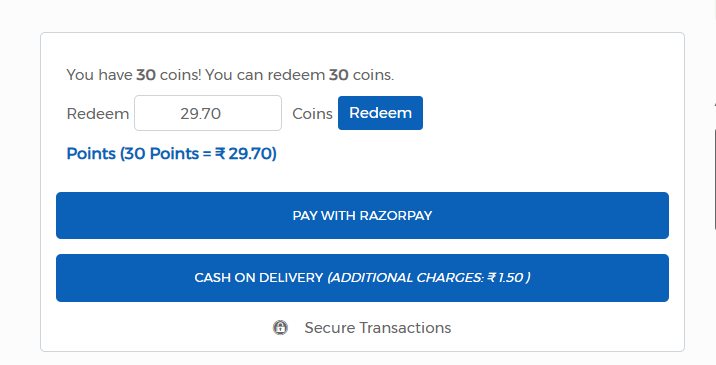
    After successful purchase, the recharge amount is added to the customer wallet. During checkout, available balance is displayed and can be applied to reduce the payable amount.

    This prepaid flow is widely adopted by ecommerce platforms to improve customer retention and transaction speed. Points earned from recharge can be redeemed as wallet value to reduce the payable amount at checkout.
    Recharge Product Setup in O2VEND – Wallet & Balance Recharge Guide

    Business Benefits of Recharge Products

    Recharge products improve cash flow by collecting advance payments. They also increase customer stickiness by encouraging repeat usage of stored balance.

    Businesses benefit from faster checkout, reduced payment failures, and higher lifetime customer value.


    Difference Between Membership and Recharge Products

    Membership products focus on access, benefits, or privileges over a period of time. Recharge products focus on prepaid value that can be consumed gradually across multiple orders.

    Both product types complement each other when used together in loyalty-driven ecommerce strategies.

    Related Reading

    • Exploring Loyalty Programs: A Guide & Top 5 Examples
      https://o2vend.com/blog/posts/exploring-loyalty-programs-a-guide-and-top-5-examples

    • How to Set Up and Use O2VEND’s Loyalty Program
      https://o2vend.com/blog/posts/how-to-set-up-and-use-o2vends-loyalty-program

    • The Rise of Omnichannel Loyalty Programs
      https://o2vend.com/blog/posts/the-rise-of-omnichannel-loyalty-programs-retaining-customers-across-platforms

    • Edit this page
    In this article
    © 2019–2026 Jeyan Technologies Private Limited • www.o2vend.com • Create your own store