Manufacturing Products Guide | Fix Raw Material Tracking & Production Cost Errors
⚠️ Facing raw material stock mismatches or production cost errors?
Manual adjustments can be time-consuming and error-prone. Manufacturing Products enable:
- ✅ Automatic tracking of all raw materials
- ⚡ Reduction of stock errors during production
- 💰 Accurate calculation of production costs per unit
This structured, BOM-driven system ensures accurate raw material management, smooth production flow, and reliable cost calculation—all in a single platform.
What Are Manufacturing Products? – Guide for Accurate Raw Material & Cost Tracking
Manufacturing Products represent items used internally during production.
These items are not intended for direct sale and are consumed while producing finished goods.
They typically include:
- Raw materials
- Components and parts
- Consumables used in production
- Intermediate items used in assembly
Manufacturing Products ensure production activities remain inventory-driven, traceable, and cost-accurate.
Why Use Manufacturing Products? – Benefits for Inventory & Cost Control
Manufacturing Products exist to solve common production challenges such as:
- Untracked raw material usage
- Incorrect finished goods costing
- Manual stock adjustments
- Inventory mismatch during production
By using Manufacturing Products, production workflows become system-controlled rather than manual.
How to Create a Manufacturing Product – Step by Step Guide
Navigation Path
Back Office → Products → Create Product → Manufacturing
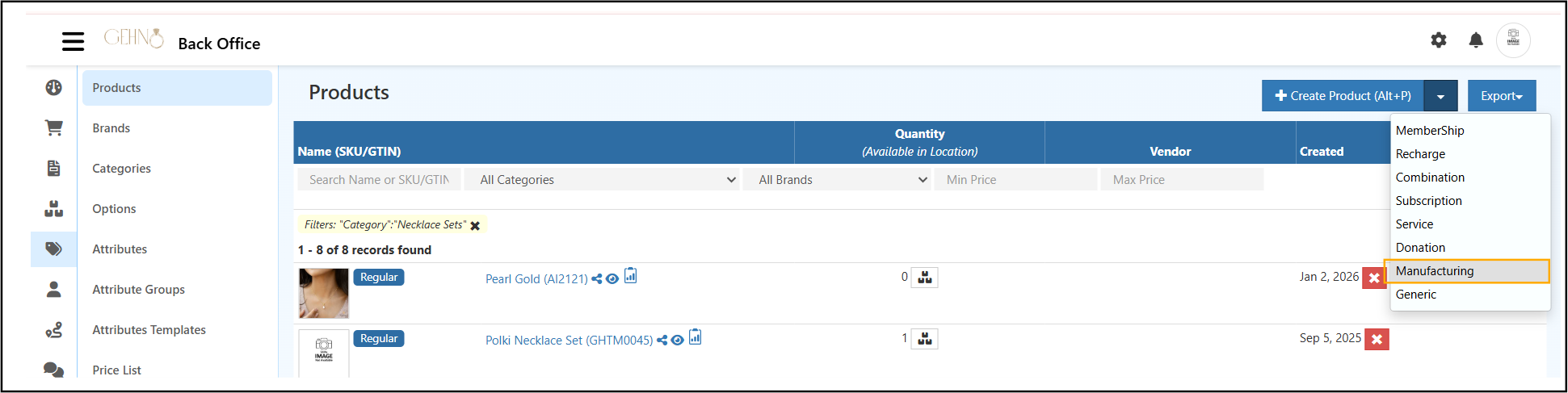
This option activates manufacturing-specific features such as BOM and internal stock handling.
When Manufacturing Product Type Should Be Used
Manufacturing type is appropriate when the item:
- Is required for producing another product
- Gets consumed during manufacturing
- Is tracked for cost and stock control
- Is not sold directly
Manufacturing type should not be used for:
- Finished goods
- Retail or POS items
- Subscription or service products
General Tab – Detailed Field Explanation
| Field | Explanation |
|---|---|
| Name | Internal name used for identification |
| SKU | Unique internal tracking code |
| Type | Manufacturing (system-defined) |
| GTIN | Optional identifier for reference |
| Price Code | Internal costing or accounting reference |
| Brand | Optional internal grouping |
| Category | Raw Materials or Components |
| Tax Class | Applicable tax configuration |
| Units | Stock measurement unit |
| Ordering Units | Procurement unit |
| Cost | Core value used for production costing |
| Publish | Keeps item active in system |
| Lot | Enables batch-level tracking if required |
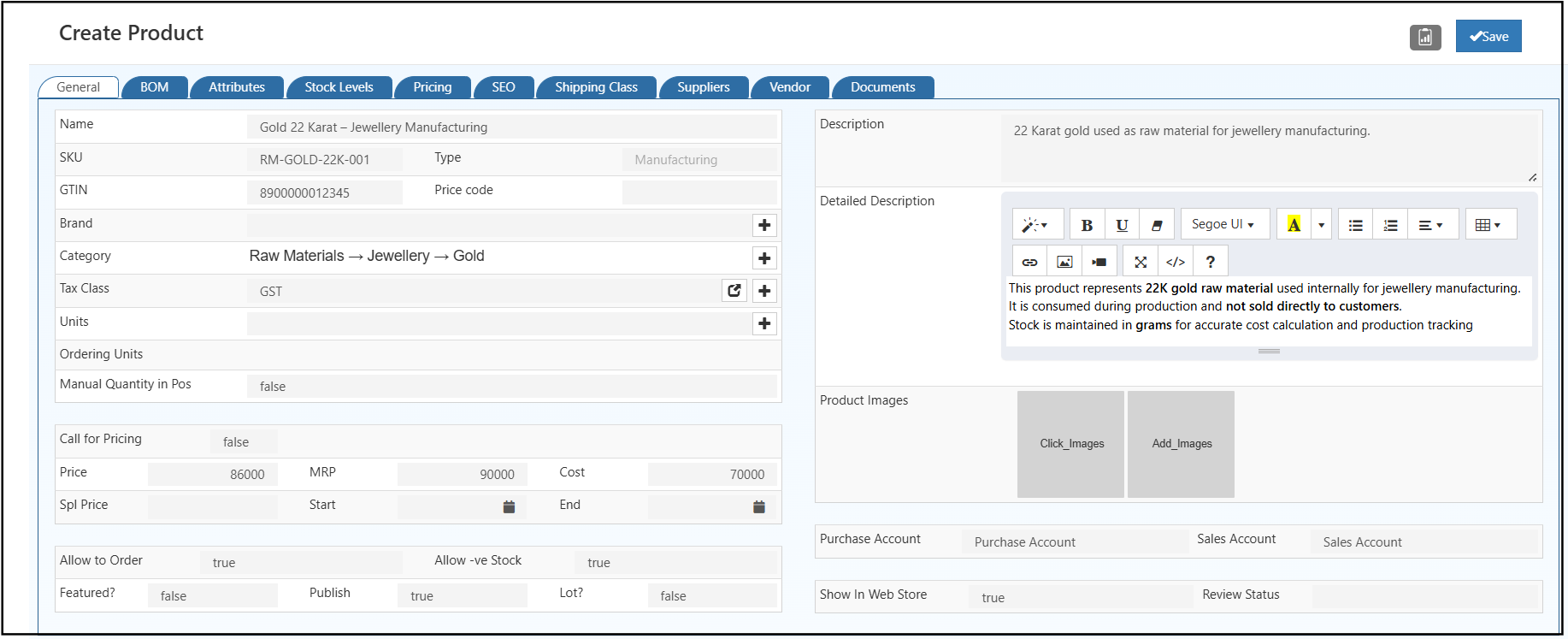
Description Fields – Usage Guidelines
Description
A short internal summary defining the role of the item in production.
Detailed Description
The detailed section should clarify:
- Internal manufacturing usage
- Consumption during production
- Non-availability for direct sale
- Importance in cost calculation and stock tracking
Clear descriptions reduce internal confusion and training dependency.
Manufacturing Product vs Regular Product – Key Differences
| Aspect | Manufacturing Product | Regular Product |
|---|---|---|
| Purpose | Internal production use | Customer sale |
| Stock Movement | BOM-based consumption | Sold via POS / Orders |
| Pricing | Cost-focused | Price & MRP driven |
| Customer Visibility | Internal only | Visible to customers |
| BOM Usage | Required | Not required |
Clear separation between these two product types is essential for clean inventory data.
Understanding BOM (Bill of Materials) – Automate Inventory & Cost
The BOM tab defines how manufacturing products are consumed to produce finished goods. Manufacturing Products work closely with manufacturing vouchers to automate raw material consumption and inventory updates
Learn how manufacturing vouchers control inventory during production.
Raw Materials Section
- Lists all manufacturing products required
- Defines exact quantity consumed per production unit
By-Products Section (Optional)
- Records secondary outputs generated during production
- Helps track reusable or sellable by-products
BOM ensures inventory deduction happens automatically and accurately.
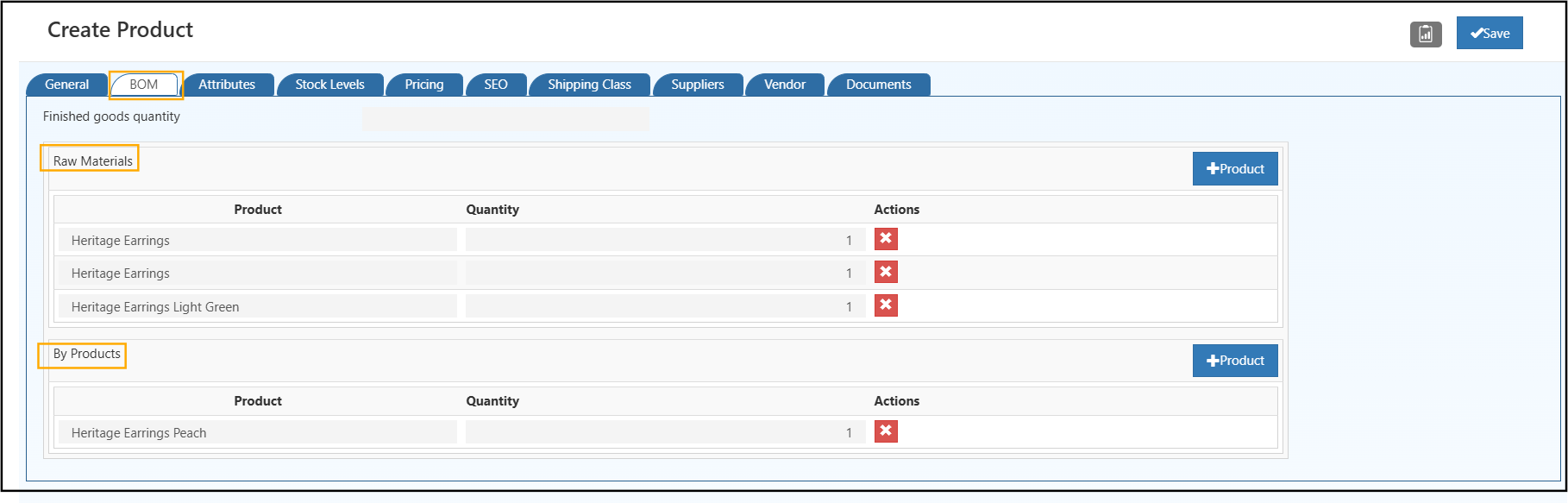
Raw Material vs By Product – Jewelry Example
| Category | Example | Description |
|---|---|---|
| Raw Material | Gold, Silver, Pearls | Used to create necklaces or rings |
| By Product | Gold scraps, leftover stones, defective components | Extra / leftover pieces after production |
Raw Material vs By Product – Water Bottle Example
| Category | Example | Description |
|---|---|---|
| Raw Material | Plastic pellets, caps, labels | Items consumed to produce the bottle |
| By Product | Plastic scraps, leftover labels, damaged caps | Minor outputs or reusable materials from production |
Stock Management & Inventory Behavior for Manufacturing Products
Manufacturing Products:
- Maintain internal stock quantities
- Allow negative stock during production stages
- Update stock only through inward, adjustment, or BOM consumption
This approach prevents accidental stock reduction via POS or sales orders.
Cost & Pricing Management for Manufacturing Products
Pricing fields in Manufacturing Products are cost-oriented.
- Selling price and MRP are not applicable
- Cost value drives:
- Finished goods valuation
- Profit calculation
- Manufacturing reports
Accurate cost entry is mandatory for reliable analytics.
Top 5 Benefits of Manufacturing Products for Inventory & Cost Control
Manufacturing Products enable organizations to:
- Record exact raw material consumption
- Maintain accurate production costing
- Support negative stock scenarios during active manufacturing
- Separate internal items from customer-facing products
- Automate inventory movement through BOM (Bill of Materials)
This structure reduces dependency on manual stock corrections and improves reporting reliability.
Results of Proper Manufacturing Product Setup
Properly configured Manufacturing Products result in:
- Structured production workflows
- Accurate inventory consumption
- Reliable cost reporting
- Reduced manual intervention
Manufacturing Products form the backbone of efficient, scalable, and audit-ready production management.
Frequently Asked Questions (FAQs)
Q: What is the difference between Raw Material & By Product?
A: Raw Material = input consumed to make a finished product.
By Product = secondary output or leftover materials generated during production.
Q: Can Manufacturing Products be sold directly?
A: No, these are internal items meant only for production.
Q: How to fix BOM errors?
A: Ensure all raw materials and quantities are correctly listed and linked to manufacturing vouchers.
Related Topics
Explore other product types in O2VEND:
- Combination Product – Create products with multiple variants or options.
- Donation Product – Setup donation-based products for your catalog.
- Generic Product – Standard product creation and management.
- Manufacturing Product – Manage products produced in-house.
- Recharge Product – Setup prepaid or recharge-based products.
- Service Product – Add service-based offerings to your catalog.
Related Articles on Manufacturing & Inventory Management
For deeper understanding of manufacturing workflows and inventory control, explore the following resources:
Manufacturing Vouchers: Simplifying Inventory Management
Learn how manufacturing vouchers streamline raw material consumption and production inventory tracking.Manufacturing Voucher – Detailed Help Guide
Step-by-step explanation of manufacturing voucher usage and inventory impact.Wholesale eCommerce Explained: Best Platforms & Use Cases
Understand how manufacturing, inventory, and wholesale selling workflows connect at scale.