Diagnose Integration Issues with External API Logs
Identify failed API calls, delayed responses, and integration errors across external systems using detailed API request and response logs.
What is External API Logs?
External API Logs is a diagnostic report that records all incoming and outgoing API interactions between O2VEND and external systems such as marketplaces, analytics services, and third-party platforms.
The report captures request payloads, response data, provider details, and execution status for each API call.
Why External API Logs Is Important
This report helps technical and operations teams maintain stable integrations and quickly resolve failures.
- Detect failed or delayed API requests
- Validate data sent to and received from external systems
- Support debugging during integration issues
- Maintain audit trails for system communication
Why use this report?
- Troubleshoot marketplace or analytics sync issues
- Identify API failures causing missing data
- Validate third-party webhook responses
- Audit external system communication
- Support developers during issue resolution
How to Access the External API Logs
Navigation Path:
Back Office → Reports → Miscellaneous → External API Logs
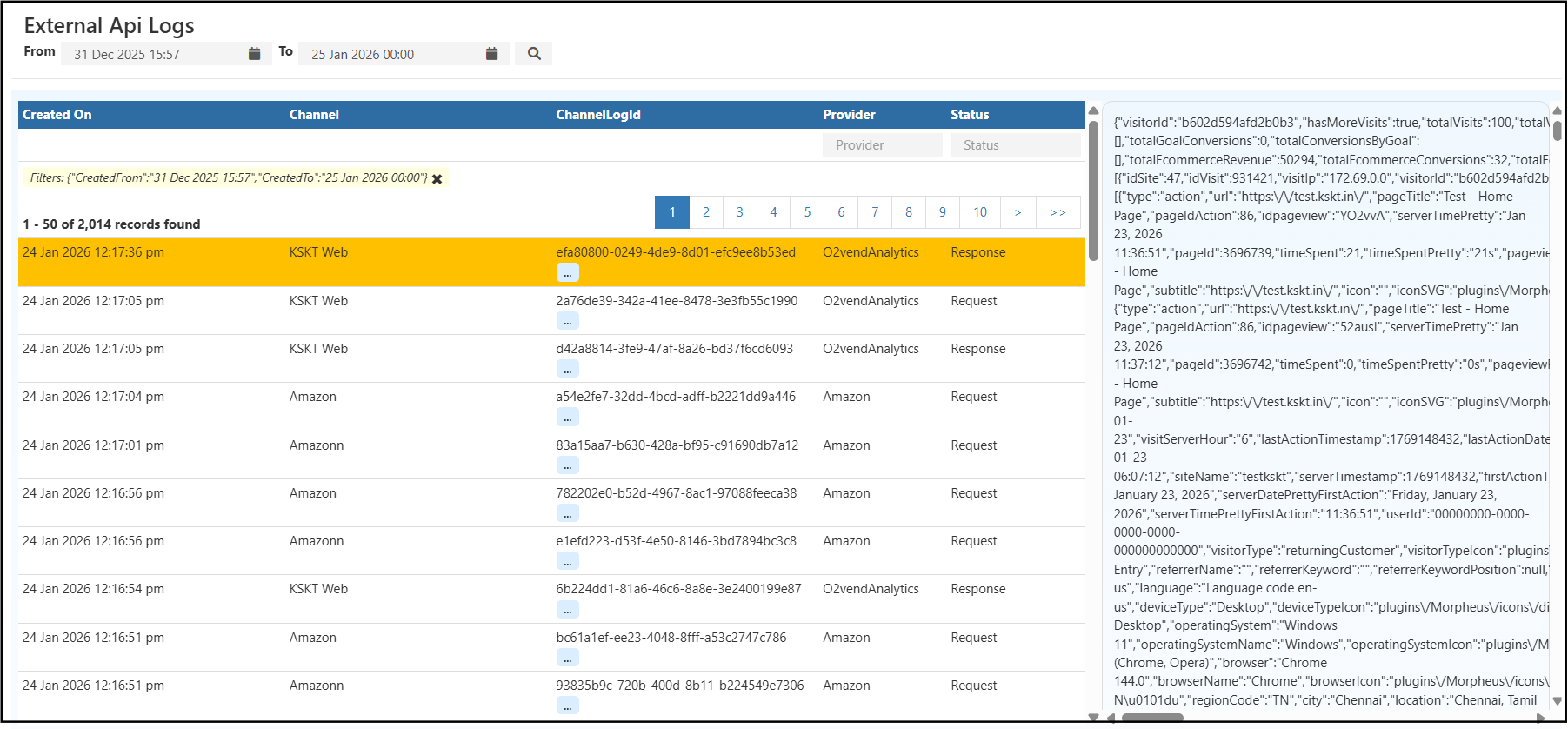
Filters & Controls
Use filters to narrow down logs and isolate issues:
- Date Range – View API activity for a specific time period
- Channel – Filter by source channel (Web, Marketplace, App)
- Provider – External system name (Amazon, Analytics, etc.)
- Status – Request or Response
Report View Explained
Log Table View
The table displays each API interaction with the following details:
- Created On – Date and time of the API call
- Channel – Source channel triggering the API
- Channel Log ID – Unique identifier for the API request
- Provider – External system receiving or sending data
- Status – Request or Response
Payload & Response Viewer
Selecting a log entry displays the full JSON payload or response, including:
- Request parameters
- API endpoints
- Response status and data
- Execution timestamps
This helps teams validate whether data was processed correctly.
How to Use the External API Logs
- Select the required date range
- Filter by provider or channel
- Identify failed or delayed API responses
- Open the log entry to inspect payload details
- Share the Channel Log ID with support or developers
Common Usage Scenarios
- Marketplace orders not syncing correctly
- Analytics data mismatch or missing metrics
- Debugging webhook or API failures
- Investigating third-party system downtime
- Verifying successful data transmission
Business Benefits
Faster Issue Resolution
Quickly isolate the root cause of integration failures.
Improved Integration Reliability
Monitor external API health and prevent recurring issues.
Strong Audit & Traceability
Maintain a clear log of all external system communications.