Bhashsms Integration in O2VEND
Integrating Bhashsms with O2VEND enables WhatsApp notifications for orders and shipping updates.
Access Path for Bhashsms Integration in O2VEND
Go to Integration → WhatsApp → Bhashsms.
Configure Bhashsms Integration in O2VEND
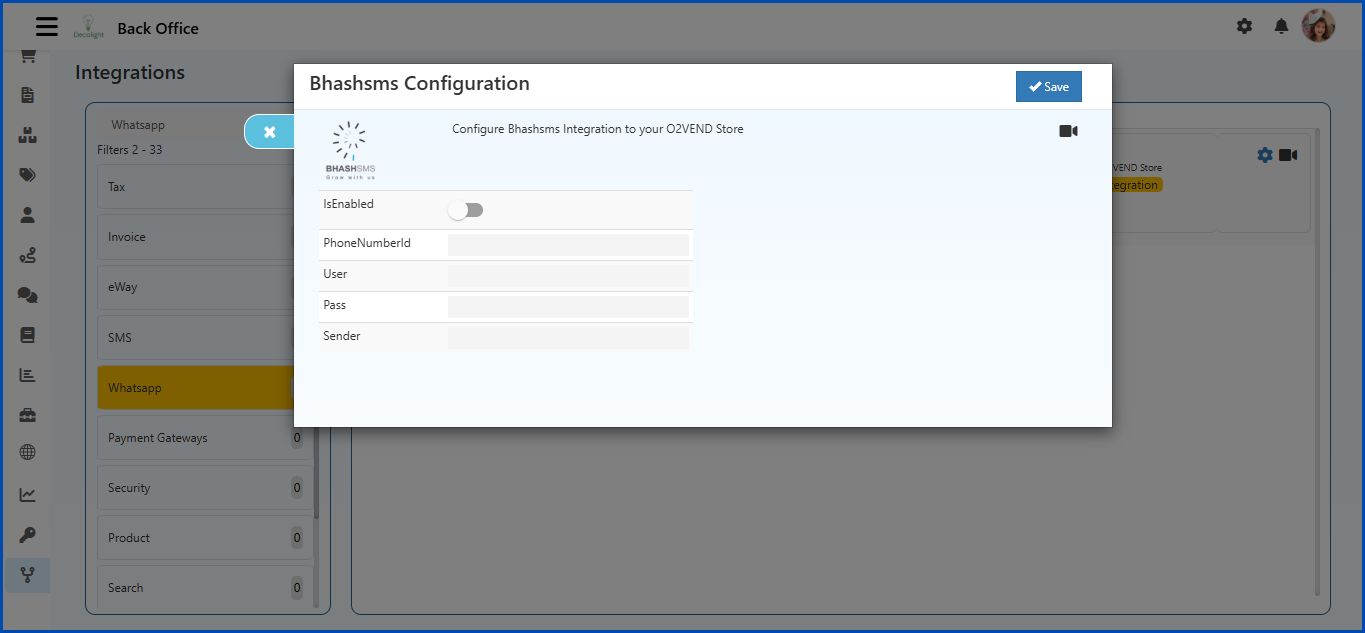
Fields Explanation
IsEnabled
- Toggle switch to enable or disable Bhashsms integration.
- ON → Integration active, WhatsApp notifications will be sent.
- OFF → Integration disabled.
PhoneNumberId
- Enter the unique Phone Number ID provided by WhatsApp.
- Example:
123456789
User
- Enter the username for the Bhashsms account.
- Example:
myusername
Pass
- Enter the password for the Bhashsms account.
- Example:
mypassword
Sender
- Enter the sender ID provided by Bhashsms.
- Example:
ABCD
Top Right
Save Button
- Click Save after filling all fields to activate the integration.
Important Note
Before enabling Bhashsms integration in O2VEND:
- WhatsApp message templates must be created and approved in the Bhashsms account before integration is enabled.
- After approval, configure these templates in O2VEND Back Office under Inbox → Configuration and save them.
- If templates are not configured and saved, even if Bhashsms integration settings are enabled, WhatsApp notifications will NOT be sent.