Credit Sales Invoice Return Items in O2VEND
Overview
The Credit Sales Invoice Return Items feature in O2VEND helps the POS system identify an existing Credit Invoice and use the return amount as payment toward that invoice.
When this option is enabled, the system automatically links the return to the original credit invoice and updates the outstanding balance, ensuring accurate and smooth credit return processing.
Location in Back Office
Navigation Path:
Back Office → Features → Payment → Credit Sales Invoice Return Items
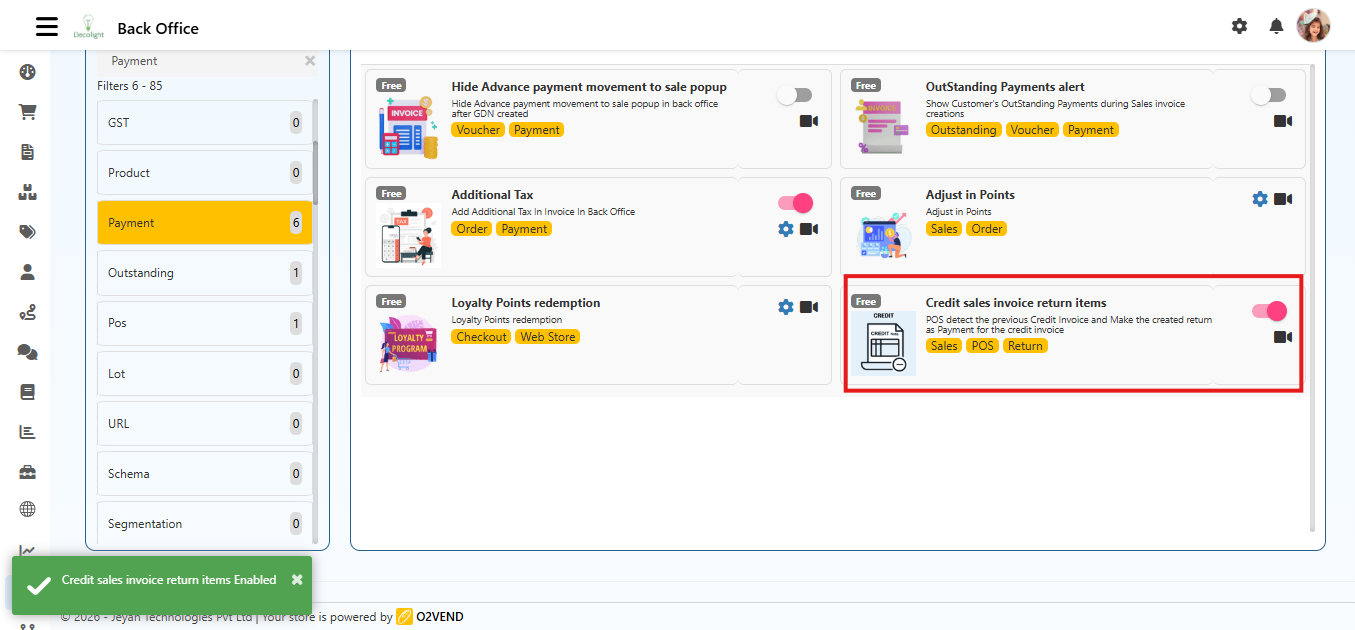
Purpose of Credit Sales Invoice Return Items
This feature helps to:
- Manage returns for credit invoices efficiently.
- Automatically apply return amounts as payments against outstanding credit.
- Maintain accurate customer account balances.
- Simplify POS operations for credit-based sales.
Enabling Credit Sales Invoice Return Items
- Navigate to the Credit Sales Invoice Return Items feature under Sales.
- Use the toggle switch to enable the feature.
- Once enabled, POS will start detecting previous credit invoices for returns.
How It Works
- When a return is created for items sold on credit:
- POS identifies the original credit invoice.
- The return amount is applied as a payment to reduce the outstanding balance.
- The adjustment is reflected in:
- Customer ledger.
- Invoice history.
- Accounting reports.
Example Scenario
- A customer purchased goods worth ₹ 10,000 on credit.
- Later, they return items worth ₹ 2,000.
- POS detects the original credit invoice and applies ₹2,000 as payment.
- The outstanding balance becomes ₹ 8,000.