Daily Tax Report in O2VEND – Monitor Day-wise Tax Liability Accurately
The Daily Tax Report in O2VEND helps businesses track tax amounts calculated on sales and returns for each day. It provides a clear breakdown of net sales and applicable taxes, making it essential for GST compliance and financial reconciliation.
What is Daily Tax Report?
The Daily Tax Report summarizes day-wise sales, return sales, net sales, and corresponding tax values.
It presents tax data at a daily level, segmented by tax type such as IGST, CGST and SGST, ensuring transparent tax tracking.
- Summarizes daily sales and tax calculations.
- Displays tax breakup based on configured tax percentages.
- Supports branch-wise and consolidated views.
Why Daily Tax Report Is Important
This report plays a key role in taxation and compliance:
- Helps ensure accurate GST calculation on daily transactions.
- Supports statutory reporting and audit requirements.
- Identifies tax impact of sales returns.
- Enables easy reconciliation between sales and tax amounts.
Why use this report?
- Track daily GST liability accurately.
- Reconcile sales, returns, and net taxable value.
- Verify CGST and SGST amounts for each day.
- Prepare data for monthly or period-based tax filing.
- Audit unusual tax variations caused by returns.
How to Access the Daily Tax Report
Navigation Path: Back Office → Reports → Account Reports → Daily Tax Report
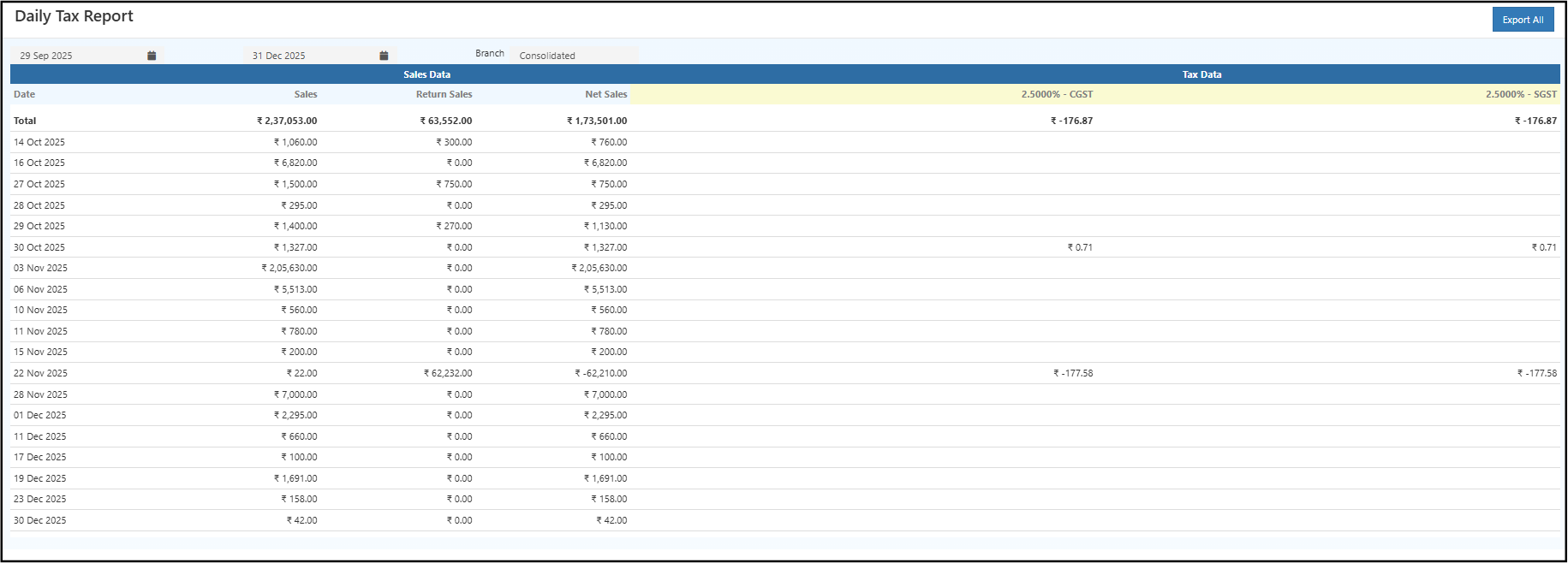
Filters & Controls
- Date Range: Select from and to dates to view tax data for a specific period.
- Branch: Choose a specific branch or view Consolidated data across branches.
Report View Explained
Summary Table
The summary table displays:
- Date: Transaction date.
- Sales: Total gross sales for the day.
- Return Sales: Value of returned items.
- Net Sales: Sales after deducting returns.
- CGST / SGST / IGST Columns: Tax amounts calculated based on configured tax rates.
A Total row at the top summarizes sales, returns, net sales, and tax amounts for the selected period.
Drill-Down Details
- Clicking on a specific date row allows users to cross-verify daily sales and tax figures with underlying transactions.
- This helps identify which day contributed to higher or negative tax values.
How to Use the Daily Tax Report
- Open the Daily Tax Report from the Finance reports section.
- Select the required date range.
- Choose branch-wise or consolidated view.
- Review daily sales, returns, and net sales.
- Verify CGST and SGST values for each day.
- Export the report for filing or audit purposes.
Common Usage Scenarios
- Accountants verifying daily GST calculations.
- Finance teams reconciling tax with sales reports.
- Business owners reviewing tax impact of returns.
- Preparing data for monthly GST returns.
Business Benefits
Improves tax accuracy by clearly showing daily taxable values and tax amounts.
Simplifies GST audits with transparent, date-wise tax reporting.
Reduces reconciliation errors between sales, returns, and tax liability.
Export Options
- Export All: Download the complete report in Excel or CSV format.