VisitLog History Report – Verified Agent Visit Proof
This report displays verified customer visits captured directly from the O2VEND Agent App, with live photo evidence, GPS coordinates, and visit details for complete transparency.
The VisitLog History Report displays real visit data captured from the O2VEND Agent App. Whenever an agent visits a customer location and logs the visit through the mobile app, the photo, GPS location, reason, and notes are automatically reflected in this report.
This report acts as a single source of truth to track where agents went, whom they visited, and what activity was performed, backed by real-time photo and location evidence.
Track and verify every agent visit with live photo & GPS proof using the O2VEND Agent App → https://o2vend.com/app
What is VisitLog History Report?
The VisitLog History Report shows a history of customer visits recorded by agents using the O2VEND Agent App.
Each entry represents a physical visit made by an agent, captured directly from the mobile device and synced to the back office.
The report includes:
- Customer visited (Visit To)
- Agent who made the visit (Visit By)
- Visit reason (Order, Follow-up, Collection, Service, etc.)
- Notes entered by the agent
- GPS latitude & longitude
- Live photo taken at the visit location
Why VisitLog History Report Is Important
This report helps businesses verify field activity with real proof, instead of relying on manual updates.
Key importance:
- Confirms that agents actually visited the customer location
- Provides photo and GPS-based validation
- Improves control over field operations
- Prevents fake or missed visit reporting
- Creates a reliable audit trail for management
Why use this report?
- Track agent movement and visit coverage
- View real photos taken during customer visits
- Verify visit location using GPS coordinates
- Review visit reasons like orders or follow-ups
- Strengthen accountability of field staff
How Visit Data Is Captured (Agent App Flow)
- Agent opens the O2VEND Agent App
- Selects the customer (Visit To)
- Chooses the visit reason
- Adds an optional note
- App automatically captures:
- Current latitude & longitude
- Live photo using mobile camera
- Agent saves the visit
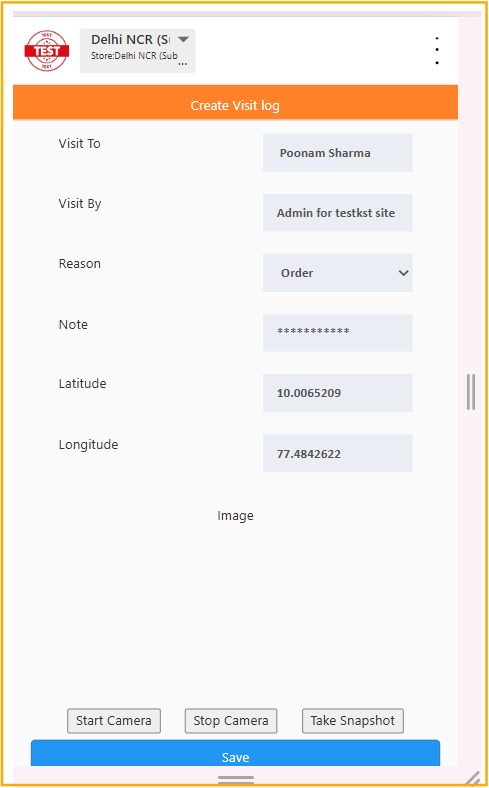
Once saved, this data instantly appears in the VisitLog History Report in the Back Office.
How to Access the VisitLog History Report
Navigation Path:
Back Office → Reports → Miscellaneous Reports → VisitLog
This opens the VisitLog History page showing all agent visits logged from the mobile app.
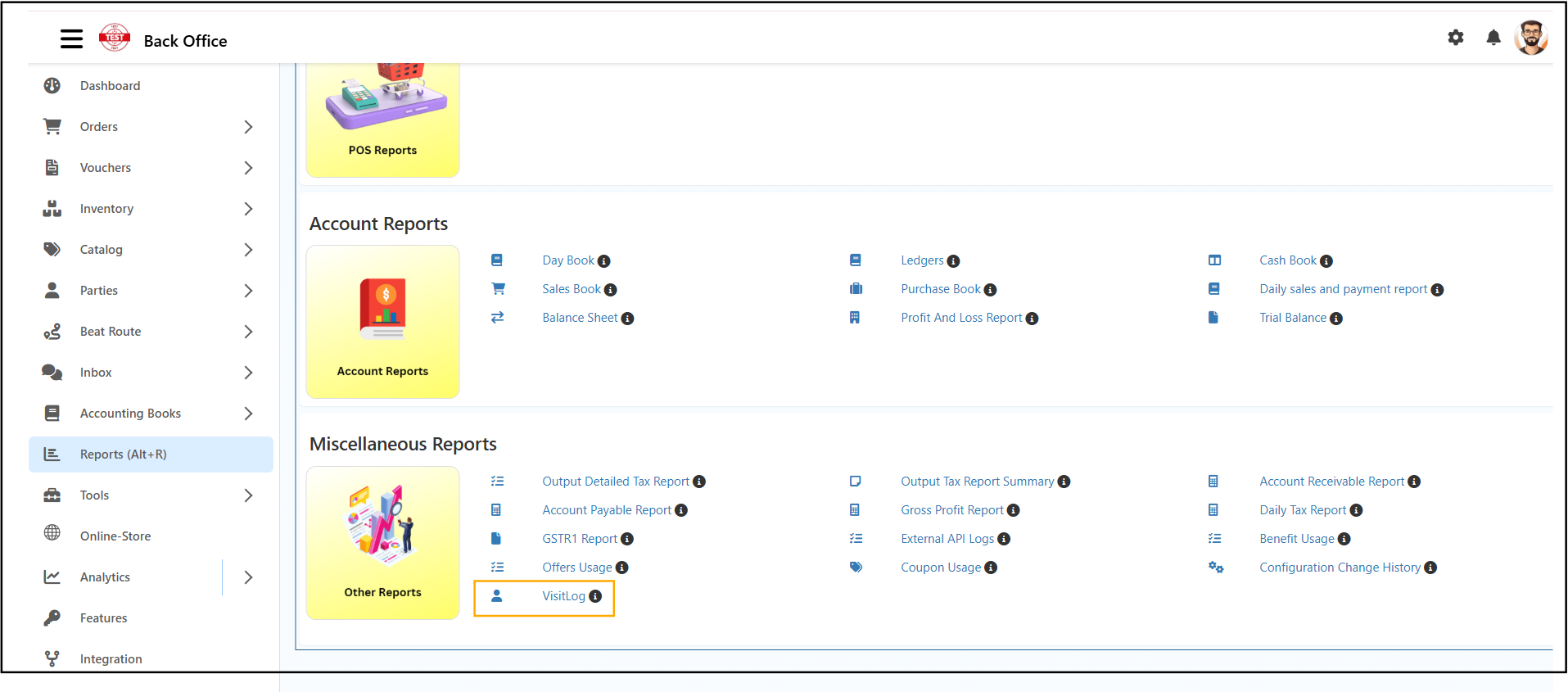
Report View Explained
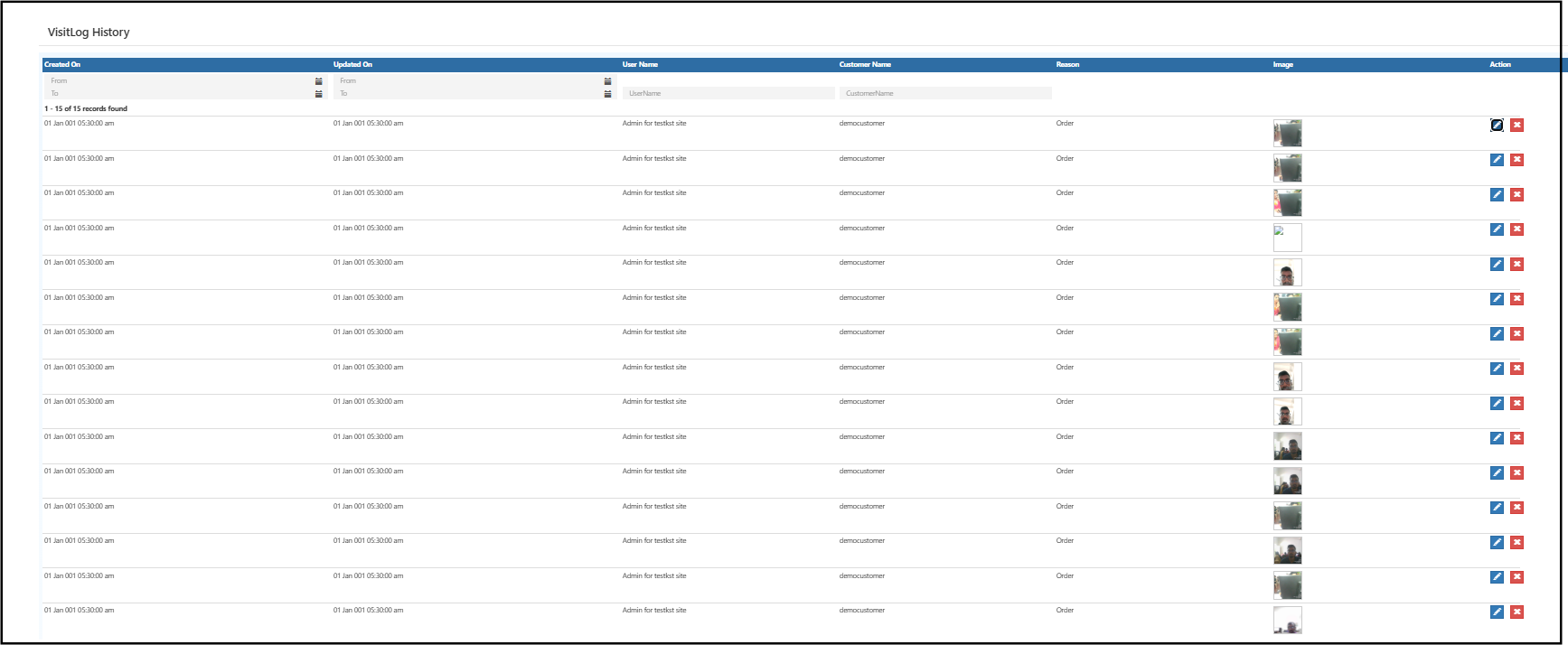
Summary Table (Back Office)
The report is displayed as a table with the following columns:
- Created On – Date & time the agent logged the visit
- Updated On – Last update time
- User Name – Agent name
- Customer Name – Customer visited
- Reason – Purpose of visit (Order, Follow-up, etc.)
- Image – Thumbnail of the photo taken in the Agent App
- Action – View / Edit (if permitted)
This view allows managers to quickly scan agent activity across locations.
Actions (Edit or Delete)
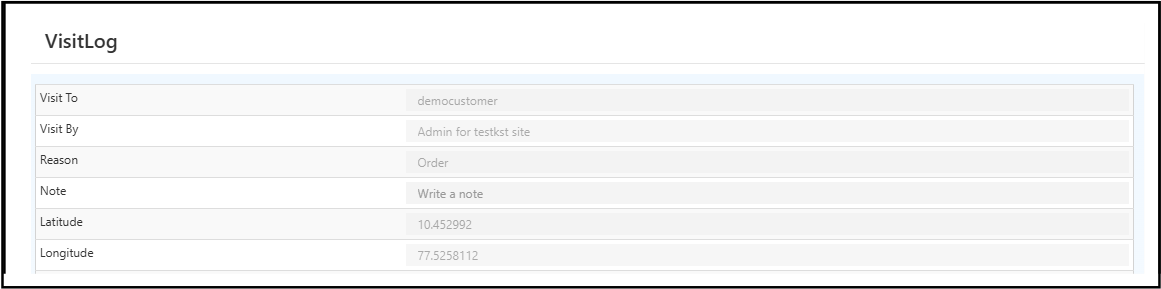
Clicking on a visit entry opens the detailed VisitLog view, showing:
- Visit To (Customer)
- Visit By (Agent)
- Visit Reason
- Agent Notes
- Latitude & Longitude captured from mobile
- Full-size visit photo taken at customer location
This confirms when, where, and how the visit was performed.
How to Use the VisitLog History Report
- Open the VisitLog History Report from Back Office.
- Review agent visits for a selected date range.
- Check visit photos to confirm physical presence.
- Verify GPS coordinates if required.
- Open individual entries for full visit details.
- Use the data for performance review or audits.
Common Usage Scenarios
- Tracking daily routes covered by sales agents
- Verifying customer visits during order booking
- Reviewing follow-up or collection visits
- Auditing agent activity with photo evidence
- Resolving disputes related to missed visits
Business Benefits
Real-Time Field Visibility
Know exactly where agents are visiting and what they are doing.
Verified Visits with Proof
Each visit is backed by live photo and GPS data.
Strong Operational Control
Reduces false reporting and improves discipline in field teams.
Who Should Use This Report?
- Business Owners
- Sales & Distribution Managers
- Field Operations Heads
- Audit & Compliance Teams
- Admin Users
Frequently Asked Questions (FAQs)
1. Where does the visit photo come from?
The photo is captured directly from the O2VEND Agent App camera at the customer location.
2. Is GPS location captured automatically?
Yes. Latitude and longitude are auto-recorded from the agent’s mobile device.
3. Can agents edit visits after saving?
Edit permissions depend on role settings configured by admin.
4. Does this report show fake or manual entries?
No. All entries originate from the Agent App visit workflow.
5. Can this be used for audit purposes?
Yes. Photo + GPS makes it suitable for internal audits.
O2VEND Agent App
All visit photos, GPS locations, and visit details shown in this report are captured directly from the O2VEND Agent App.
Use the Agent App to log real customer visits with live photo proof and automatic location tracking.
🔗 Access the Agent App:
https://o2vend.com/app
Related Topics
Learn More from O2VEND
Explore how reports and automation can improve business visibility and decision-making: