O2VEND Documentation
  • Tutorials
  • Back Office
  • Point Of Sale(POS)
  • Agent App
  • Developer Guide
  • Warehouse Management System (WMS)
Search Results for

    Show / Hide Table of Contents
    • Getting Started
    • O2VEND Store
      • My Stores
        • Create Store
      • My Account
        • My Profile
        • Manage Billing
        • Support Desk
    • O2VEND ERP (Backoffice)
    • Dashboard
      • Dashboard
    • Orders
      • Quotation
      • Request For Quotation
      • Sales Order
        • Create Sales Order
        • Edit Sales Order
        • Goods Issue in Sales Order
      • Work Order
      • Purchase Order
      • Subscription
      • ActiveCarts
    • Vouchers
      • Sales
        • Manage Sales
        • Create Sales Invoice
        • Cancel Sales Invoice
        • How to create GDN(Goods Delivered Note)
        • How to add lot for products in GDN
        • How to view sales details
      • Services
        • Services
      • Purchase
        • Manage purchase
        • Create Purchase Invoice
        • Cancel purchase Invoice
        • How to create GRN(Goods Received Note)
        • How to add lot for products in GRN
        • How to print a barcode label in purchase
        • How to view purchase details
      • Credit Note
      • Debit Note
      • Receipt
      • Payment
      • Journal
      • Contra
    • Inventory
      • Stock Quantity (Alt+T)
      • Stock History
      • Print Barcode Label
      • Delivery Challan
      • Receipt Challan
      • Stock Transfer
      • Manufacturing Voucher
      • Stock Take
      • Incoming Packages
      • Outgoing Packages
    • Catalog
      • Product
        • Product
        • General
        • Variations
        • Attributes
        • Stock Levels
        • Pricing
        • SEO
        • Shipping Class
        • Online Analytics
        • Suppliers
        • Vendor
        • Documents
        • History
        • Clone Product
      • Brand
      • Categories
      • Option
      • Attributes
      • Attributes Categories
      • Attributes Templates
      • Price List
      • Bulk Product Price update
      • Bulk Product Updates
      • Sku Rules
      • Pricing Rules
      • Create Product
        • Combination
        • Donation
        • Generic
        • Manufacturing
        • Membership
        • Recharge
        • Service
        • Subscription
    • Parties
      • Customers
      • Customer Groups
      • Supplier
      • Supplier Group
    • Beat Route
      • beats
      • Routes
      • Beat Runs
    • Inbox
      • SMS
      • E-Mail
      • Whatsapp
      • Configuration Template Setup
    • Accounting Books
      • Ledgers
      • Chart of Accounts
      • Day Book
      • Cash Book
      • Sales Book
      • Purchase Book
      • Account Group Book
    • Reports
      • Order Reports
        • Web Orders Progress Report
        • Back Order Items Report
        • Purchase Order Pending Item Report
        • Sales Order Pending Item Summary Report
        • Sales Shipping Status Report
        • Sales Order Summary
        • Sales Order Progress Report
        • Purchase Order Progress Report
        • Sales Order with Product Line Item Report
        • Sales Order Packing Sheet Report
        • Back Order Report
        • Purchase Order Summary
        • Sales Order Shipment Report
        • Sales Order Shipping Address Report
      • Sales/Purchase Reports
        • Sales Invoice Report
        • Sales Invoice Summary
        • Sales Items Summary
        • Purchase Invoice Report
        • Purchase Invoice Summary
        • Purchase Items Summary
        • Receipt Report
        • Daily Settlement Report
        • Contribution Margin Report
        • Agent Sales Report
        • Agent Report
        • Employee Sales Report
        • Employee Report
        • Employee Product Sales & Commission Report
      • Supplier Reports
        • Supplier Report
        • Supplier Purchase Report
        • Supplier Detail Report
      • Inventory Reports
        • Stock Summary
        • Stock Valuation Summary
        • Stock Ageing Report
        • Location Summary
        • Stock Ledger Report
        • Stock/Location Summary
        • Stock Movement And Valuation Summary
        • Stock Movement Summary Report
      • Products
        • Sold Product Categories
        • Product Category Summary
        • Product Sale Summary
        • Category Sale Summary
        • Brand Sale Summary
        • Reordering Stock Summary
        • Price Movement
        • Product Seasonal Demand
        • Product Stock Analysis Report
        • Stock Projection Report
      • Pos Reports
        • Cash Register Summary
        • Current Cash Registers
      • Account Reports
        • Day Book
        • Ledger
        • Cash Book
        • Sales Books
        • Purchase Books
        • Daily Sales and Payment Report
        • Balance Sheet
        • Profit and Loss Report
        • Trial Balance
      • Miscellaneous Reports
        • Output Detailed Tax Report
        • Output Tax Report Summary
        • Account Receivable Report
        • Gross Profit Report
        • Daily Tax Report
        • GSTR-1 Report
        • External API Logs
        • Benefit Usage
        • Offers Usage
        • Coupon Usage
        • Configuration Change History
        • VisitLog
    • Tools
      • Import
      • Export
    • OnlineStore
      • Themes
      • Theme Data
      • Shipping Methods
      • Payment Methods
      • Currency
      • Reviews
      • Zones
      • Delivery Zones
      • webstoreContentsSettings
        • Site Pages
        • Site Menus
          • Main Menu
          • Site Menus
        • Home Page Components
        • Page Header
        • Blog Categories
        • Blog
        • News Letter Subscription
        • menus
          • Main Menu
          • Site Menus
    • Analytics
      • Visitor Analytics
      • E-commerce Analytics
      • Product Analytics
      • Campaigns Analytics
    • Settings
      • Settings
      • Business Settings
        • Business Details
        • Tax Classes
        • Tax Rates
        • Operating Countries
        • Operating State or Province
        • Branches
        • Sales Channels
        • Return Rule
        • Backoffice Print Detail
        • Download Template
      • Point Of Sale
        • Quick Add Buttons
        • Print Settings
        • Payment Methods
        • Delivery Settings
        • Language
        • POS Offline Mode
      • Agent App
        • Agent App Print Details
      • Inventory
        • Unit Of Measure
        • Location
        • Unit Of Measure Conversions
        • Stock Levels
        • Sub Location
        • Print Barcode Label Settings
        • Package Material
      • userSettings
        • vendors
        • User Date Setup
        • Employees
          • Set Up Employee Roles
          • Ecommerce
          • Point Of Sale
          • Back Office
          • Sales App
        • Vendors Commission
        • Credit Rules
        • Automatic User Code
      • Loyalty and Promotions
        • Reward Points
        • Coupons
        • Gift Vouchers
        • Offers and Discounts
        • Benefits
        • Affiliate
        • Coupon Print Setting
      • Account
        • Financial Year
        • Voucher Numbering
        • Sales Account Map
        • Voucher Numbering Rules
    • Features
      • General
      • POS
      • Webstore
      • Integration
      • Notification
        • Notification
      • Push Notification
        • Web Notification
      • Order
        • Order
      • Voucher
        • Voucher
      • Date
        • Date
      • Tax
        • Additional Tax
      • GST
        • Product Tax
      • Product
        • Product
      • Payment
        • Credit sales invoice return items
      • Outstanding
        • Outstanding
      • POS
        • Point Of Sales
      • Lot
        • Disable lot popup
      • URL
        • URL
      • Schema
        • Schema
      • Segmentation
        • Segmentation
      • SEO
        • SEO
      • General
        • General
      • Inventory
        • Inventory
      • GDN
        • GDN
      • GRN
        • GRN
      • SKU
        • SKU length for variation
      • Price
        • Price
      • Cost
        • Cost
      • Email
        • Email
      • Margin
        • Margin
      • Stock
        • Stock
      • Login
        • Guest Checkout
      • IP
        • IP
      • White Listing
        • White listing
      • App
        • App
      • Print
        • Print
      • Option
        • Option
      • Attributes
        • Attributes
      • Variation
        • variation
      • Communication
        • Communication
    • New Features
      • Sales
        • Sales
      • Display
        • Display
      • Web Store
        • Webstore
      • Affiliate
        • affiliate
      • Refer
        • Refer
      • GeoIP
        • GeoIP
      • Currency
        • currency
      • Video
        • Video
      • Invoice
        • Invoice
      • SMS
        • SMS
      • Whatsapp
        • Whatsapp
      • Menu
        • Menu
      • GTIN
        • GTIN
      • Checkout
        • checkout
      • Coupon
        • coupon
      • Delivery Zone
        • Delivery Zone
      • Shipment
        • Shipment
      • Marketing
        • Marketing
      • Vendor
        • Vendor
      • Sub Location
        • Sub Location
      • Discount
        • Discount
      • Return
        • Return
      • BackOffice
        • backoffice
      • Pricing Rule
        • Pricing Rule
      • Purchase
        • Purchase
    • Integration
      • General
      • O2VEND Gateway
        • O2VEND Webhook
      • Integration
        • reCAPTCHA
        • Send Grid
      • API Key Management
        • Storefront Api Keys
      • Storefront Settings
        • storefront
      • Shipment Gateways
        • Shipway
        • Shiprocket
        • Amazon Shipping
        • XpressBees
        • eShipper
        • GetDelivered
      • Email Configuration
        • Email
      • Communication Settings
        • Amazon SES
      • GST Configuration
        • E-invoice
        • E-Way
      • Tax Settings
        • Tax
      • Invoice Settings
        • invoice
      • eWay Bill Integration
        • eWay
      • SMS Configuration
        • MSG91
      • WhatsApp Integration
        • Whatsapp
        • Bhashsms
      • Payment Gateways
        • Paytm
        • Paypal
        • Cashfree
        • PayU
        • Stripe
        • Razorpay
        • Phonepe
      • Security Settings
        • security
      • Product Management
        • Shopify
      • Search
        • Type Sense
      • Images
        • Your own CDN domain
      • Inventory Management
        • Inventory Management
      • Orders Management
        • order
        • Myntra
        • Unicommerce
        • Amazon
        • Flipkart
        • HubSpot
      • Display
        • display
    • Profile
      • My Profile
    • POS App
    • Manage Physical Stores
      • Login
      • Sales Bill
        • Manage sales orders
        • How to add products to a customer's shopping cart
        • How to apply discounts/coupons
        • How to search products in Sales Screen
        • How to add products quickly to the Cart
        • How to add serial and lot number
        • How to Print sales bills in POS
      • Receive Payments (Receipts)
      • Delivery
      • Order Fulfillment List
      • Invoice Receipts
      • Manage Cash Register
      • Reprint
      • Dashboard
      • POS Offline
      • Stock Transfer
    • Agent App
    • O2VEND App
      • Install O2VEND App
      • Home
      • Customers
      • Orders
      • Products
      • Receipts
      • Stock Movement
      • Employee Authorize
    • Webhooks
      • Webhook
      • Examples of JSON format data via webhook
      • Testing webhook
    • Developer Guide

    Inventory Stock History – Track Stock Movement & Audit Trail

    Track complete inventory stock history including stock in, stock out, lot, serial, and warehouse movement logs. This module provides a full audit trail to ensure accurate inventory control and warehouse accountability.

    This guide explains how to manage Stock History inside the O2VEND Inventory Module.

    Stock History provides a complete inventory audit trail, helping track stock movements, lot and serial details, SKU-level activity, warehouse actions, adjustments, and reference-based changes.

    It helps maintain accurate inventory, prevents stock mismatches, and ensures smooth warehouse operations.

    What Is Inventory Stock History?

    Stock History is a chronological record of all inventory activities across purchases, sales, transfers, manufacturing, and stock adjustments.
    It provides a complete view of stock movement at SKU level, supporting audits, operational analysis, and accurate inventory tracking.

    Businesses use the Stock History report to monitor:

    • Inventory movement and transaction logs
    • SKU-level tracking and traceability
    • Warehouse stock records
    • Lot and serial number movements
    • Stock in and stock out history
    • Inventory audit trail and adjustments
    • Quantity changes and corrections
    • Inward and outward stock flow
    • Reference-based actions (GRN, GDN, transfers, vouchers)
    • Stock movement across branches and warehouses

    This report acts as a centralized inventory movement tracking system, offering clear visibility into how products move within the organization and who performed each action.
    It is widely used by warehouse managers, auditors, and operations teams to ensure stock accuracy, compliance, and reliable inventory control.


    How to View Inventory Stock History

    1. Open the Back Office
    2. Go to Inventory
    3. Click Stock History
    4. View complete movement logs for all SKUs
    5. Use filters to refine by:
      • Date range
      • SKU
      • Product
      • Lot number
      • Serial number
      • Location

    This section displays the entire Warehouse Stock Log for better audit clarity. Inventory Stock History showing stock movement, SKU, lot, and warehouse details
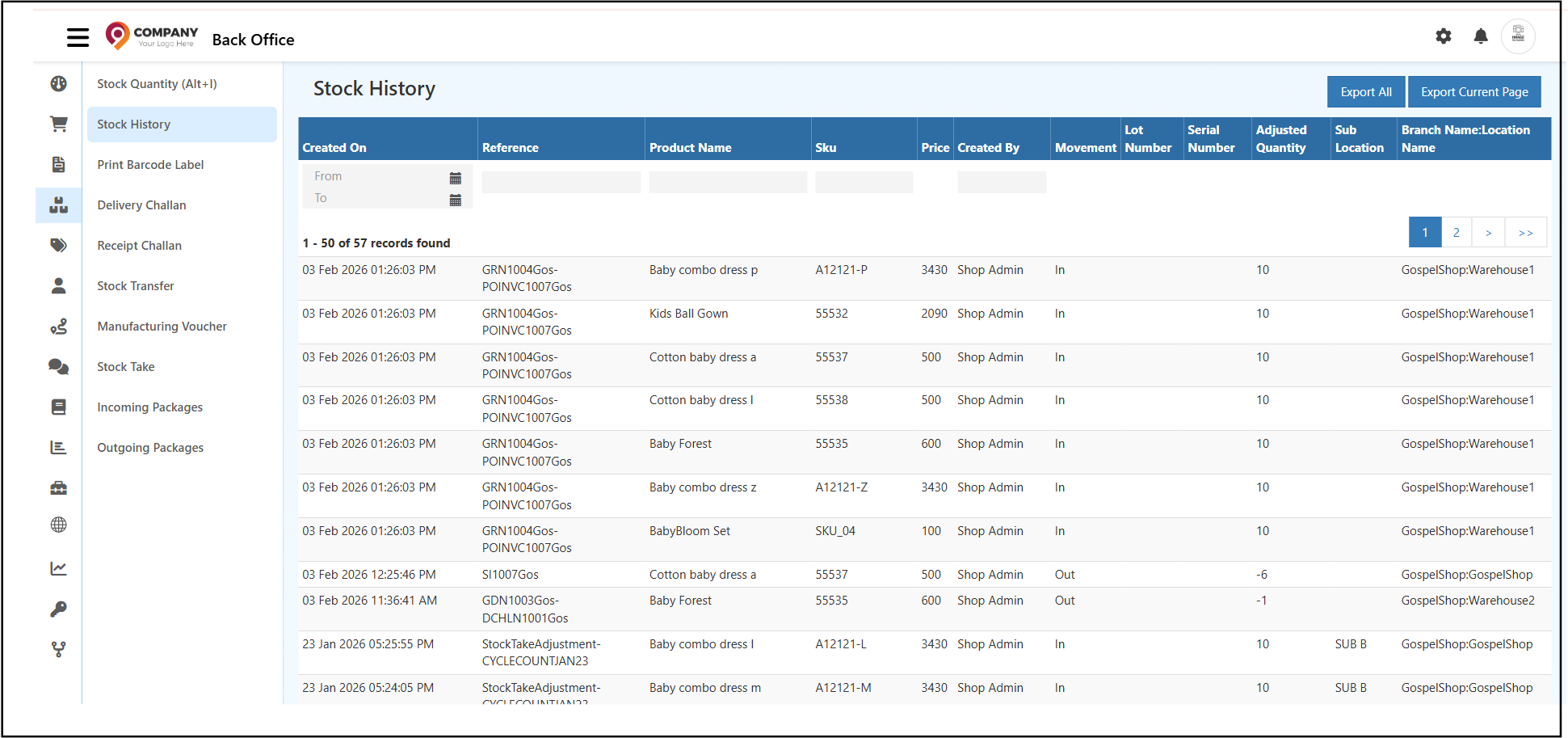
    Inventory Stock History screen displaying stock in and stock out movements with SKU, lot, serial, and warehouse location details.

    Inventory Stock History Fields Explained

    Created On

    Shows the date and time when the stock movement was recorded.

    Reference

    Indicates the source of the movement such as:

    • Sales order
    • Purchase entry
    • Return
    • Adjustment
    • Transfer

    Each reference helps identify the reason behind inventory change.

    Product Name

    Displays the product involved in the movement.
    Use product search to filter specific items.

    SKU

    The SKU Tracking feature allows you to identify individual product records.
    Search by SKU to view item-specific history.

    Price

    Displays the price of the item involved in that specific movement.

    Created By

    Name of the admin or employee who performed the action.
    Useful for tracking responsibilities.

    Movement (IN / OUT)

    Stock movements are classified into two types:

    • IN – Stock added to inventory
    • OUT – Stock removed from inventory

    These movements help monitor:

    • Incoming purchase stock
    • Sales deductions
    • Adjustments
    • Warehouse transfers

    This ensures accurate Stock In and Stock Out History and supports better forecasting.


    Lot Number Tracking in Inventory Stock History

    Lot Number Tracking allows batch-wise monitoring of products.
    Useful for items with:

    • Expiry dates
    • Manufacturing batches
    • Safety-sensitive products

    It provides complete traceability of each batch as part of the Inventory Audit Trail.


    Serial Number Tracking for Inventory Items

    A Serial Number is a unique identifier assigned to individual units.
    This feature helps track:

    • High-value items
    • Warranty details
    • Repairs & replacements
    • Product ownership history

    Using Serial Number Movement, users can trace every action performed on a specific item from purchase to sale.


    Adjusted Quantity and Stock Corrections

    Shows quantity manually adjusted from:

    • Product page
    • Stock inventory
    • Admin stock correction

    This ensures full transparency in the Inventory Audit Trail.


    Sub Location

    Warehouse sub-bin or rack location.

    Branch Name / Location Name

    Indicates the branch and warehouse where the movement occurred.

    Shows the exact warehouse or store location where the stock was added or removed.
    Important for multi-warehouse operations and accurate Warehouse Stock Log maintenance.


    Filters and Search Options in Stock History

    The Stock History page supports filters to quickly analyse movements:

    • From / To Date - for period-based tracking
    • Reference filter - to identify specific GRN, GDN, MV, etc.
    • Product name filter - for product-level movement study
    • SKU filter - for precise SKU traceability
    • Created By - to analyse entries created by specific staff

    These filters optimise inventory audits and reconciliation tasks.


    Export Inventory Stock History Reports

    The Stock History module includes export actions:

    • Export Current Page - Downloads only the visible records
    • Export All - Downloads complete stock movement history

    Useful for offline audit, MIS reporting, or compliance verification.


    When to Use Stock History

    Use the Stock History report when you need to:

    • Investigate stock mismatches or quantity issues
    • Audit warehouse transactions
    • Track stock movement for compliance or reporting
    • Verify lot or serial-based product flow
    • Reconcile inventory during stock take or adjustments

    Key Benefits of Inventory Stock History

    • Accurate end-to-end inventory visibility
    • Fast identification of incorrect or duplicate entries
    • Strong support for warehouse audit trails
    • Better control over lot/serial-based tracking
    • Complete traceability of stock from purchase to sale
    • Enhanced accuracy in inventory valuation and reconciliation

    --

    Related Inventory Topics

    • Inventory Barcode Printing
    • Manufacturing Voucher
    • Goods Receipt Challan
    • Inventory Stock History
    • Inventory Stock Audit
    • Inventory Stock Transfer
    • Inventory Stock Quantity Overview
    • Edit this page
    In this article
    © 2019–2026 Jeyan Technologies Private Limited • www.o2vend.com • Create your own store