O2VEND Documentation
  • Tutorials
  • Back Office
  • Point Of Sale(POS)
  • Agent App
  • Developer Guide
  • Warehouse Management System (WMS)
Search Results for

    Show / Hide Table of Contents
    • Getting Started
    • O2VEND Store
      • My Stores
        • Create Store
      • My Account
        • My Profile
        • Manage Billing
        • Support Desk
    • O2VEND ERP (Backoffice)
    • Dashboard
      • Dashboard
    • Orders
      • Quotation
      • Request For Quotation
      • Sales Order
        • Create Sales Order
        • Edit Sales Order
        • Goods Issue in Sales Order
      • Work Order
      • Purchase Order
      • Subscription
      • ActiveCarts
    • Vouchers
      • Sales
        • Manage Sales
        • Create Sales Invoice
        • Cancel Sales Invoice
        • How to create GDN(Goods Delivered Note)
        • How to add lot for products in GDN
        • How to view sales details
      • Services
        • Services
      • Purchase
        • Manage purchase
        • Create Purchase Invoice
        • Cancel purchase Invoice
        • How to create GRN(Goods Received Note)
        • How to add lot for products in GRN
        • How to print a barcode label in purchase
        • How to view purchase details
      • Credit Note
      • Debit Note
      • Receipt
      • Payment
      • Journal
      • Contra
    • Inventory
      • Stock Quantity (Alt+T)
      • Stock History
      • Print Barcode Label
      • Delivery Challan
      • Receipt Challan
      • Stock Transfer
      • Manufacturing Voucher
      • Stock Take
      • Incoming Packages
      • Outgoing Packages
    • Catalog
      • Product
        • Product
        • General
        • Variations
        • Attributes
        • Stock Levels
        • Pricing
        • SEO
        • Shipping Class
        • Online Analytics
        • Suppliers
        • Vendor
        • Documents
        • History
        • Clone Product
      • Brand
      • Categories
      • Option
      • Attributes
      • Attributes Categories
      • Attributes Templates
      • Price List
      • Bulk Product Price update
      • Bulk Product Updates
      • Sku Rules
      • Pricing Rules
      • Create Product
        • Combination
        • Donation
        • Generic
        • Manufacturing
        • Membership
        • Recharge
        • Service
        • Subscription
    • Parties
      • Customers
      • Customer Groups
      • Supplier
      • Supplier Group
    • Beat Route
      • beats
      • Routes
      • Beat Runs
    • Inbox
      • SMS
      • E-Mail
      • Whatsapp
      • Configuration Template Setup
    • Accounting Books
      • Ledgers
      • Chart of Accounts
      • Day Book
      • Cash Book
      • Sales Book
      • Purchase Book
      • Account Group Book
    • Reports
      • Order Reports
        • Web Orders Progress Report
        • Back Order Items Report
        • Purchase Order Pending Item Report
        • Sales Order Pending Item Summary Report
        • Sales Shipping Status Report
        • Sales Order Summary
        • Sales Order Progress Report
        • Purchase Order Progress Report
        • Sales Order with Product Line Item Report
        • Sales Order Packing Sheet Report
        • Back Order Report
        • Purchase Order Summary
        • Sales Order Shipment Report
        • Sales Order Shipping Address Report
      • Sales/Purchase Reports
        • Sales Invoice Report
        • Sales Invoice Summary
        • Sales Items Summary
        • Purchase Invoice Report
        • Purchase Invoice Summary
        • Purchase Items Summary
        • Receipt Report
        • Daily Settlement Report
        • Contribution Margin Report
        • Agent Sales Report
        • Agent Report
        • Employee Sales Report
        • Employee Report
        • Employee Product Sales & Commission Report
      • Supplier Reports
        • Supplier Report
        • Supplier Purchase Report
        • Supplier Detail Report
      • Inventory Reports
        • Stock Summary
        • Stock Valuation Summary
        • Stock Ageing Report
        • Location Summary
        • Stock Ledger Report
        • Stock/Location Summary
        • Stock Movement And Valuation Summary
        • Stock Movement Summary Report
      • Products
        • Sold Product Categories
        • Product Category Summary
        • Product Sale Summary
        • Category Sale Summary
        • Brand Sale Summary
        • Reordering Stock Summary
        • Price Movement
        • Product Seasonal Demand
        • Product Stock Analysis Report
        • Stock Projection Report
      • Pos Reports
        • Cash Register Summary
        • Current Cash Registers
      • Account Reports
        • Day Book
        • Ledger
        • Cash Book
        • Sales Books
        • Purchase Books
        • Daily Sales and Payment Report
        • Balance Sheet
        • Profit and Loss Report
        • Trial Balance
      • Miscellaneous Reports
        • Output Detailed Tax Report
        • Output Tax Report Summary
        • Account Receivable Report
        • Gross Profit Report
        • Daily Tax Report
        • GSTR-1 Report
        • External API Logs
        • Benefit Usage
        • Offers Usage
        • Coupon Usage
        • Configuration Change History
        • VisitLog
    • Tools
      • Import
      • Export
    • OnlineStore
      • Themes
      • Theme Data
      • Shipping Methods
      • Payment Methods
      • Currency
      • Reviews
      • Zones
      • Delivery Zones
      • webstoreContentsSettings
        • Site Pages
        • Site Menus
          • Main Menu
          • Site Menus
        • Home Page Components
        • Page Header
        • Blog Categories
        • Blog
        • News Letter Subscription
        • menus
          • Main Menu
          • Site Menus
    • Analytics
      • Visitor Analytics
      • E-commerce Analytics
      • Product Analytics
      • Campaigns Analytics
    • Settings
      • Settings
      • Business Settings
        • Business Details
        • Tax Classes
        • Tax Rates
        • Operating Countries
        • Operating State or Province
        • Branches
        • Sales Channels
        • Return Rule
        • Backoffice Print Detail
        • Download Template
      • Point Of Sale
        • Quick Add Buttons
        • Print Settings
        • Payment Methods
        • Delivery Settings
        • Language
        • POS Offline Mode
      • Agent App
        • Agent App Print Details
      • Inventory
        • Unit Of Measure
        • Location
        • Unit Of Measure Conversions
        • Stock Levels
        • Sub Location
        • Print Barcode Label Settings
        • Package Material
      • userSettings
        • vendors
        • User Date Setup
        • Employees
          • Set Up Employee Roles
          • Ecommerce
          • Point Of Sale
          • Back Office
          • Sales App
        • Vendors Commission
        • Credit Rules
        • Automatic User Code
      • Loyalty and Promotions
        • Reward Points
        • Coupons
        • Gift Vouchers
        • Offers and Discounts
        • Benefits
        • Affiliate
        • Coupon Print Setting
      • Account
        • Financial Year
        • Voucher Numbering
        • Sales Account Map
        • Voucher Numbering Rules
    • Features
      • General
      • POS
      • Webstore
      • Integration
      • Notification
        • Notification
      • Push Notification
        • Web Notification
      • Order
        • Order
      • Voucher
        • Voucher
      • Date
        • Date
      • Tax
        • Additional Tax
      • GST
        • Product Tax
      • Product
        • Product
      • Payment
        • Credit sales invoice return items
      • Outstanding
        • Outstanding
      • POS
        • Point Of Sales
      • Lot
        • Disable lot popup
      • URL
        • URL
      • Schema
        • Schema
      • Segmentation
        • Segmentation
      • SEO
        • SEO
      • General
        • General
      • Inventory
        • Inventory
      • GDN
        • GDN
      • GRN
        • GRN
      • SKU
        • SKU length for variation
      • Price
        • Price
      • Cost
        • Cost
      • Email
        • Email
      • Margin
        • Margin
      • Stock
        • Stock
      • Login
        • Guest Checkout
      • IP
        • IP
      • White Listing
        • White listing
      • App
        • App
      • Print
        • Print
      • Option
        • Option
      • Attributes
        • Attributes
      • Variation
        • variation
      • Communication
        • Communication
    • New Features
      • Sales
        • Sales
      • Display
        • Display
      • Web Store
        • Webstore
      • Affiliate
        • affiliate
      • Refer
        • Refer
      • GeoIP
        • GeoIP
      • Currency
        • currency
      • Video
        • Video
      • Invoice
        • Invoice
      • SMS
        • SMS
      • Whatsapp
        • Whatsapp
      • Menu
        • Menu
      • GTIN
        • GTIN
      • Checkout
        • checkout
      • Coupon
        • coupon
      • Delivery Zone
        • Delivery Zone
      • Shipment
        • Shipment
      • Marketing
        • Marketing
      • Vendor
        • Vendor
      • Sub Location
        • Sub Location
      • Discount
        • Discount
      • Return
        • Return
      • BackOffice
        • backoffice
      • Pricing Rule
        • Pricing Rule
      • Purchase
        • Purchase
    • Integration
      • General
      • O2VEND Gateway
        • O2VEND Webhook
      • Integration
        • reCAPTCHA
        • Send Grid
      • API Key Management
        • Storefront Api Keys
      • Storefront Settings
        • storefront
      • Shipment Gateways
        • Shipway
        • Shiprocket
        • Amazon Shipping
        • XpressBees
        • eShipper
        • GetDelivered
      • Email Configuration
        • Email
      • Communication Settings
        • Amazon SES
      • GST Configuration
        • E-invoice
        • E-Way
      • Tax Settings
        • Tax
      • Invoice Settings
        • invoice
      • eWay Bill Integration
        • eWay
      • SMS Configuration
        • MSG91
      • WhatsApp Integration
        • Whatsapp
        • Bhashsms
      • Payment Gateways
        • Paytm
        • Paypal
        • Cashfree
        • PayU
        • Stripe
        • Razorpay
        • Phonepe
      • Security Settings
        • security
      • Product Management
        • Shopify
      • Search
        • Type Sense
      • Images
        • Your own CDN domain
      • Inventory Management
        • Inventory Management
      • Orders Management
        • order
        • Myntra
        • Unicommerce
        • Amazon
        • Flipkart
        • HubSpot
      • Display
        • display
    • Profile
      • My Profile
    • POS App
    • Manage Physical Stores
      • Login
      • Sales Bill
        • Manage sales orders
        • How to add products to a customer's shopping cart
        • How to apply discounts/coupons
        • How to search products in Sales Screen
        • How to add products quickly to the Cart
        • How to add serial and lot number
        • How to Print sales bills in POS
      • Receive Payments (Receipts)
      • Delivery
      • Order Fulfillment List
      • Invoice Receipts
      • Manage Cash Register
      • Reprint
      • Dashboard
      • POS Offline
      • Stock Transfer
    • Agent App
    • O2VEND App
      • Install O2VEND App
      • Home
      • Customers
      • Orders
      • Products
      • Receipts
      • Stock Movement
      • Employee Authorize
    • Webhooks
      • Webhook
      • Examples of JSON format data via webhook
      • Testing webhook
    • Developer Guide

    Product SEO Guide | Boost Impressions, CTR & Organic Traffic

    Master product SEO in O2VEND to improve search visibility, clicks, and traffic. Optimize URLs, meta titles, descriptions, related & cross-sell products for maximum impact

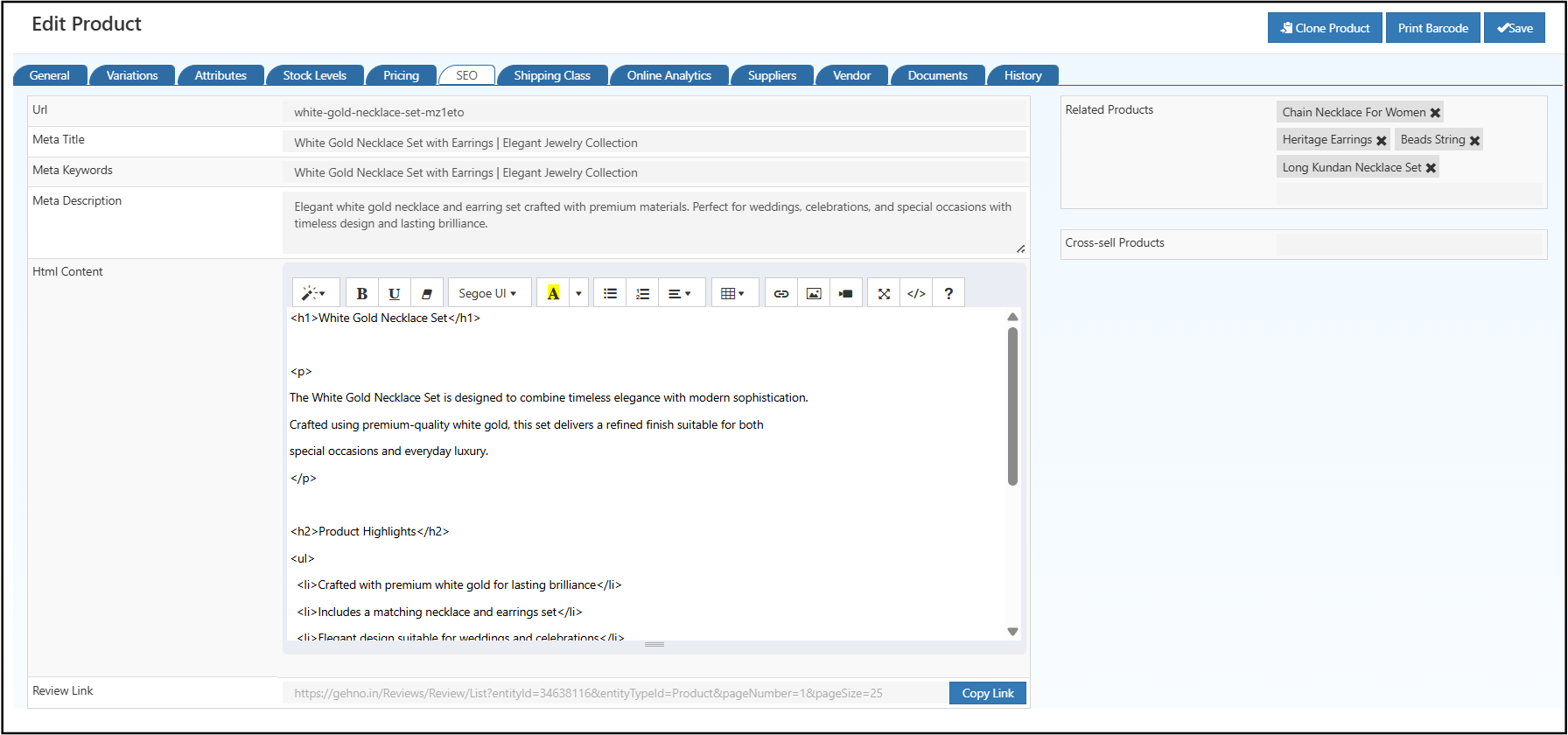
    The SEO tab in O2VEND Product Catalog is designed to maximize search visibility, click-through rate (CTR), and impressions. Configure how each product appears in search results and attract high-intent traffic to your product detail pages.

    Well-optimized product SEO helps you:

    • Rank higher in search engines
    • Drive consistent organic traffic
    • Convert impressions into clicks

    This tab allows you to configure:

    • SEO-friendly product URLs
    • Meta title, meta keywords, and meta description
    • Related products and cross-sell products
    • Rich HTML content for search engines and customers

    Why Product SEO Matters

    Strong product-level SEO ensures you:

    • 📈 Increase impressions in search results
    • 🎯 Improve CTR with compelling titles & descriptions
    • 💡 Attract high-intent organic traffic
    • 💰 Reduce dependency on paid marketing
    • 🔍 Enhance product discoverability across categories

    Pro Tip: Every product should have unique, keyword-focused SEO content aligned with business goals and customer search intent.


    Product SEO URL Slug

    The SEO URL Slug defines the permanent URL for a product page — critical for search ranking, link consistency, and user trust.
    seoproduct

    Key Points:

    • Slug does not automatically change if the product name is edited.
    • Maintain existing links and SEO authority with stable URLs.
    • If editing is necessary, use proper redirects to avoid ranking loss.

    Best Practices:

    • Keep slugs short and readable
    • Include primary product keywords
    • Avoid special characters, symbols, and unnecessary numbers
    • Use hyphens (-) instead of spaces
    • Ensure relevance to the product name

    Meta Titles, Keywords & Description

    Meta Title

    • Appears in browser tabs and search engine results (SERPs)
    • Keep it unique, descriptive, and keyword-rich
    • Use action-oriented language to increase CTR

    Meta Keywords

    • Maintain keyword clarity and internal relevance
    • Use only accurate and relevant keywords
    • Avoid keyword stuffing

    Meta Description

    • Appears below the title in SERPs
    • Length: 150–160 characters
    • Highlight key benefits, features, or use cases
    • Include primary keywords naturally
    • Use actionable language to encourage clicks

    HTML Content

    The HTML Content section improves:

    • On-page SEO
    • User engagement
    • Conversion rates

    Supported Features:

    • Headings (H1, H2, H3)
    • Lists, formatted text, and tables
    • Images and inline styling
    • HTML, CSS, and JS (via code mode)

    Well-structured HTML helps search engines understand product relevance while improving readability for customers.

    htmlcontent


    Review Link

    The Review Link directs users to product reviews, enhancing social proof and SEO snippets.

    Benefits:

    • Encourages customer feedback
    • Integrates with third-party or internal review systems
    • Supports rich snippets (ratings, stars) in search results

    Best Practice: Ensure the review link is stable and publicly accessible to maintain SEO trust signals.


    Related Products

    Show relevant products alongside the main item to increase discovery and engagement.

    Benefits:

    • Improves product discovery
    • Boosts session duration and cross-navigation
    • Supports upselling strategies

    How to Add Related Products:

    1. Open the SEO tab
    2. Enter the product name in Related Products
    3. Select from the list
    4. Click Save

    Tip: Choose products from the same category or complementary items for relevance.


    Cross-Sell Products

    Recommend complementary products to increase average order value (AOV).

    Benefits:

    • Encourages bundled purchases
    • Enhances customer experience
    • Drives higher revenue per order

    How to Add Cross-Sell Products:

    1. Open the SEO tab
    2. Enter the product name in Cross-Sell Products
    3. Select relevant products
    4. Click Save

    Tip: Select items that add functional or aesthetic value to the main product.


    SEO Best Practices:

    • Create unique SEO content per product
    • Focus on search intent
    • Use structured titles, meta descriptions, and keywords
    • Optimize URLs, related products, and HTML content to maximize impressions, CTR, and conversions
    • Edit this page
    In this article
    © 2019–2026 Jeyan Technologies Private Limited • www.o2vend.com • Create your own store