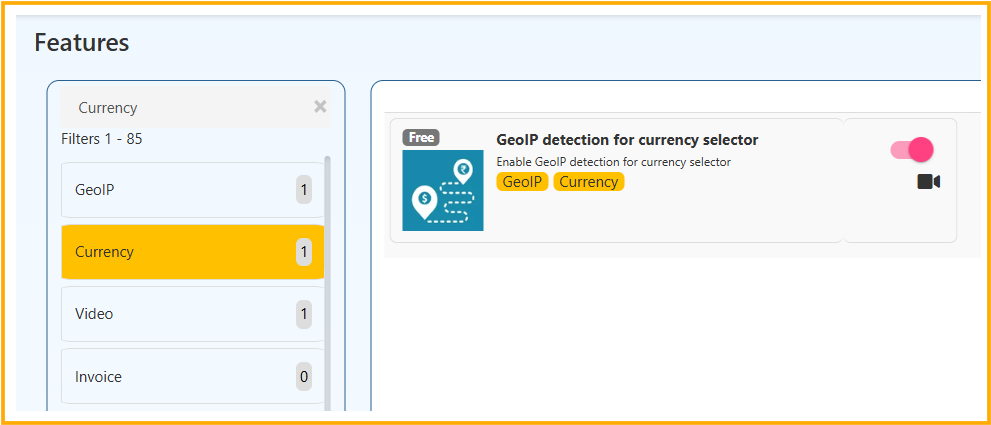
💱 GeoIP Detection for Currency Selector
The Currency Section helps your web store automatically detect and display the correct currency for customers based on their location.
What is this Feature?
GeoIP Detection for Currency Selector automatically detects the customer’s country using their IP address and selects the appropriate currency on your website.
Example:
- Customer from India → Shows ₹ INR
- Customer from USA → Shows $ USD
- Customer from UK → Shows £ GBP
How to Enable
- Go to Admin Panel
- Navigate to Features
- Filter by Currency
- Enable GeoIP detection for currency selector
- Save settings
How It Works
- Customer visits your website
- System reads IP address
- Detects country automatically
- Currency updates dynamically
- Prices displayed in local currency
Example Scenario
| Visitor Location | Displayed Currency |
|---|---|
| India | ₹ INR |
| United States | $ USD |
| UAE | AED |
| Singapore | SGD |
Benefits
✔ Improves international customer experience
✔ Reduces confusion in pricing
✔ Increases conversion rate
✔ Supports global selling
✔ Enhances professional look of website
Best Practice Recommendation
- Enable GeoIP if you sell internationally
- Ensure multi-currency pricing is configured
- Combine with localized shipping zones
Business Impact
When customers see prices in their local currency:
- Trust increases
- Checkout completion rate improves
- Cart abandonment reduces
Final Summary
The GeoIP Currency Detection feature automatically displays the correct currency based on customer location, making your web store globally ready and user-friendly.