O2VEND Retail ERP
  • Getting Started
  • Ecommerce
  • Back Office
  • POS
  • Agent App
  • PIM
  • Communication
  • CMS
  • OMS
  • WMS
  • O2C
  • Accounting
  • Reports
  • Themes and Apps
Search Results for

    Show / Hide Table of Contents
    • Overview
    • Features
      • Product Management Features
        • Product Management
        • Product Attributes
        • Product Variations
        • SKU Length for Variations
        • Product Pricing
        • Product Margin Settings
        • Product Cost Configuration
        • Product Tax Settings
        • Additional Tax Setup
      • Inventory Management Features
        • Inventory Management
        • Stock Management
        • GRN (Goods Receipt Note)
        • GDN (Goods Delivery Note)
        • Disable Lot Popup Option
      • Order & Sales Features
        • Order Management
        • Point of Sale (POS)
        • Credit Sales & Invoice Return
        • Outstanding Management
        • Voucher Management
        • Guest Checkout Option
      • Marketing & SEO Features
        • SEO Optimization
        • URL Configuration
        • Schema Markup Setup
        • Segmentation
      • Communication & Notification Features
        • Email Settings
        • Communication Settings
        • Notifications
        • Web Notifications
      • System & Security Features
        • Application Settings
        • General Settings
        • Date Configuration
        • IP Restrictions
        • White Listing
        • Print Configuration
        • Option Settings
    • Integrations
      • Marketplace Integrations
        • Amazon Integration
        • Flipkart Integration
        • Myntra Integration
        • Shopify Integration
        • Unicommerce Integration
      • Payment Gateway Integrations
        • Razorpay Integration
        • PayU Integration
        • Paytm Integration
        • PhonePe Integration
        • Cashfree Integration
        • Stripe Integration
        • Paypal Integration
      • Shipping & Logistics Integrations
        • Shiprocket Integration
        • Shipway Integration
        • eShipper Integration
        • Amazon Shipping Integration
        • XpressBees Integration
        • GetDelivered Integration
      • Communication Integrations
        • WhatsApp Integration
        • MSG91 Integration
        • SendGrid Integration
        • Amazon SES Integration
        • Email Integration
      • Marketing & CRM Integrations
        • HubSpot Integration
        • Typesense Integration
      • Tax & Compliance Integrations
        • e-Invoice Integration
        • e-Way Bill Integration
        • Tax Configuration
      • Security & Technical Integrations
        • reCAPTCHA Integration
        • Webhook Integration
        • Custom CDN Domain Setup
      • Inventory & Store Integrations
        • Inventory Integration
        • Storefront Integration
        • Display Configuration
        • General Settings
    • Product Enhancements
      • Affiliate Program Management
      • Back Office Management System
      • Checkout Process Settings
      • Coupon Code Management
      • Currency Configuration Settings
      • Delivery Zone Configuration
      • Discount Management System
      • Product Display Settings
      • Geo IP Location Detection
      • GTIN Product Code Management
      • Invoice Management System
      • Marketing & Campaign Tools
      • Menu Management Settings
      • Pricing Rule Configuration
      • Purchase Management Module
      • Referral Program Settings
      • Return Management Process
      • Sales Management System
      • Shipment & Delivery Tracking
      • SMS Notification Settings
      • Sub Location Management
      • Vendor Management System
      • Product Video Integration
      • Web Store Configuration
      • WhatsApp Integration Settings
    • Blog Categories Setup
    • Blog Management
    • Email Settings
    • Home Page Components
    • Main Menu Management
    • Newsletter Subscription Settings
    • SMS Settings
    • WhatsApp Settings
    • Communication Template Setup
    • Page Header Settings
    • Site Menu Management
    • Site Pages Management

    Amazon Integration in O2VEND

    This guide explains how to integrate Amazon with the back-office system for seamless order, inventory, and product synchronization. Follow these steps to configure the channel and enable the integration easily.

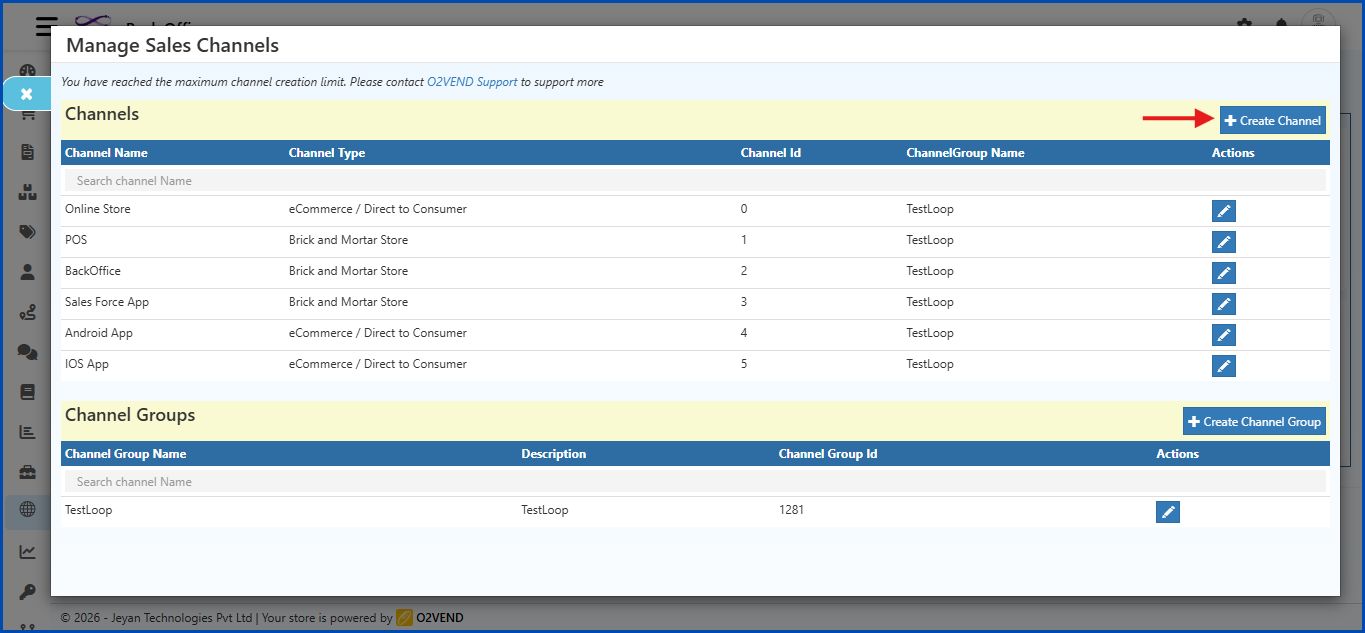
    Step 1: Navigate to Sales Channels

    Go to: Back Office → Settings → Sales Channels

    • Click the Create Channel button on the top-right side of the screen.
    Amazon Integration in O2VEND

    Initial Screen

    The Create Channel form displays these fields:

    • Channel Id
    • Channel Name
    • Channel Group Name
    • Channel Type

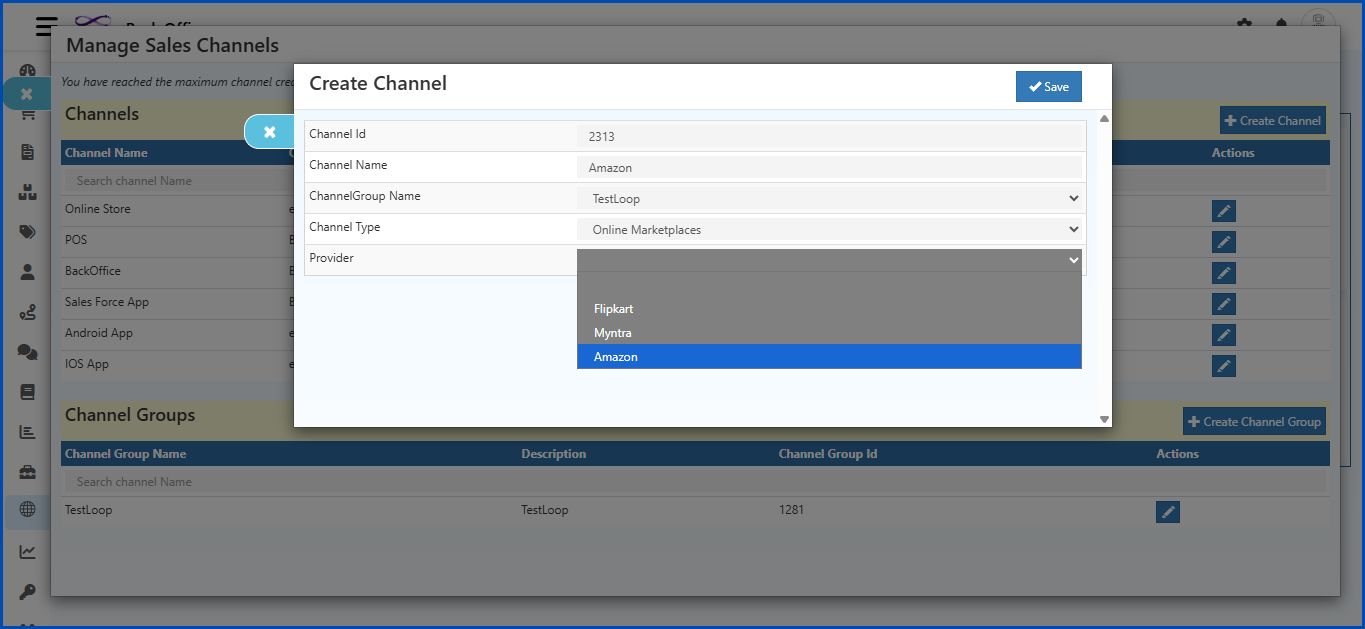
    Step 2: Select Channel Type

    • Click the Channel Type dropdown.
    • Choose Online Marketplaces.
    Amazon Integration in O2VEND

    Step 3: Select Provider

    • After selecting Online Marketplaces, a new field Provider will appear.
    • Click the Provider dropdown.
    • Select Amazon.

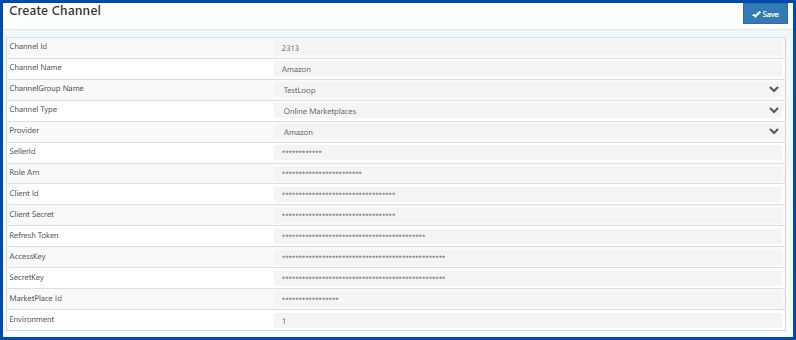
    Step 4: Additional Fields Appear

    Once Amazon is selected, the following fields appear:

    • SellerId
    • Role Arn
    • Client Id
    • Client Secret
    • Refresh Token
    • AccessKey
    • SecretKey
    • MarketPlace Id
    • Environment
    Amazon Integration in O2VEND

    Field Details

    Field Description
    Channel Id A unique number for this channel. Enter a Channel ID.
    Channel Name A name for the channel, for example Amazon.
    ChannelGroup Name A common name to group similar channels together.
    Provider Select Amazon from the dropdown list.
    SellerId The Seller ID given by Amazon. This identifies the seller account.
    Role Arn Amazon Resource Name (ARN) for the IAM role used in SP-API integration.
    Client Id Enter the Client ID from Amazon Seller Partner API credentials.
    Client Secret Enter the Client Secret from Amazon Seller Partner API credentials.
    Refresh Token A token that helps generate a new Access Token when the old one expires.
    AccessKey AWS Access Key provided by Amazon for authentication.
    SecretKey AWS Secret Key provided by Amazon for authentication.
    MarketPlace Id Enter the Marketplace ID for the region (e.g., A21TJRUUN4KGV for Amazon India).
    Environment Enter the mode:
    - 0 → Sandbox (Testing)
    - 1 → Production (Live)
    • Click Save after completing all fields.

    Step 5: Enable Amazon Integration

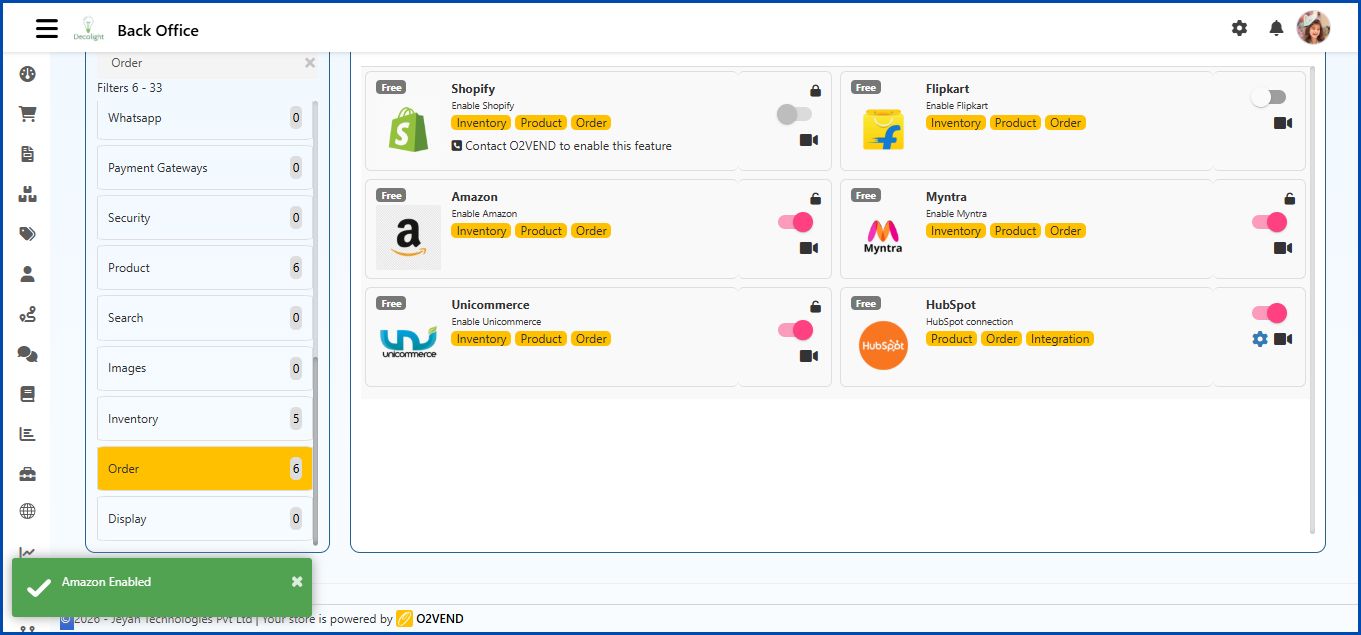
    Go to: Back Office → Integrations → Order
    Amazon Integration in O2VEND

    Process

    • Select Amazon in the list.
    • Click the toggle switch to enable the integration.
    • Once enabled, Amazon supports Order Sync, Inventory, and Product management.
    In this article
    Back to top _includes/footer.html
    © 2019–2026 Jeyan Technologies Private Limited • www.o2vend.com • Create your own store