O2VEND to O2VEND Channel Integration – Sync Products and Inventory
O2VEND to O2VEND channel integration connects two separate O2VEND systems and automatically synchronizes product data, inventory levels, and pricing between them — eliminating manual updates across locations.
This integration is built for businesses that operate multiple stores, warehouses, or business units, each running their own O2VEND environment.
Navigation: Back Office → Channel Management → Create Channel
What Is O2VEND to O2VEND Integration?
In O2VEND channel integration, one system acts as the source and the other as the destination. The source system pushes product and inventory data to the destination system through a configured sales channel — automatically, without manual re-entry.
What Gets Synchronized
The following data syncs between connected O2VEND systems:
- Products
- Categories
- Brands
- Price Lists
- Inventory Data
Why Use This Integration?
| Problem | How O2VEND Integration Solves It |
|---|---|
| Same product created manually in each store | Create once in source — auto-syncs to destination |
| Stock levels differ across branches | Inventory updates shared across connected systems |
| Pricing inconsistency across locations | Price list sync keeps all systems aligned |
| High manual effort for multi-store operations | Channel integration automates data distribution |
Step 1 – Create a Channel Group
Before creating the integration channel, set up a Channel Group to organize your channels.
- Go to Channel Management in O2VEND Back Office
- Select Create Channel Group
- Enter a name for the group
Once saved, proceed to configure the O2VEND channel under this group.
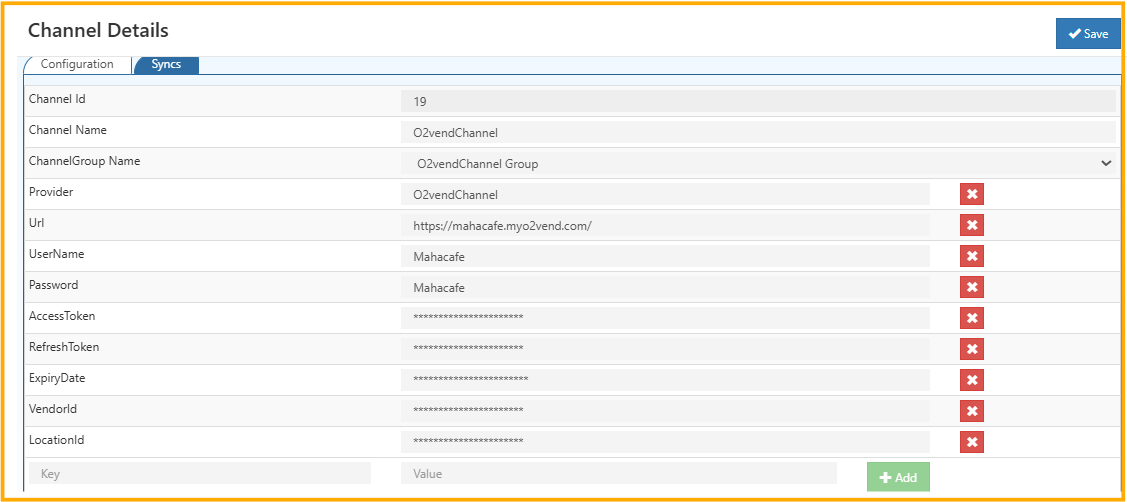
Step 2 – Configure the O2VEND Channel
In Create Channel, fill in the following details:
| Field | What to Enter |
|---|---|
| Channel Name | A name for this integration |
| Channel Group Name | Select the group created in Step 1 |
| Provider | Select O2vendChannel |
| URL | Destination O2VEND system URL where products will sync |
| Username | User account for the destination O2VEND system |
| Password | Corresponding password |
| Access Token | API token for authentication |
Click Save. O2VEND will establish a connection with the destination system using the provided credentials.
How Product Sync Works
Once the channel is configured, product synchronization is automatic:
- A product is created in the source O2VEND system
- The O2VEND channel integration sends the product data to the destination
- The product appears automatically in the destination O2VEND system
No manual re-entry needed in the destination system.
Common Use Cases
Multi-store retail — Sync product catalogs across stores running separate O2VEND systems so every location has consistent product data.
Centralized product management — Create products once in a head office O2VEND environment and distribute them automatically to all connected branch systems.
Warehouse inventory sync — Keep stock levels accurate across multiple warehouses by syncing inventory updates between connected O2VEND instances.
Distributed business units — Connect separate O2VEND environments for different business divisions and maintain consistent operational data without duplication.