O2VEND Retail ERP
  • Getting Started
  • Ecommerce
  • Back Office
  • POS
  • Agent App
  • PIM
  • Communication
  • CMS
  • OMS
  • WMS
  • O2C
  • Accounting
  • Reports
  • Themes and Apps
Search Results for

    Show / Hide Table of Contents
    • Overview
    • Features
      • Product Management Features
        • Product Management
        • Product Attributes
        • Product Variations
        • SKU Length for Variations
        • Product Pricing
        • Product Margin Settings
        • Product Cost Configuration
        • Product Tax Settings
        • Additional Tax Setup
      • Inventory Management Features
        • Inventory Management
        • Stock Management
        • GRN (Goods Receipt Note)
        • GDN (Goods Delivery Note)
        • Disable Lot Popup Option
      • Order & Sales Features
        • Order Management
        • Point of Sale (POS)
        • Credit Sales & Invoice Return
        • Outstanding Management
        • Voucher Management
        • Guest Checkout Option
      • Marketing & SEO Features
        • SEO Optimization
        • URL Configuration
        • Schema Markup Setup
        • Segmentation
      • Communication & Notification Features
        • Email Settings
        • Communication Settings
        • Notifications
        • Web Notifications
      • System & Security Features
        • Application Settings
        • General Settings
        • Date Configuration
        • IP Restrictions
        • White Listing
        • Print Configuration
        • Option Settings
    • Integrations
      • Marketplace Integrations
        • Amazon Integration
        • Flipkart Integration
        • Myntra Integration
        • Shopify Integration
        • Unicommerce Integration
      • Payment Gateway Integrations
        • Razorpay Integration
        • PayU Integration
        • Paytm Integration
        • PhonePe Integration
        • Cashfree Integration
        • Stripe Integration
        • Paypal Integration
      • Shipping & Logistics Integrations
        • Shiprocket Integration
        • Shipway Integration
        • eShipper Integration
        • Amazon Shipping Integration
        • XpressBees Integration
        • GetDelivered Integration
      • Communication Integrations
        • WhatsApp Integration
        • MSG91 Integration
        • SendGrid Integration
        • Amazon SES Integration
        • Email Integration
      • Marketing & CRM Integrations
        • HubSpot Integration
        • Typesense Integration
      • Tax & Compliance Integrations
        • e-Invoice Integration
        • e-Way Bill Integration
        • Tax Configuration
      • Security & Technical Integrations
        • reCAPTCHA Integration
        • Webhook Integration
        • Custom CDN Domain Setup
      • Inventory & Store Integrations
        • Inventory Integration
        • Storefront Integration
        • Display Configuration
        • General Settings
    • Product Enhancements
      • Affiliate Program Management
      • Back Office Management System
      • Checkout Process Settings
      • Coupon Code Management
      • Currency Configuration Settings
      • Delivery Zone Configuration
      • Discount Management System
      • Product Display Settings
      • Geo IP Location Detection
      • GTIN Product Code Management
      • Invoice Management System
      • Marketing & Campaign Tools
      • Menu Management Settings
      • Pricing Rule Configuration
      • Purchase Management Module
      • Referral Program Settings
      • Return Management Process
      • Sales Management System
      • Shipment & Delivery Tracking
      • SMS Notification Settings
      • Sub Location Management
      • Vendor Management System
      • Product Video Integration
      • Web Store Configuration
      • WhatsApp Integration Settings
    • Blog Categories Setup
    • Blog Management
    • Email Settings
    • Home Page Components
    • Main Menu Management
    • Newsletter Subscription Settings
    • SMS Settings
    • WhatsApp Settings
    • Communication Template Setup
    • Page Header Settings
    • Site Menu Management
    • Site Pages Management

    Create Product Defaults Features in O2VEND

    The Create Product Defaults screen is used to set default values for product fields. When a new product is created, these selected defaults will automatically apply. This helps maintain consistency and reduces the time required to fill repeated fields during product creation.

    This is a configuration screen where administrators can set options as True or False and define the default behavior for newly created products.

    Navigation Path

    Back Office → Features → Stock → Create Product Defaults
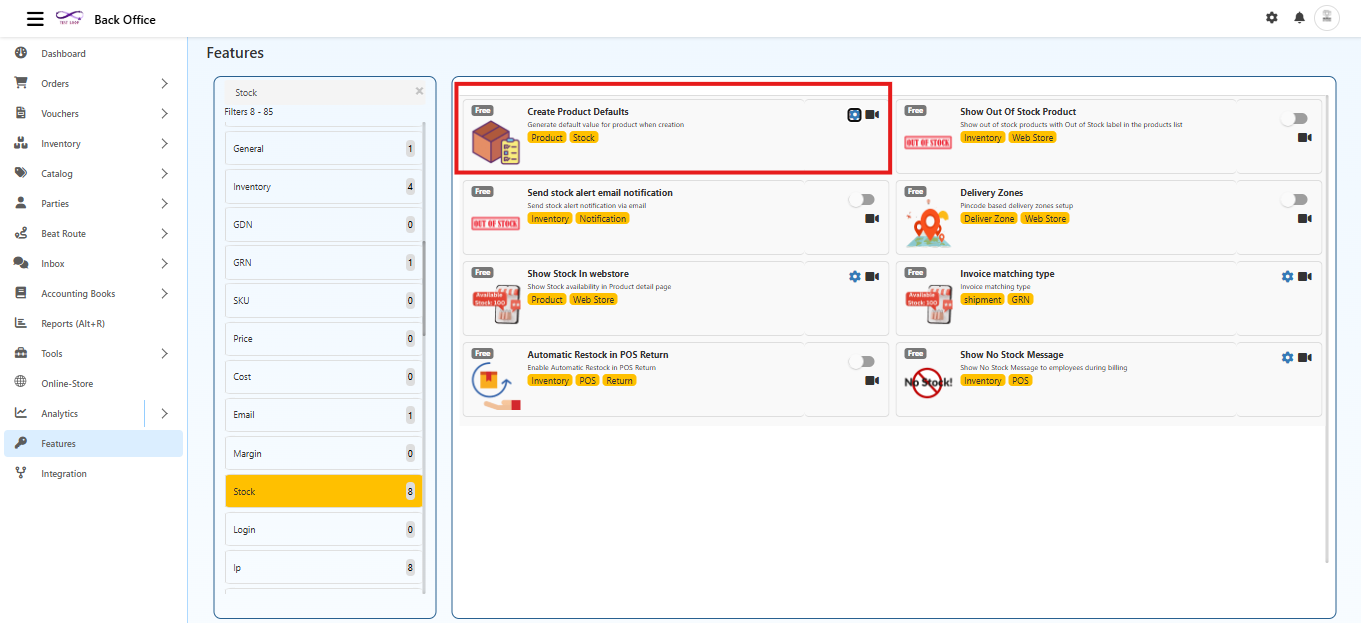
    Create Product Defaults Features in O2VEND

    Purpose

    The Create Product Defaults feature is used to:

    • Maintain consistent product settings across the system
    • Reduce manual work during product creation
    • Enforce organization wide catalog standards
    • Control visibility, stock settings, and ordering rules for new products
    • Ensure consistent default product settings across all sales channels (Ecommerce, POS, Agent App, Back Office)

    Applicability of Defaults

    All configuration options defined here apply across all sales channels, including:

    • Ecommerce store
    • POS
    • Agent App
    • Back Office

    These settings act as default behaviors for every new product created in the system.

    Configuration Options

    Each field allows selecting True or False.

    These values become the default for all newly created products.

    Create Product Defaults Features in O2VEND

    Save Variation as Individual Product

    • True → Each variation will be created as a separate product
    • False → Variations will stay inside a single main product

    Publish

    • True → Product will be published automatically
    • False → Product will remain unpublished

    Featured

    • True → Product will be added to the featured list
    • False → Product will not be featured

    Allow Negative Stock

    Defines whether the system should permit selling products even when quantity is zero or negative.

    • True → Negative stock is allowed across all sales channels (Ecommerce, POS, Agent App, Back Office).
      Useful for fast moving stores, high?demand products, or back?order workflows.
    • False → Stock cannot go below zero in any channel.
      All ordering channels will block the product once stock reaches zero.

    Call for Pricing

    • True → Product price will be displayed as Call for Pricing instead of the actual amount
    • False → Normal pricing will be displayed

    Allow to Order

    • True → The product can be added to cart and ordered from any sales channel
    • False → The product cannot be ordered from any sales channel

    Lot

    • True → Lot/Batch tracking will be enabled for the product
    • False → Lot tracking will not be used

    Show in Web Store

    • True → Product will appear in the web store
    • False → Product will not be shown in the web store

    Detailed Description

    Optional default detailed description for new products.

    HTML Content

    Optional HTML template for product description.

    Description

    Optional default short description for newly created products.

    These fields act as templates. The values can be modified while creating individual products.

    Save

    Selecting Save will apply the chosen True/False values as system defaults.
    These settings will automatically load whenever a new product is created.

    How It Works

    • These defaults apply across Ecommerce, POS, Agent App, and Back Office.
    • When a new product form is opened, all fields listed in this screen will be pre-filled with the selected default values.
    • These values can still be changed manually during product creation if needed.
    • All changes in this screen apply only to future products, not existing ones.
    • The defaults act as suggestions and do not restrict manual modifications.
    Create Product Defaults Features in O2VEND

    Outcome

    Once the settings are saved, every newly created product will automatically follow the configured default values. This ensures consistency, reduces manual input, and speeds up product creation across the system.

    In this article
    Back to top _includes/footer.html
    © 2019–2026 Jeyan Technologies Private Limited • www.o2vend.com • Create your own store