O2VEND Retail ERP
  • Getting Started
  • Ecommerce
  • Back Office
  • POS
  • Agent App
  • PIM
  • Communication
  • CMS
  • OMS
  • WMS
  • O2C
  • Accounting
  • Reports
  • Themes and Apps
Search Results for

    Show / Hide Table of Contents
    • Overview
    • Features
      • Product Management Features
        • Product Management
        • Product Attributes
        • Product Variations
        • SKU Length for Variations
        • Product Pricing
        • Product Margin Settings
        • Product Cost Configuration
        • Product Tax Settings
        • Additional Tax Setup
      • Inventory Management Features
        • Inventory Management
        • Stock Management
        • GRN (Goods Receipt Note)
        • GDN (Goods Delivery Note)
        • Disable Lot Popup Option
      • Order & Sales Features
        • Order Management
        • Point of Sale (POS)
        • Credit Sales & Invoice Return
        • Outstanding Management
        • Voucher Management
        • Guest Checkout Option
      • Marketing & SEO Features
        • SEO Optimization
        • URL Configuration
        • Schema Markup Setup
        • Segmentation
      • Communication & Notification Features
        • Email Settings
        • Communication Settings
        • Notifications
        • Web Notifications
      • System & Security Features
        • Application Settings
        • General Settings
        • Date Configuration
        • IP Restrictions
        • White Listing
        • Print Configuration
        • Option Settings
    • Integrations
      • Marketplace Integrations
        • Amazon Integration
        • Flipkart Integration
        • Myntra Integration
        • Shopify Integration
        • Unicommerce Integration
      • Payment Gateway Integrations
        • Razorpay Integration
        • PayU Integration
        • Paytm Integration
        • PhonePe Integration
        • Cashfree Integration
        • Stripe Integration
        • Paypal Integration
      • Shipping & Logistics Integrations
        • Shiprocket Integration
        • Shipway Integration
        • eShipper Integration
        • Amazon Shipping Integration
        • XpressBees Integration
        • GetDelivered Integration
      • Communication Integrations
        • WhatsApp Integration
        • MSG91 Integration
        • SendGrid Integration
        • Amazon SES Integration
        • Email Integration
      • Marketing & CRM Integrations
        • HubSpot Integration
        • Typesense Integration
      • Tax & Compliance Integrations
        • e-Invoice Integration
        • e-Way Bill Integration
        • Tax Configuration
      • Security & Technical Integrations
        • reCAPTCHA Integration
        • Webhook Integration
        • Custom CDN Domain Setup
      • Inventory & Store Integrations
        • Inventory Integration
        • Storefront Integration
        • Display Configuration
        • General Settings
    • Product Enhancements
      • Affiliate Program Management
      • Back Office Management System
      • Checkout Process Settings
      • Coupon Code Management
      • Currency Configuration Settings
      • Delivery Zone Configuration
      • Discount Management System
      • Product Display Settings
      • Geo IP Location Detection
      • GTIN Product Code Management
      • Invoice Management System
      • Marketing & Campaign Tools
      • Menu Management Settings
      • Pricing Rule Configuration
      • Purchase Management Module
      • Referral Program Settings
      • Return Management Process
      • Sales Management System
      • Shipment & Delivery Tracking
      • SMS Notification Settings
      • Sub Location Management
      • Vendor Management System
      • Product Video Integration
      • Web Store Configuration
      • WhatsApp Integration Settings
    • Blog Categories Setup
    • Blog Management
    • Email Settings
    • Home Page Components
    • Main Menu Management
    • Newsletter Subscription Settings
    • SMS Settings
    • WhatsApp Settings
    • Communication Template Setup
    • Page Header Settings
    • Site Menu Management
    • Site Pages Management

    Seamless Payments with Cashfree in O2VEND: A Streamlined Guide

    In today's fast-paced e-commerce landscape, offering frictionless payment options is crucial for customer satisfaction and business success. O2VEND's integration with Cashfree, a leading Indian payment gateway, empowers you to accept secure and convenient online payments, streamlining your transaction process and boosting conversion rates.

    Benefits of Cashfree Integration:

    • Enhanced Convenience: Customers can pay using credit cards, debit cards, wallets, and Buy Now, Pay Later (BNPL) options, eliminating the need for physical cash.
    • Increased Security: Industry-leading security measures and PCI compliance ensure the safety of transactions and customer data.
    • Quick Settlements: Enjoy prompt fund settlements without delays, improving your cash flow.
    • Competitive Rates: Benefit from transparent pricing and access to competitive payment processing fees.
    • Seamless Integration: O2VEND's intuitive interface makes setting up and managing Cashfree effortless.
    • Improved Conversion Rates: Offer a wider range of payment options to cater to diverse customer preferences, potentially leading to higher conversions.

    integration Steps:

    1. Create a Cashfree Account:
    • Click here to visit the Cashfree signup page: https://bitly.ws/36qKH
    • Enter your email, password, and phone number.
    • Click "Create Account" to get started.
    Seamless Payments with Cashfree in O2VEND: A Streamlined Guide
    1. Obtain API Keys:
    • Log in to your Cashfree account dashboard.
    • Navigate to the "Developer" section.
    • Click on "API Keys" and then "API keys" again.
    • In the "Production API Details" section, note down your App ID and Secret Key. These will be needed for the O2VEND integration.
    Seamless Payments with Cashfree in O2VEND: A Streamlined Guide Seamless Payments with Cashfree in O2VEND: A Streamlined Guide
    1. Integrate Cashfree in O2VEND:
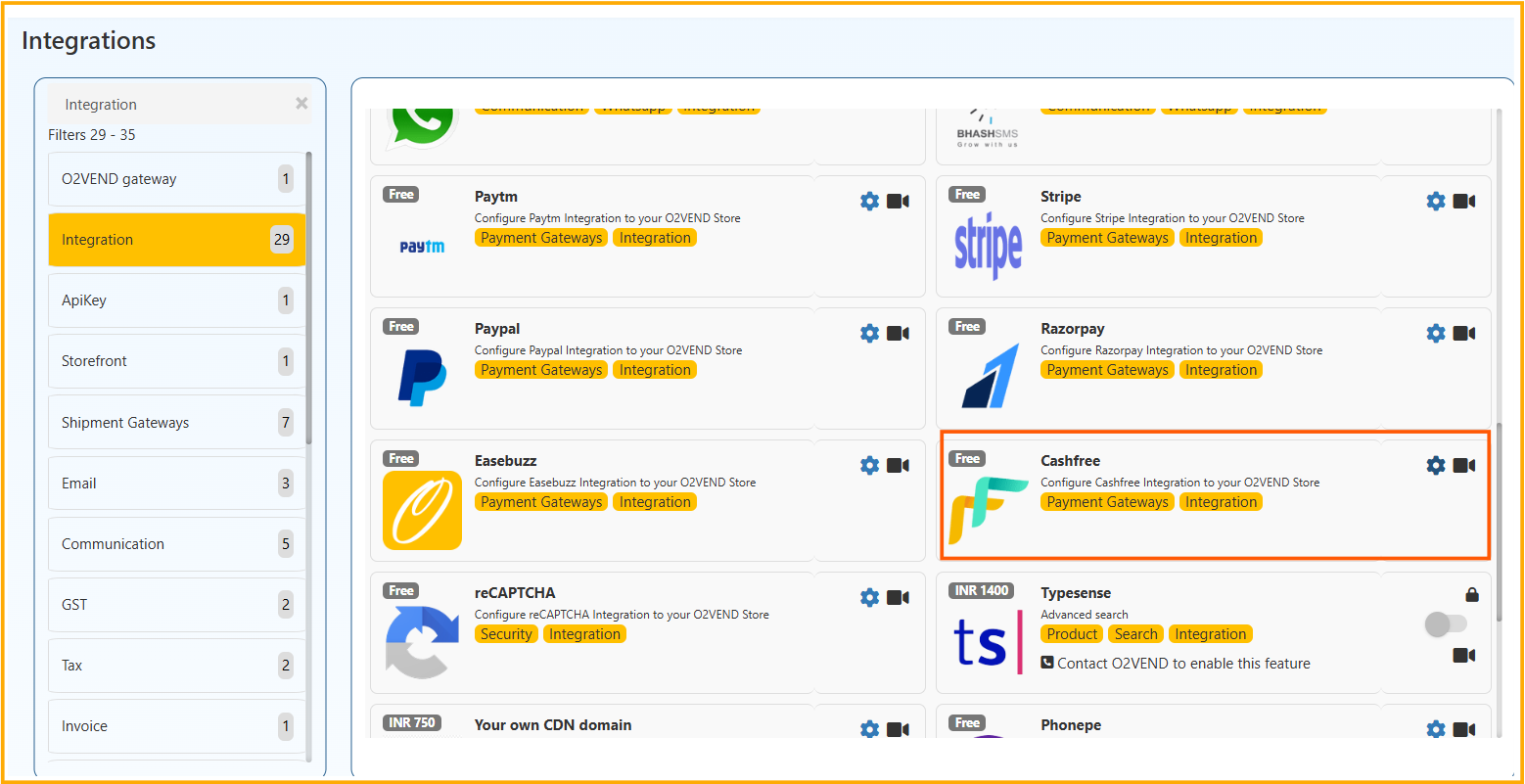
    • Log in to your O2VEND Back Office.
    • Go to the "Integration" section.
    • Locate the "Cashfree" integration and click "Activate."
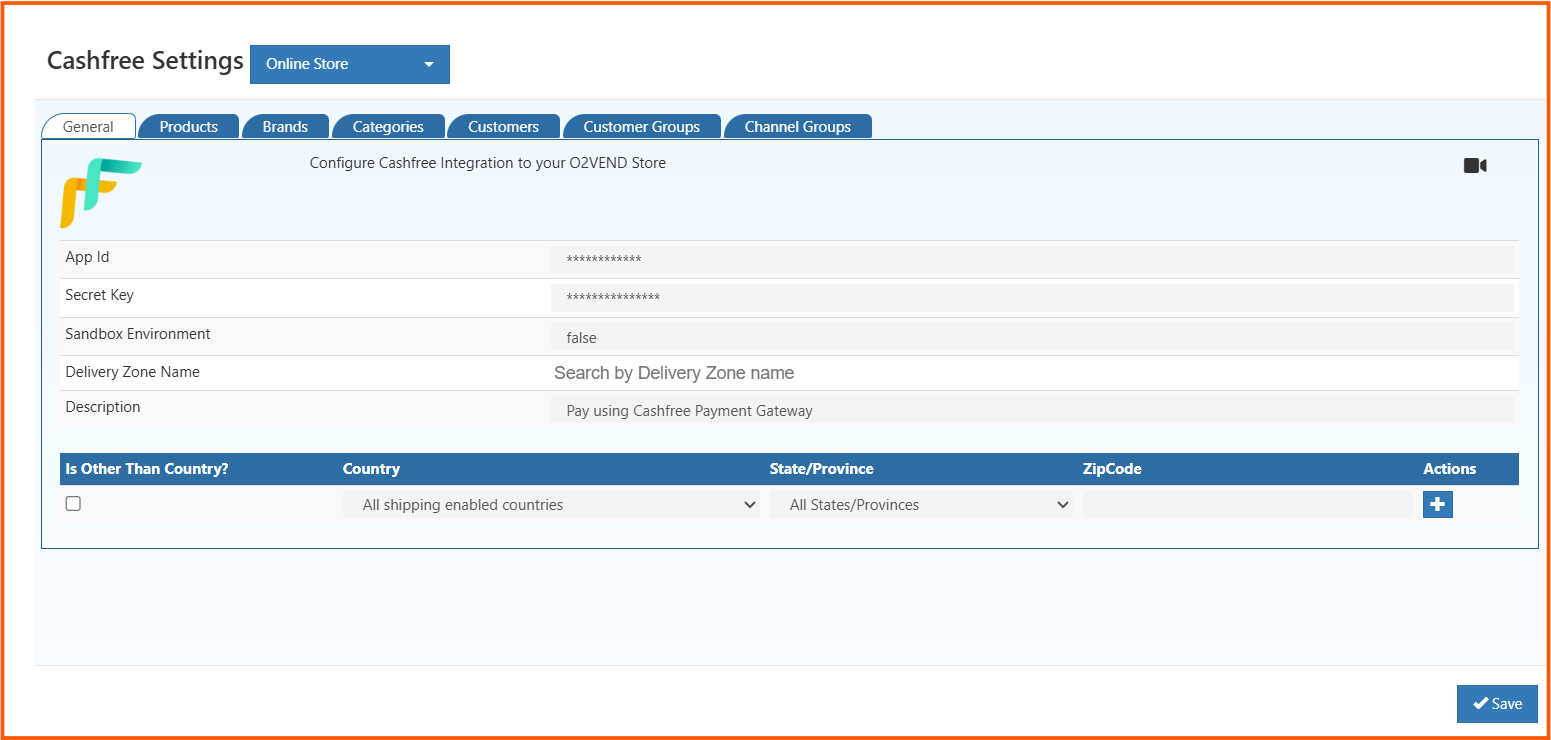
    • Enter the App ID and Secret Key obtained from Cashfree.
    • Specify the "Sandbox Environment" value as "True" for testing and "False" for production.
    • Enter a description for the payment method (e.g., "Cashfree Payments").
    • Select your country, state, and zip code (optional). If specified, the Cashfree option will only be available for transactions in those regions.
    • Click "Save" to complete the integration.
    Seamless Payments with Cashfree in O2VEND: A Streamlined Guide
    1. Enable Cashfree as a Payment Method:
    • In your O2VEND Back Office, go to "Online Store" -> "Setup Payment Method."
    • Locate "Cashfree Payments" and click "OK" when prompted to enable it.
    Seamless Payments with Cashfree in O2VEND: A Streamlined Guide Seamless Payments with Cashfree in O2VEND: A Streamlined Guide
    1. Additional Notes:

    Contact O2VEND support if you encounter any issues during the integration process.

    Start Accepting Seamless Payments Today!

    By integrating Cashfree with O2VEND, you can unlock a world of benefits for your e-commerce business. Offer your customers a convenient and secure payment experience, streamline your operations, and watch your sales soar.

    In this article
    Back to top _includes/footer.html
    © 2019–2026 Jeyan Technologies Private Limited • www.o2vend.com • Create your own store