O2VEND Retail ERP
  • Product
  • Solutions
  • Resources
    • Blog
    • Community
    • Partnership
    • Find Partner
    • Developer
  • Pricing
  • Docs
    • Getting Started
      • Channels
        • Sales Channel
        • O2VEND to O2VEND Channel
        • Shopify Integration Guide
    • Commerce
      • Ecommerce
      • POS
      • Agent App
      • CMS
      • Themes & Apps
      • Apps
        • Sales Navigator
    • Operations
      • OMS
      • WMS
      • O2C
      • Vendor Portal
      • Supplier Portal
    • Back Office
      • Accounting
      • Reports
      • PIM
      • Communication
      • Back Office
Search Results for

    Show / Hide Table of Contents
    • Overview
    • Features
      • Product Management Features
        • Product Management
        • Product Attributes
        • Product Variations
        • SKU Length for Variations
        • Product Pricing
        • Product Cost Configuration
        • Product Tax Settings
        • Additional Tax Setup
      • Inventory Management Features
        • Inventory Management
        • Stock Management
        • GRN (Goods Receipt Note)
        • GDN (Goods Delivery Note)
        • Disable Lot Popup Option
      • Order & Sales Features
        • Order Management
        • Point of Sale (POS)
        • Credit Sales & Invoice Return
        • Outstanding Management
        • Voucher Management
        • Guest Checkout Option
      • Marketing & SEO Features
        • SEO Optimization
        • URL Configuration
        • Schema Markup Setup
      • Communication & Notification Features
        • Email Settings
        • Communication Settings
        • Notifications
        • Web Notifications
      • System & Security Features
        • Application Settings
        • General Settings
        • Date Configuration
        • White Listing
        • Option Settings
    • Integrations
      • Marketplace Integrations
        • Amazon Integration
        • Flipkart Integration
        • Myntra Integration
        • Shopify Integration
        • Unicommerce Integration
      • Payment Gateway Integrations
        • Razorpay Integration
        • PayU Integration
        • Paytm Integration
        • PhonePe Integration
        • Cashfree Integration
        • Stripe Integration
        • Paypal Integration
      • Shipping & Logistics Integrations
        • Shiprocket Integration
        • Shipway Integration
        • eShipper Integration
        • Amazon Shipping Integration
        • XpressBees Integration
        • GetDelivered Integration
      • Communication Integrations
        • WhatsApp Integration
        • MSG91 Integration
        • SendGrid Integration
        • Amazon SES Integration
        • Email Integration
      • Marketing & CRM Integrations
        • HubSpot Integration
        • Typesense Integration
      • Tax & Compliance Integrations
        • e-Invoice Integration
        • e-Way Bill Integration
        • Tax Configuration
      • Security & Technical Integrations
        • reCAPTCHA Integration
        • Webhook Integration
        • Custom CDN Domain Setup
      • Inventory & Store Integrations
        • Inventory Integration
        • Storefront Integration
        • Channel-to-Channel Integration
        • Display Configuration
        • General Settings
    • Product Enhancements
      • Affiliate Program Management
      • Back Office Management System
      • Checkout Process Settings
      • Coupon Code Management
      • Currency Configuration Settings
      • Delivery Zone Configuration
      • Discount Management System
      • Product Display Settings
      • GTIN Product Code Management
      • Invoice Management System
      • Marketing & Campaign Tools
      • Menu Management Settings
      • Pricing Rule Configuration
      • Purchase Management Module
      • Referral Program Settings
      • Return Management Process
      • Sales Management System
      • Shipment & Delivery Tracking
      • SMS Notification Settings
      • Sub Location Management
      • Vendor Management System
      • Product Video Integration
      • Web Store Configuration
      • WhatsApp Integration Settings
    • Blog Categories Setup
    • Blog Management
    • Email Settings
    • Home Page Components
    • Main Menu Management
    • Newsletter Subscription Settings
    • SMS Settings
    • WhatsApp Settings
    • Communication Template Setup
    • Page Header Settings
    • Site Menu Management
    • Site Pages Management

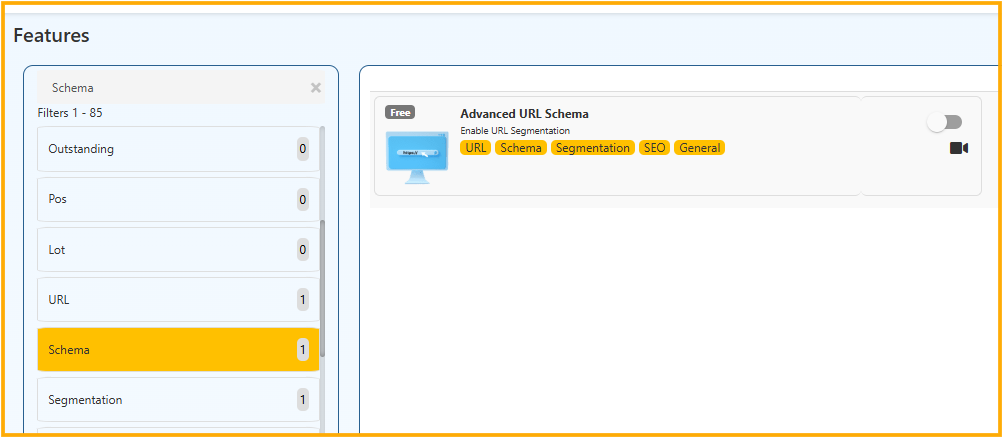
    Advanced URL Schema – Enable URL Segmentation (SEO Configuration Guide)

    📌 Overview

    The Advanced URL Schema feature allows you to enable structured URL segmentation for better SEO, cleaner links, and improved search engine visibility.

    This feature improves:

    • URL readability
    • SEO ranking
    • User experience
    • Web store structure

    🔹 1. What is URL Segmentation?

    URL Segmentation means organizing URLs in a structured hierarchy instead of using random IDs or query parameters.

    ❌ Without URL Segmentation:

    https://yourstore.com/product?id=12345

    ✅ With URL Segmentation:

    https://yourstore.com/mens/shirts/cotton-formal-shirt

    This improves both SEO and user understanding.


    🔹 2. Why Use Advanced URL Schema?

    🎯 Benefits

    • Better SEO indexing
    • Higher click-through rate (CTR)
    • Clean & professional URLs
    • Improved Google ranking
    • Easier category navigation
    • Keyword-rich URLs

    Search engines prefer descriptive URLs over dynamic parameters.


    🔹 3. How to Enable Advanced URL Schema

    ⚙️ Steps to Configure

    1. Go to Settings
    2. Navigate to General Settings
    3. Open SEO Configuration
    4. Enable:

    Advanced URL Schema Enable URL Segmentation

    1. Save changes

    🔹 4. URL Structure Example

    After enabling, URLs may follow structure like:

    /category/sub-category/product-name

    Example:

    /electronics/mobiles/samsung-galaxy-s23

    Or for collections:

    /collections/winter-sale/jackets


    🔹 5. SEO Impact

    When enabled:

    • Category names appear in URL
    • Product keywords included automatically
    • URL becomes crawl-friendly
    • Duplicate URL issues reduced

    🔹 6. Best Practice for URL Segmentation

    ✔ Use lowercase letters
    ✔ Avoid special characters
    ✔ Use hyphens instead of spaces
    ✔ Keep URLs short but descriptive
    ✔ Avoid unnecessary numbers

    Example:

    /women/ethnic-wear/embroidered-kurti


    🔹 7. When to Use This Feature

    Recommended for:

    • E-commerce stores
    • Multi-category product catalogs
    • SEO-focused businesses
    • Large inventory stores

    🔹 8. Important Notes

    • After enabling, clear website cache
    • Regenerate sitemap
    • Resubmit sitemap in Google Search Console
    • Avoid changing URL structure frequently

    Changing URLs without proper redirects may affect SEO ranking.

    Enabling Advanced URL Schema with URL Segmentation ensures:

    • Structured website hierarchy
    • Improved SEO performance
    • Better search engine crawling
    • Higher organic traffic potential

    This feature is essential for long-term e-commerce growth.

    In this article
    O2VEND

    O2VEND Help Center for Ecommerce, Back Office, POS, Agent App, PIM, OMS, WMS, Accounting, O2C, CMS, and ERP Reports workflows.

    Get Demo Contact Sales

    Product Docs

    Ecommerce Back Office Point of Sale Agent App Warehouse (WMS)

    Module Docs

    PIM OMS Accounting Order to Cash (O2C) CMS

    Resources

    Ecommerce POS Back Office Agent App Restaurant POS Integrations

    Community and Company

    Blog Community Partnership Find Partner Developer Pricing

    © 2019-2026 Jeyan Technologies Private Limited. All rights reserved.

    Privacy Policy • Terms of Service • Cancellation & Refund