Integrate eShipper with O2VEND | Configure Shipping & Track Orders
Efficient shipping and order tracking in O2VEND is achieved through seamless integration with eShipper. This setup automates shipment creation, manages COD and international orders, and enables precise tracking for every delivery. The step-by-step configuration ensures smooth order fulfillment and operational efficiency.
Accessing eShipper Integration
The integration process begins in the O2VEND Back Office. The eShipper Configuration screen contains all necessary fields for setup.
Steps to access the integration:
- Navigate to Integration in the O2VEND Back Office.
- Click Shipment Gateways → eShipper.
- The eShipper Configuration screen will display sections for account settings, international shipment details, package dimensions, and webhook setup.
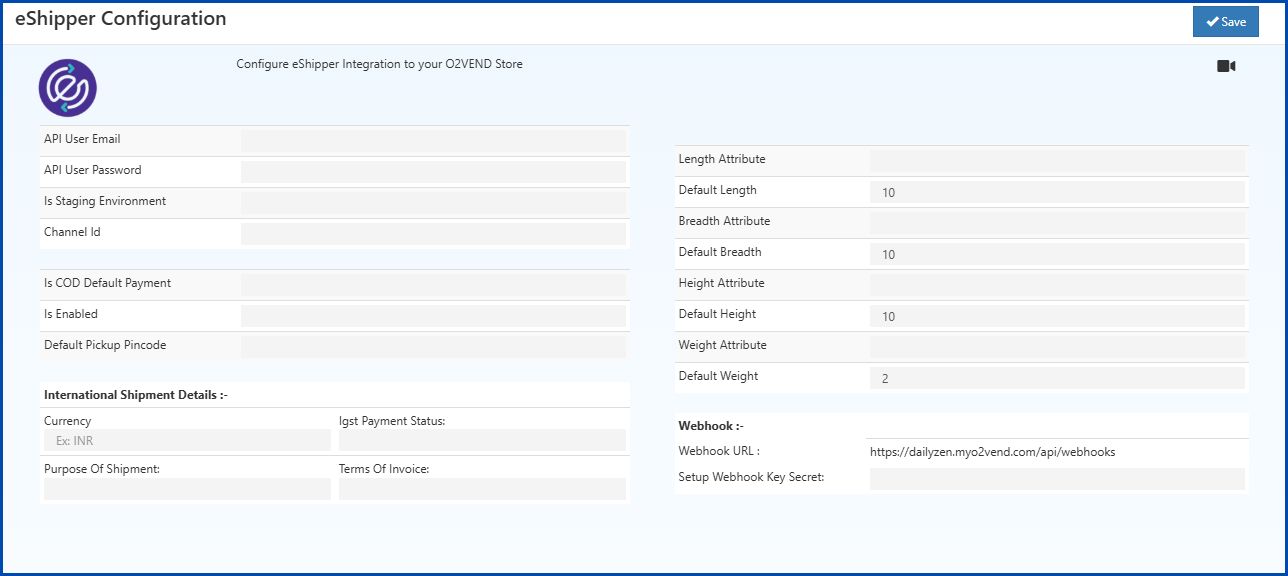
Screen Overview
The configuration screen is divided into the following sections:
- Account & Integration – API credentials and default store settings.
- International Shipment Details – Settings for global shipments.
- Package Dimensions – Default product dimensions for accurate shipping calculations.
- Webhook Settings – Receive automated shipment updates directly in O2VEND.
Automate Shipping & Track Orders
Set up eShipper integration in O2VEND to automate shipment creation, manage COD and international orders, and track deliveries in real time.
eShipper Configuration
Left Section: Account & Integration
This section connects the O2VEND store with the eShipper account and sets default store options.
| Field | Description | Example |
|---|---|---|
| API User Email | Email provided by eShipper for API access | [email protected] |
| API User Password | Password for the eShipper API account | ******** |
| Is Staging Environment | true for sandbox/testing, false for live |
false |
| Channel Id | Channel Id assigned to the store | O2VEND-Store-01 |
| Is COD Default Payment | true if Cash on Delivery is default, otherwise false |
false |
| Is Enabled | Activate integration with true, disable with false |
true |
| Default Pickup Pincode | Postal code of the default pickup location | 600001 |
Tip: Always test settings in the staging environment before enabling live mode. Warning: API credentials must remain confidential to prevent unauthorized access.
International Shipment Details
This section configures shipment preferences for international orders, including currency, IGST payment, and invoice terms.
| Field | Description | Example |
|---|---|---|
| Currency | Currency code for international shipments | INR / USD |
| IGST Payment Status | Options: Not Applicable, LUT/Export under Bond, Export Against Payment of IGST | Not Applicable |
| Purpose Of Shipment | Reason for shipment | Commercial, Gift, Sample |
| Terms Of Invoice | Invoice or shipping terms | CIF, FOB |
Select the IGST payment option based on the type of export to ensure compliance with tax regulations.
Right Section: Package Dimensions
This section maps product attributes for length, breadth, height, and weight, with default values if attribute data is missing. Accurate dimensions help calculate shipping costs correctly.
| Field | Description | Example |
|---|---|---|
| Length Attribute | Product attribute name for length | length_cm |
| Default Length | Default length if attribute missing | 10 |
| Breadth Attribute | Product attribute name for width/breadth | width_cm |
| Default Breadth | Default breadth if attribute missing | 10 |
| Height Attribute | Product attribute name for height | height_cm |
| Default Height | Default height if attribute missing | 10 |
| Weight Attribute | Product attribute name for weight | weight_kg |
| Default Weight | Default weight in kilograms | 2 |
Webhook Section
This section allows O2VEND to receive automated shipment updates from eShipper.
| Field | Description | Example |
|---|---|---|
| Webhook URL | System-generated URL for receiving shipment updates (read-only) | https://store.myo2vend.com/api/webhooks |
| Setup Webhook Key Secret | Secret key for validating webhook requests | secret_12345 |
The webhook key ensures secure communication between O2VEND and eShipper.
Saving Configuration
Once all fields are completed:
- Verify all information for accuracy.
- Click the Save button at the top-right corner of the screen.
- Integration will activate, enabling automated shipment creation, COD management, and order tracking.
Related Topics
Amazon Shipping Integration in O2VEND Learn how to configure Amazon Shipping, manage orders, and track shipments directly from O2VEND.
Shiprocket Integration Guide Step-by-step guide to integrate Shiprocket, automate shipment creation, and track deliveries.
Shipway Integration Setup Configure Shipway as a shipment gateway, sync orders, and monitor delivery status in O2VEND.
GetDelivered Shipment Integration Guide to connect GetDelivered, manage shipments, and receive tracking updates.
XpressBees Shipping Integration Instructions for integrating XpressBees, creating shipments, and tracking orders efficiently.
Automate Shipping & Track Orders with eShipper
Configure eShipper integration in O2VEND to automate shipment creation, manage COD and international orders, and track deliveries in real time for smooth operations.