O2VEND Retail ERP
  • Product
  • Solutions
  • Resources
    • Blog
    • Community
    • Partnership
    • Find Partner
    • Developer
  • Pricing
  • Docs
    • Getting Started
      • Channels
        • Sales Channel
        • O2VEND to O2VEND Channel
        • Shopify Integration Guide
    • Commerce
      • Ecommerce
      • POS
      • Agent App
      • CMS
      • Themes & Apps
      • Apps
        • Sales Navigator
    • Operations
      • OMS
      • WMS
      • O2C
      • Vendor Portal
      • Supplier Portal
    • Back Office
      • Accounting
      • Reports
      • PIM
      • Communication
      • Back Office
Search Results for

    Show / Hide Table of Contents
    • Overview
    • Features
      • Product Management Features
        • Product Management
        • Product Attributes
        • Product Variations
        • SKU Length for Variations
        • Product Pricing
        • Product Cost Configuration
        • Product Tax Settings
        • Additional Tax Setup
      • Inventory Management Features
        • Inventory Management
        • Stock Management
        • GRN (Goods Receipt Note)
        • GDN (Goods Delivery Note)
        • Disable Lot Popup Option
      • Order & Sales Features
        • Order Management
        • Point of Sale (POS)
        • Credit Sales & Invoice Return
        • Outstanding Management
        • Voucher Management
        • Guest Checkout Option
      • Marketing & SEO Features
        • SEO Optimization
        • URL Configuration
        • Schema Markup Setup
      • Communication & Notification Features
        • Email Settings
        • Communication Settings
        • Notifications
        • Web Notifications
      • System & Security Features
        • Application Settings
        • General Settings
        • Date Configuration
        • White Listing
        • Option Settings
    • Integrations
      • Marketplace Integrations
        • Amazon Integration
        • Flipkart Integration
        • Myntra Integration
        • Shopify Integration
        • Unicommerce Integration
      • Payment Gateway Integrations
        • Razorpay Integration
        • PayU Integration
        • Paytm Integration
        • PhonePe Integration
        • Cashfree Integration
        • Stripe Integration
        • Paypal Integration
      • Shipping & Logistics Integrations
        • Shiprocket Integration
        • Shipway Integration
        • eShipper Integration
        • Amazon Shipping Integration
        • XpressBees Integration
        • GetDelivered Integration
      • Communication Integrations
        • WhatsApp Integration
        • MSG91 Integration
        • SendGrid Integration
        • Amazon SES Integration
        • Email Integration
      • Marketing & CRM Integrations
        • HubSpot Integration
        • Typesense Integration
      • Tax & Compliance Integrations
        • e-Invoice Integration
        • e-Way Bill Integration
        • Tax Configuration
      • Security & Technical Integrations
        • reCAPTCHA Integration
        • Webhook Integration
        • Custom CDN Domain Setup
      • Inventory & Store Integrations
        • Inventory Integration
        • Storefront Integration
        • Channel-to-Channel Integration
        • Display Configuration
        • General Settings
    • Product Enhancements
      • Affiliate Program Management
      • Back Office Management System
      • Checkout Process Settings
      • Coupon Code Management
      • Currency Configuration Settings
      • Delivery Zone Configuration
      • Discount Management System
      • Product Display Settings
      • GTIN Product Code Management
      • Invoice Management System
      • Marketing & Campaign Tools
      • Menu Management Settings
      • Pricing Rule Configuration
      • Purchase Management Module
      • Referral Program Settings
      • Return Management Process
      • Sales Management System
      • Shipment & Delivery Tracking
      • SMS Notification Settings
      • Sub Location Management
      • Vendor Management System
      • Product Video Integration
      • Web Store Configuration
      • WhatsApp Integration Settings
    • Blog Categories Setup
    • Blog Management
    • Email Settings
    • Home Page Components
    • Main Menu Management
    • Newsletter Subscription Settings
    • SMS Settings
    • WhatsApp Settings
    • Communication Template Setup
    • Page Header Settings
    • Site Menu Management
    • Site Pages Management

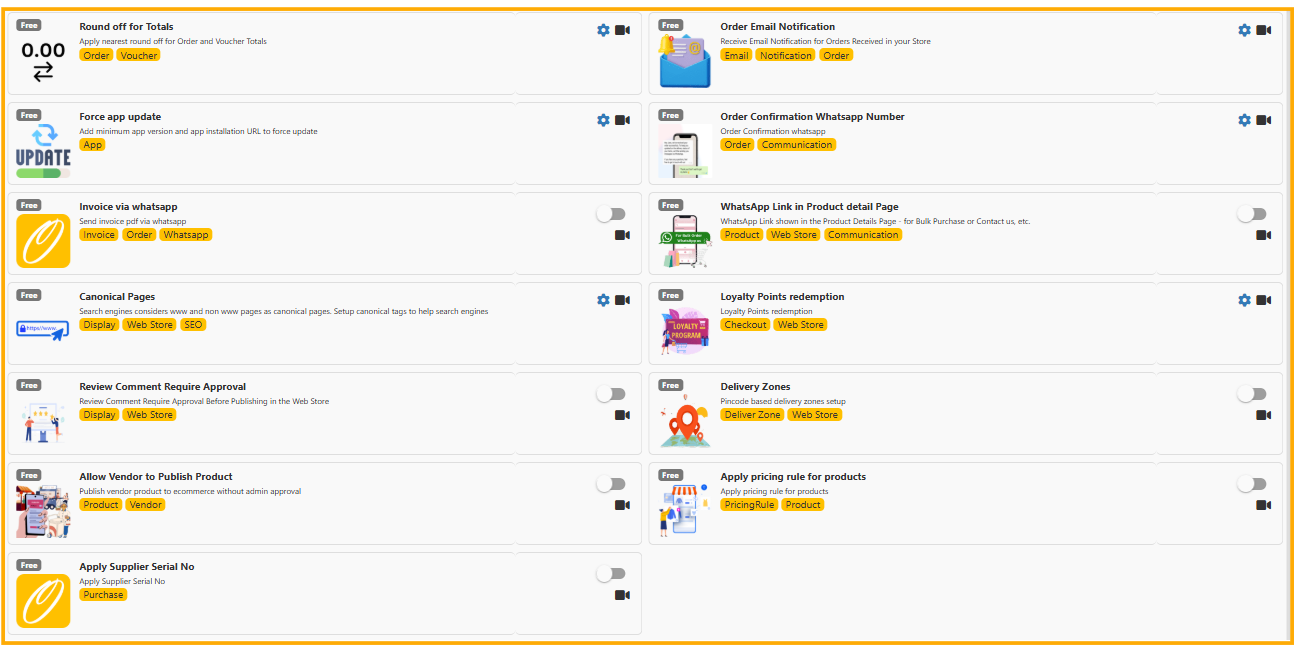
    O2VEND Feature Settings Guide

    Complete overview of all automation, customer communication, inventory control, and SEO features available in O2VEND.

    This guide explains all features available in the O2VEND feature settings panel. Each feature helps improve automation, customer communication, inventory control, and SEO performance.


    1️⃣ Round Off for Totals

    Purpose:
    Automatically rounds off order totals and voucher totals to the nearest value.

    Why Use It?

    • Avoid decimal confusion in billing
    • Clean invoice values
    • Suitable for retail POS stores

    Example: ₹199.87 → ₹200.00

    How to Enable:

    1. Go to Feature Settings
    2. Enable "Round Off for Totals"
    3. Save changes

    2️⃣ Order Email Notification

    Purpose:
    Receive email notifications when a new order is placed.

    Benefits:

    • Instant order alerts
    • Better order tracking
    • No need to constantly check dashboard

    Setup Steps:

    1. Enable the feature
    2. Enter notification email address
    3. Save settings

    3️⃣ Force App Update

    Purpose:
    Force mobile app users to update to the latest version.

    Why Important?

    • Ensures all users run updated version
    • Fixes bugs & security issues
    • Prevents compatibility problems

    Configuration:

    1. Set minimum app version
    2. Provide update URL
    3. Enable feature

    4️⃣ Order Confirmation WhatsApp Number

    Purpose:
    Send order confirmation messages via WhatsApp.

    Advantages:

    • Instant confirmation
    • Improves customer trust
    • Faster communication

    How to Use:

    1. Enter WhatsApp number
    2. Enable feature
    3. Save configuration

    5️⃣ Invoice via WhatsApp

    Purpose:
    Send invoice copy directly to customer WhatsApp.

    Benefits:

    • Paperless billing
    • Quick invoice delivery
    • Better customer experience

    Steps:

    1. Enable feature
    2. Connect WhatsApp integration
    3. Invoice auto-sends after billing

    6️⃣ WhatsApp Link in Product Detail Page

    Purpose:
    Display WhatsApp chat button on product page.

    Use Case:

    • Customer can enquire before buying
    • Increases conversion rate
    • Improves engagement

    7️⃣ Canonical Pages

    Purpose:
    Prevent duplicate SEO issues (www vs non-www pages).

    Why Important?

    • Avoid duplicate content penalty
    • Improve Google ranking
    • Strengthen SEO signals

    How It Works: System sets preferred URL version for search engines.


    8️⃣ Loyalty Points Redemption

    Purpose:
    Allow customers to redeem loyalty points during checkout.

    Benefits:

    • Increase repeat purchases
    • Encourage customer retention
    • Reward loyal buyers

    Example: 100 Points = ₹100 Discount


    9️⃣ Review Comment Require Approval

    Purpose:
    Admin approval required before publishing product reviews.

    Why Use It?

    • Prevent spam reviews
    • Maintain brand reputation
    • Control public feedback

    🔟 Delivery Zones

    Purpose:
    Setup delivery areas based on pincodes or zones.

    Advantages:

    • Restrict unsupported areas
    • Set delivery charges per zone
    • Manage logistics efficiently

    1️⃣1️⃣ Allow Vendor to Publish Product

    Purpose:
    Allow vendors to publish products without admin approval.

    Best For: Marketplace model businesses.

    Note: Enable only for trusted vendors.


    1️⃣2️⃣ Apply Pricing Rule for Products

    Purpose:
    Automatically apply pricing rules to selected products.

    Examples:

    • Buy 2 Get 10% Off
    • Festival discount
    • Category-wise price updates

    1️⃣3️⃣ Apply Supplier Serial No

    Purpose:
    Track products using supplier serial numbers.

    Use Cases:

    • Electronics
    • Warranty management
    • Batch tracking

    Final Checklist Before Enabling Features

    • Understand business requirement
    • Test feature before going live
    • Configure email & WhatsApp integrations
    • Enable only required modules

    O2VEND Smart Configuration = Better Automation + Better Customer Experience + Stronger SEO

    In this article
    © 2019-2026 Jeyan Technologies Private Limited • www.o2vend.com • Create your own store