O2VEND Retail ERP
  • Getting Started
  • Ecommerce
  • Back Office
  • POS
  • Agent App
  • PIM
  • Communication
  • CMS
  • OMS
  • WMS
  • O2C
  • Accounting
  • Reports
  • Themes and Apps
Search Results for

    Show / Hide Table of Contents
    • Overview
    • Features
      • Product Management Features
        • Product Management
        • Product Attributes
        • Product Variations
        • SKU Length for Variations
        • Product Pricing
        • Product Margin Settings
        • Product Cost Configuration
        • Product Tax Settings
        • Additional Tax Setup
      • Inventory Management Features
        • Inventory Management
        • Stock Management
        • GRN (Goods Receipt Note)
        • GDN (Goods Delivery Note)
        • Disable Lot Popup Option
      • Order & Sales Features
        • Order Management
        • Point of Sale (POS)
        • Credit Sales & Invoice Return
        • Outstanding Management
        • Voucher Management
        • Guest Checkout Option
      • Marketing & SEO Features
        • SEO Optimization
        • URL Configuration
        • Schema Markup Setup
        • Segmentation
      • Communication & Notification Features
        • Email Settings
        • Communication Settings
        • Notifications
        • Web Notifications
      • System & Security Features
        • Application Settings
        • General Settings
        • Date Configuration
        • IP Restrictions
        • White Listing
        • Print Configuration
        • Option Settings
    • Integrations
      • Marketplace Integrations
        • Amazon Integration
        • Flipkart Integration
        • Myntra Integration
        • Shopify Integration
        • Unicommerce Integration
      • Payment Gateway Integrations
        • Razorpay Integration
        • PayU Integration
        • Paytm Integration
        • PhonePe Integration
        • Cashfree Integration
        • Stripe Integration
        • Paypal Integration
      • Shipping & Logistics Integrations
        • Shiprocket Integration
        • Shipway Integration
        • eShipper Integration
        • Amazon Shipping Integration
        • XpressBees Integration
        • GetDelivered Integration
      • Communication Integrations
        • WhatsApp Integration
        • MSG91 Integration
        • SendGrid Integration
        • Amazon SES Integration
        • Email Integration
      • Marketing & CRM Integrations
        • HubSpot Integration
        • Typesense Integration
      • Tax & Compliance Integrations
        • e-Invoice Integration
        • e-Way Bill Integration
        • Tax Configuration
      • Security & Technical Integrations
        • reCAPTCHA Integration
        • Webhook Integration
        • Custom CDN Domain Setup
      • Inventory & Store Integrations
        • Inventory Integration
        • Storefront Integration
        • Display Configuration
        • General Settings
    • Product Enhancements
      • Affiliate Program Management
      • Back Office Management System
      • Checkout Process Settings
      • Coupon Code Management
      • Currency Configuration Settings
      • Delivery Zone Configuration
      • Discount Management System
      • Product Display Settings
      • Geo IP Location Detection
      • GTIN Product Code Management
      • Invoice Management System
      • Marketing & Campaign Tools
      • Menu Management Settings
      • Pricing Rule Configuration
      • Purchase Management Module
      • Referral Program Settings
      • Return Management Process
      • Sales Management System
      • Shipment & Delivery Tracking
      • SMS Notification Settings
      • Sub Location Management
      • Vendor Management System
      • Product Video Integration
      • Web Store Configuration
      • WhatsApp Integration Settings
    • Blog Categories Setup
    • Blog Management
    • Email Settings
    • Home Page Components
    • Main Menu Management
    • Newsletter Subscription Settings
    • SMS Settings
    • WhatsApp Settings
    • Communication Template Setup
    • Page Header Settings
    • Site Menu Management
    • Site Pages Management

    Order Confirmation WhatsApp Number

    The Order Confirmation WhatsApp Number feature allows order confirmation messages to be sent directly to a WhatsApp number. This ensures faster communication and provides instant alerts whenever a new order is placed on the eCommerce store.

    This setting enables automatic notifications for every order, improving order management efficiency.

    Navigation Path

    The configuration can be accessed using the following path:

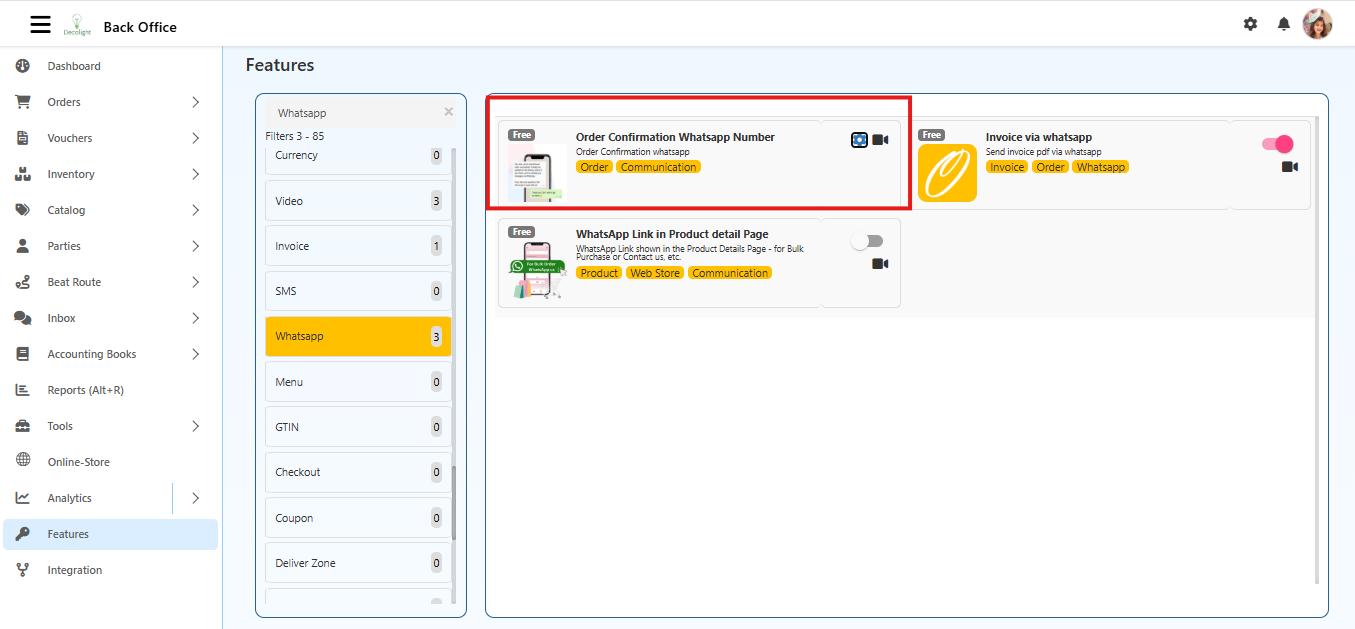
    Back Office → Features → WhatsApp → Order Confirmation WhatsApp Number

    Order Confirmation WhatsApp Number

    When Enabled

    • Sends an automatic WhatsApp message whenever a customer places an order.
    • Delivers the message to the configured WhatsApp number.
    • Provides instant alerts for new orders to staff or store management.

    When Disabled

    • No WhatsApp messages are sent for new orders.

    Configuration Steps

    1. Open Features

      • From the Back Office dashboard, select Features in the left-hand menu.
    2. Select WhatsApp

      • In the Features list, select WhatsApp to access messaging options.
    3. Open Order Confirmation WhatsApp Number

      • Click Order Confirmation WhatsApp Number.
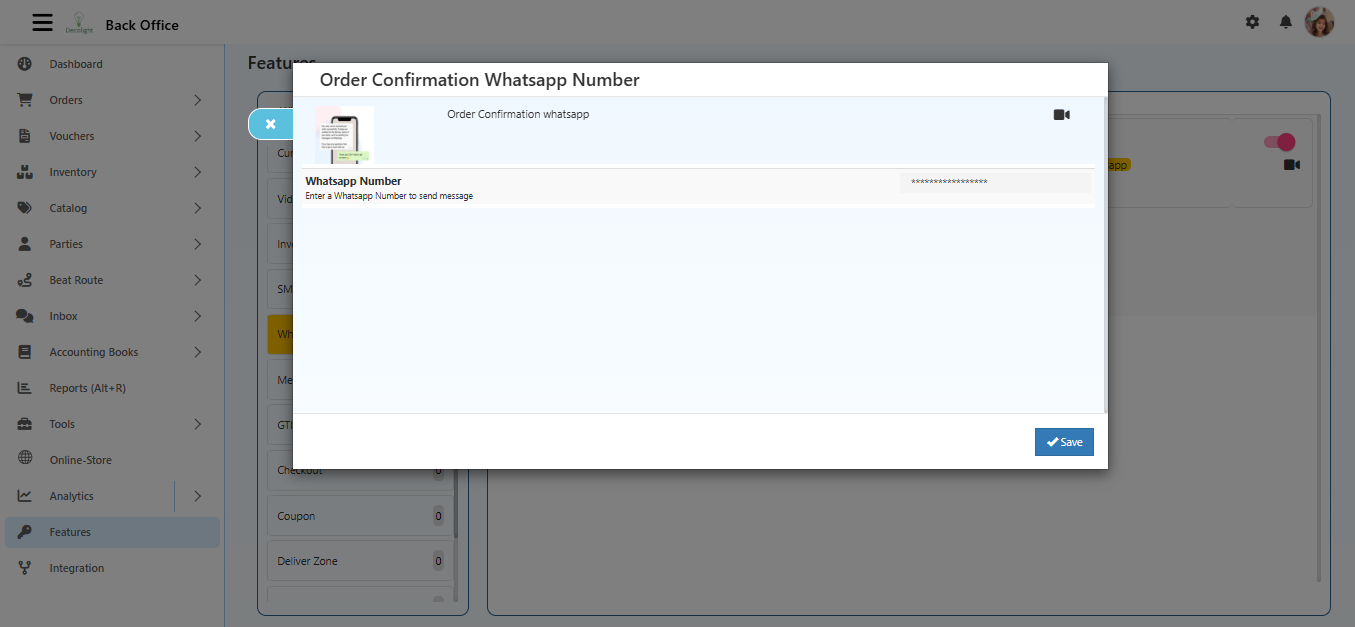
      • A popup window titled Order Confirmation WhatsApp Number will appear.
      Order Confirmation WhatsApp Number
    4. Enter WhatsApp Number

      • Locate the WhatsApp Number field.
      • Enter the number in the format: CountryCode + PhoneNumber (Example: +91 9876543210).
    5. Save

      • Click the Save button at the bottom-right corner.
      • The number is now saved for sending order confirmation messages via WhatsApp.

    WhatsApp Number Guidelines

    • Ensure the number is valid and active on WhatsApp.
    • Messages are sent automatically based on order confirmation triggers.
    • Incorrect numbers will prevent WhatsApp notifications from being delivered.

    Summary

    Configuring the Order Confirmation WhatsApp Number allows:

    • Automatic notifications for new orders
    • Faster order processing and handling
    • Real-time alerts for staff or management
    In this article
    Back to top _includes/footer.html
    © 2019–2026 Jeyan Technologies Private Limited • www.o2vend.com • Create your own store