O2VEND Retail ERP
  • Product
  • Solutions
  • Resources
    • Blog
    • Community
    • Partnership
    • Find Partner
    • Developer
  • Pricing
  • Docs
    • Getting Started
      • Channels
        • Sales Channel
        • O2VEND to O2VEND Channel
        • Shopify Integration Guide
    • Commerce
      • Ecommerce
      • POS
      • Agent App
      • CMS
      • Themes & Apps
      • Apps
        • Sales Navigator
    • Operations
      • OMS
      • WMS
      • O2C
      • Vendor Portal
      • Supplier Portal
    • Back Office
      • Accounting
      • Reports
      • PIM
      • Communication
      • Back Office
Search Results for

    Show / Hide Table of Contents
    • Overview
    • Features
      • Product Management Features
        • Product Management
        • Product Attributes
        • Product Variations
        • SKU Length for Variations
        • Product Pricing
        • Product Cost Configuration
        • Product Tax Settings
        • Additional Tax Setup
      • Inventory Management Features
        • Inventory Management
        • Stock Management
        • GRN (Goods Receipt Note)
        • GDN (Goods Delivery Note)
        • Disable Lot Popup Option
      • Order & Sales Features
        • Order Management
        • Point of Sale (POS)
        • Credit Sales & Invoice Return
        • Outstanding Management
        • Voucher Management
        • Guest Checkout Option
      • Marketing & SEO Features
        • SEO Optimization
        • URL Configuration
        • Schema Markup Setup
      • Communication & Notification Features
        • Email Settings
        • Communication Settings
        • Notifications
        • Web Notifications
      • System & Security Features
        • Application Settings
        • General Settings
        • Date Configuration
        • White Listing
        • Option Settings
    • Integrations
      • Marketplace Integrations
        • Amazon Integration
        • Flipkart Integration
        • Myntra Integration
        • Shopify Integration
        • Unicommerce Integration
      • Payment Gateway Integrations
        • Razorpay Integration
        • PayU Integration
        • Paytm Integration
        • PhonePe Integration
        • Cashfree Integration
        • Stripe Integration
        • Paypal Integration
      • Shipping & Logistics Integrations
        • Shiprocket Integration
        • Shipway Integration
        • eShipper Integration
        • Amazon Shipping Integration
        • XpressBees Integration
        • GetDelivered Integration
      • Communication Integrations
        • WhatsApp Integration
        • MSG91 Integration
        • SendGrid Integration
        • Amazon SES Integration
        • Email Integration
      • Marketing & CRM Integrations
        • HubSpot Integration
        • Typesense Integration
      • Tax & Compliance Integrations
        • e-Invoice Integration
        • e-Way Bill Integration
        • Tax Configuration
      • Security & Technical Integrations
        • reCAPTCHA Integration
        • Webhook Integration
        • Custom CDN Domain Setup
      • Inventory & Store Integrations
        • Inventory Integration
        • Storefront Integration
        • Channel-to-Channel Integration
        • Display Configuration
        • General Settings
    • Product Enhancements
      • Affiliate Program Management
      • Back Office Management System
      • Checkout Process Settings
      • Coupon Code Management
      • Currency Configuration Settings
      • Delivery Zone Configuration
      • Discount Management System
      • Product Display Settings
      • GTIN Product Code Management
      • Invoice Management System
      • Marketing & Campaign Tools
      • Menu Management Settings
      • Pricing Rule Configuration
      • Purchase Management Module
      • Referral Program Settings
      • Return Management Process
      • Sales Management System
      • Shipment & Delivery Tracking
      • SMS Notification Settings
      • Sub Location Management
      • Vendor Management System
      • Product Video Integration
      • Web Store Configuration
      • WhatsApp Integration Settings
    • Blog Categories Setup
    • Blog Management
    • Email Settings
    • Home Page Components
    • Main Menu Management
    • Newsletter Subscription Settings
    • SMS Settings
    • WhatsApp Settings
    • Communication Template Setup
    • Page Header Settings
    • Site Menu Management
    • Site Pages Management

    Enable Refer and Earn – Complete Tutorial Guide

    🔹 Overview

    The Refer and Earn feature allows customers to promote your store by sharing a unique referral link or coupon code. When a new customer makes a purchase using that referral, the referrer earns a reward.

    This feature is part of the Affiliate / Referral System and is a powerful marketing tool for increasing organic sales.


    🔹 How Refer and Earn Works

    Step 1: Customer Registration

    • Customer signs up in the web store.
    • System automatically generates:
      • Unique Referral URL
      • Unique Referral Coupon Code

    Example:

    https://yourstore.com?ref=HEMA123

    Coupon Code:

    HEMA10


    Step 2: Sharing Referral

    Customer shares:

    • Referral link via WhatsApp / Social Media
    • Coupon code with friends

    Step 3: New Customer Purchase

    New user:

    • Clicks referral link OR
    • Applies referral coupon code during checkout

    System tracks the referral automatically.


    Step 4: Reward Generation

    After successful purchase:

    • Referrer receives reward
    • Reward type depends on configuration

    Possible reward types:

    • Wallet credit
    • Discount coupon
    • Cashback
    • Commission percentage
    • Fixed reward amount

    🔹 How to Enable Refer and Earn

    ⚙️ Configuration Steps

    1. Go to Admin Panel
    2. Navigate to Settings
    3. Open Affiliate / Referral Settings
    4. Enable:

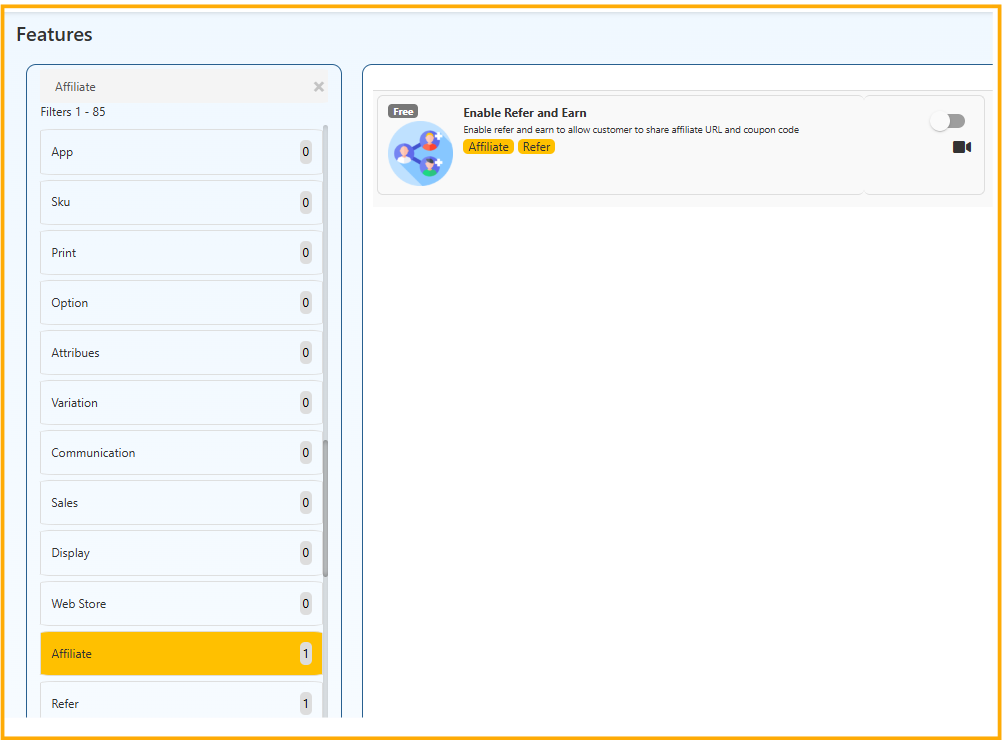
    Enable Refer and Earn

    1. Configure the following:
    • Reward Type (Fixed / Percentage)
    • Minimum Order Value
    • Reward Credit Method (Wallet / Coupon)
    • Coupon Validity Period
    • Maximum Referral Usage Limit
    • Auto-Approval or Manual Approval
    1. Save settings

    🔹 Key Configuration Options Explained

    1️⃣ Reward Type

    • Fixed Amount (₹100 per referral)
    • Percentage (5% of order value)

    2️⃣ Minimum Order Value

    Reward applies only if order exceeds specified amount.

    3️⃣ Referral Tracking

    System tracks:

    • Referrer ID
    • Referred Customer
    • Order ID
    • Reward status

    🔹 Benefits of Refer and Earn

    ✔ Increase customer acquisition
    ✔ Encourage repeat purchases
    ✔ Improve brand visibility
    ✔ Low-cost marketing strategy
    ✔ Increase customer engagement


    🔹 Best Practices

    • Set reasonable reward values
    • Avoid too high commission margins
    • Monitor fraud activity
    • Limit self-referrals
    • Use email automation to notify rewards

    The Refer and Earn feature transforms your customers into brand promoters.
    With proper configuration, it helps grow your business through referral-based marketing while maintaining

    In this article
    © 2019-2026 Jeyan Technologies Private Limited • www.o2vend.com • Create your own store