O2VEND Retail ERP
  • Product
  • Solutions
  • Resources
    • Blog
    • Community
    • Partnership
    • Find Partner
    • Developer
  • Pricing
  • Docs
    • Getting Started
      • Channels
        • Sales Channel
        • O2VEND to O2VEND Channel
        • Shopify Integration Guide
    • Commerce
      • Ecommerce
      • POS
      • Agent App
      • CMS
      • Themes & Apps
      • Apps
        • Sales Navigator
    • Operations
      • OMS
      • WMS
      • O2C
      • Vendor Portal
      • Supplier Portal
    • Back Office
      • Accounting
      • Reports
      • PIM
      • Communication
      • Back Office
Search Results for

    Show / Hide Table of Contents
    • Overview
    • Features
      • Product Management Features
        • Product Management
        • Product Attributes
        • Product Variations
        • SKU Length for Variations
        • Product Pricing
        • Product Cost Configuration
        • Product Tax Settings
        • Additional Tax Setup
      • Inventory Management Features
        • Inventory Management
        • Stock Management
        • GRN (Goods Receipt Note)
        • GDN (Goods Delivery Note)
        • Disable Lot Popup Option
      • Order & Sales Features
        • Order Management
        • Point of Sale (POS)
        • Credit Sales & Invoice Return
        • Outstanding Management
        • Voucher Management
        • Guest Checkout Option
      • Marketing & SEO Features
        • SEO Optimization
        • URL Configuration
        • Schema Markup Setup
      • Communication & Notification Features
        • Email Settings
        • Communication Settings
        • Notifications
        • Web Notifications
      • System & Security Features
        • Application Settings
        • General Settings
        • Date Configuration
        • White Listing
        • Option Settings
    • Integrations
      • Marketplace Integrations
        • Amazon Integration
        • Flipkart Integration
        • Myntra Integration
        • Shopify Integration
        • Unicommerce Integration
      • Payment Gateway Integrations
        • Razorpay Integration
        • PayU Integration
        • Paytm Integration
        • PhonePe Integration
        • Cashfree Integration
        • Stripe Integration
        • Paypal Integration
      • Shipping & Logistics Integrations
        • Shiprocket Integration
        • Shipway Integration
        • eShipper Integration
        • Amazon Shipping Integration
        • XpressBees Integration
        • GetDelivered Integration
      • Communication Integrations
        • WhatsApp Integration
        • MSG91 Integration
        • SendGrid Integration
        • Amazon SES Integration
        • Email Integration
      • Marketing & CRM Integrations
        • HubSpot Integration
        • Typesense Integration
      • Tax & Compliance Integrations
        • e-Invoice Integration
        • e-Way Bill Integration
        • Tax Configuration
      • Security & Technical Integrations
        • reCAPTCHA Integration
        • Webhook Integration
        • Custom CDN Domain Setup
      • Inventory & Store Integrations
        • Inventory Integration
        • Storefront Integration
        • Channel-to-Channel Integration
        • Display Configuration
        • General Settings
    • Product Enhancements
      • Affiliate Program Management
      • Back Office Management System
      • Checkout Process Settings
      • Coupon Code Management
      • Currency Configuration Settings
      • Delivery Zone Configuration
      • Discount Management System
      • Product Display Settings
      • GTIN Product Code Management
      • Invoice Management System
      • Marketing & Campaign Tools
      • Menu Management Settings
      • Pricing Rule Configuration
      • Purchase Management Module
      • Referral Program Settings
      • Return Management Process
      • Sales Management System
      • Shipment & Delivery Tracking
      • SMS Notification Settings
      • Sub Location Management
      • Vendor Management System
      • Product Video Integration
      • Web Store Configuration
      • WhatsApp Integration Settings
    • Blog Categories Setup
    • Blog Management
    • Email Settings
    • Home Page Components
    • Main Menu Management
    • Newsletter Subscription Settings
    • SMS Settings
    • WhatsApp Settings
    • Communication Template Setup
    • Page Header Settings
    • Site Menu Management
    • Site Pages Management

    Communication Features – Complete Setup Guide

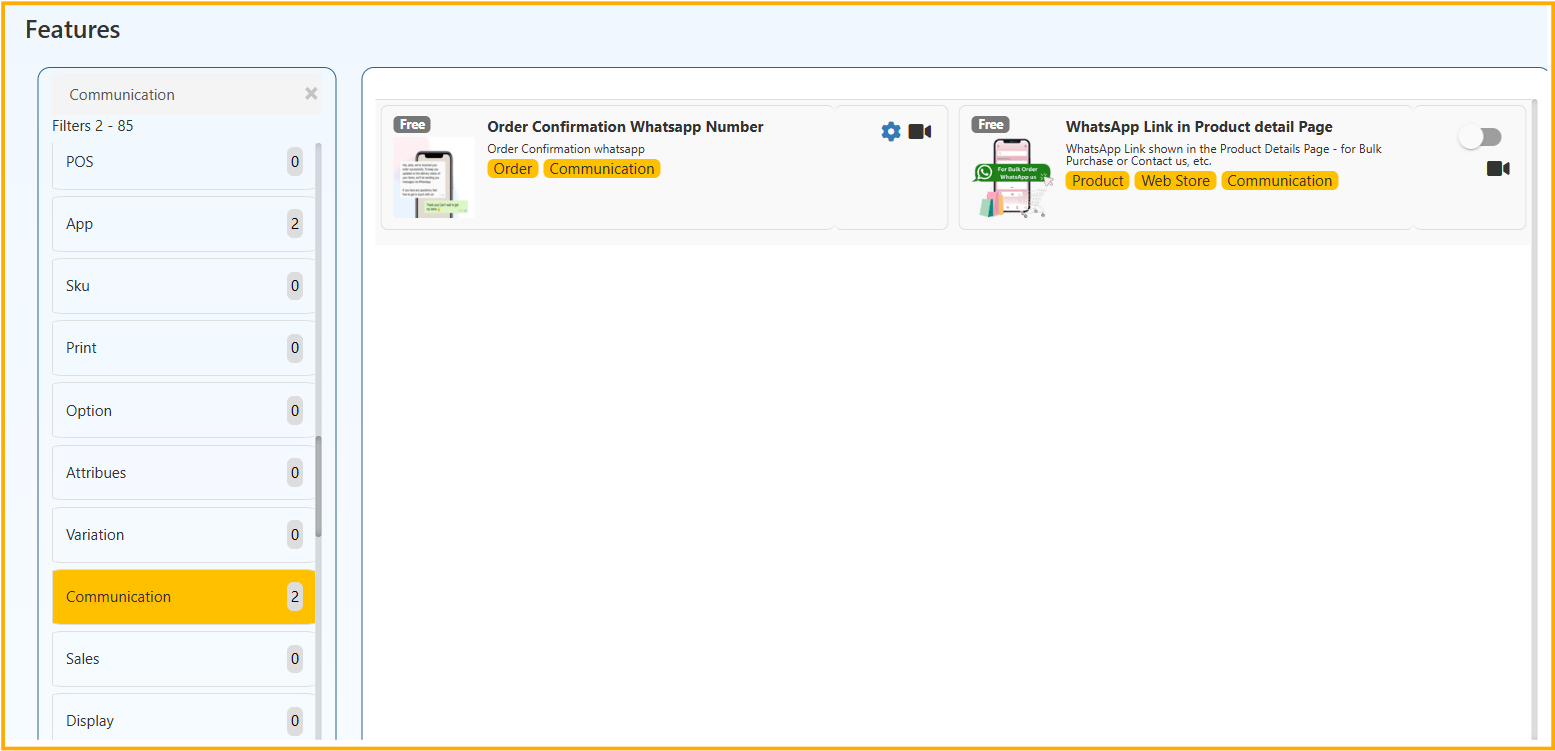
    The Communication section allows you to configure WhatsApp-based customer interaction features.
    From the current setup, the following features are available:

    • Order Confirmation WhatsApp Number
    • WhatsApp Link in Product Detail Page

    This guide explains both features completely with correct configuration steps.


    1️⃣ Order Confirmation WhatsApp Number

    Category: Order | Communication

    🔹 Purpose

    This feature allows the system to send order confirmation details via WhatsApp after an order is placed.

    It improves instant communication and keeps customers informed.


    🔹 How to Configure

    1. Go to Features
    2. Click on Communication
    3. Locate Order Confirmation WhatsApp Number
    4. Click the Settings (⚙) icon
    5. Enter the required WhatsApp Number
      • Use correct format
      • Include country code if required
    6. Click Save

    🔹 What Happens After Enabling

    • When a customer places an order,
    • Order confirmation details are sent via WhatsApp
    • To the configured WhatsApp number.

    This ensures immediate communication regarding new orders.


    🔹 Why Use This Feature?

    • Instant order updates
    • Faster internal processing
    • Reduces missed orders
    • Improves operational efficiency

    ⚠ Important Notes

    • Make sure WhatsApp integration is properly configured.
    • This feature does not change order processing.
    • It only sends confirmation notifications.

    2️⃣ WhatsApp Link in Product Detail Page

    Category: Product | Web Store | Communication

    🔹 Purpose

    Displays a WhatsApp contact button directly on the product detail page of your web store.

    This allows customers to contact your business before purchasing.


    🔹 How to Configure

    1. Go to Features
    2. Click on Communication
    3. Locate WhatsApp Link in Product Detail Page
    4. Enable the toggle switch
    5. Click Save

    🔹 What Happens After Enabling

    • A WhatsApp button will appear on product detail pages.
    • Customers can directly message your business.
    • Useful for bulk purchase enquiries or product clarification.

    🔹 Business Benefits

    • Improves customer engagement
    • Increases conversion rate
    • Helpful for high-value or custom products
    • Reduces hesitation before purchase

    ✅ When to Enable Communication Features

    Enable these features if:

    • Your customers prefer WhatsApp communication
    • You want faster order confirmation handling
    • You handle enquiry-based sales
    • You want better customer engagement

    Proper configuration of Communication features ensures smooth and instant interaction between your business and customers.

    In this article
    © 2019-2026 Jeyan Technologies Private Limited • www.o2vend.com • Create your own store