O2VEND Retail ERP
  • Getting Started
  • Ecommerce
  • Back Office
  • POS
  • Agent App
  • PIM
  • Communication
  • CMS
  • OMS
  • WMS
  • O2C
  • Accounting
  • Reports
  • Themes and Apps
Search Results for

    Show / Hide Table of Contents
    • Overview
    • Features
      • Product Management Features
        • Product Management
        • Product Attributes
        • Product Variations
        • SKU Length for Variations
        • Product Pricing
        • Product Margin Settings
        • Product Cost Configuration
        • Product Tax Settings
        • Additional Tax Setup
      • Inventory Management Features
        • Inventory Management
        • Stock Management
        • GRN (Goods Receipt Note)
        • GDN (Goods Delivery Note)
        • Disable Lot Popup Option
      • Order & Sales Features
        • Order Management
        • Point of Sale (POS)
        • Credit Sales & Invoice Return
        • Outstanding Management
        • Voucher Management
        • Guest Checkout Option
      • Marketing & SEO Features
        • SEO Optimization
        • URL Configuration
        • Schema Markup Setup
        • Segmentation
      • Communication & Notification Features
        • Email Settings
        • Communication Settings
        • Notifications
        • Web Notifications
      • System & Security Features
        • Application Settings
        • General Settings
        • Date Configuration
        • IP Restrictions
        • White Listing
        • Print Configuration
        • Option Settings
    • Integrations
      • Marketplace Integrations
        • Amazon Integration
        • Flipkart Integration
        • Myntra Integration
        • Shopify Integration
        • Unicommerce Integration
      • Payment Gateway Integrations
        • Razorpay Integration
        • PayU Integration
        • Paytm Integration
        • PhonePe Integration
        • Cashfree Integration
        • Stripe Integration
        • Paypal Integration
      • Shipping & Logistics Integrations
        • Shiprocket Integration
        • Shipway Integration
        • eShipper Integration
        • Amazon Shipping Integration
        • XpressBees Integration
        • GetDelivered Integration
      • Communication Integrations
        • WhatsApp Integration
        • MSG91 Integration
        • SendGrid Integration
        • Amazon SES Integration
        • Email Integration
      • Marketing & CRM Integrations
        • HubSpot Integration
        • Typesense Integration
      • Tax & Compliance Integrations
        • e-Invoice Integration
        • e-Way Bill Integration
        • Tax Configuration
      • Security & Technical Integrations
        • reCAPTCHA Integration
        • Webhook Integration
        • Custom CDN Domain Setup
      • Inventory & Store Integrations
        • Inventory Integration
        • Storefront Integration
        • Display Configuration
        • General Settings
    • Product Enhancements
      • Affiliate Program Management
      • Back Office Management System
      • Checkout Process Settings
      • Coupon Code Management
      • Currency Configuration Settings
      • Delivery Zone Configuration
      • Discount Management System
      • Product Display Settings
      • Geo IP Location Detection
      • GTIN Product Code Management
      • Invoice Management System
      • Marketing & Campaign Tools
      • Menu Management Settings
      • Pricing Rule Configuration
      • Purchase Management Module
      • Referral Program Settings
      • Return Management Process
      • Sales Management System
      • Shipment & Delivery Tracking
      • SMS Notification Settings
      • Sub Location Management
      • Vendor Management System
      • Product Video Integration
      • Web Store Configuration
      • WhatsApp Integration Settings
    • Blog Categories Setup
    • Blog Management
    • Email Settings
    • Home Page Components
    • Main Menu Management
    • Newsletter Subscription Settings
    • SMS Settings
    • WhatsApp Settings
    • Communication Template Setup
    • Page Header Settings
    • Site Menu Management
    • Site Pages Management

    Home Page Components - Your Friendly Guide to O2VEND eCommerce Stores

    1. Why Your Homepage Is a Big Deal

    Think of your homepage as the welcome mat to your store. It's the first thing visitors see, and you have mere seconds to impress them. A clean, well-organized homepage not only keeps people browsing but also nudges them toward making a purchase.

    Here�s what your homepage does:

    • Show off your products: Highlight best-sellers and current promotions.
    • Guide visitors easily: Make it simple to explore categories and products.
    • Tell your brand story: Show your style, reliability, and uniqueness.

    Fun fact: Studies say over 30% of visitors bounce from websites that look messy or confusing. A neat, attractive homepage can stop that.

    2. Key Ingredients for a Great Homepage

    A homepage isn�t just about looking pretty�it�s about balancing visuals, text, and action prompts. With O2VEND, you can mix and match pre-built components and widgets to get it just right.

    Banners � Catch the Eye

    Banners are those big images at the top. They�re perfect for:

    • Show current deals and promotions (like �Summer Specials � Save Up to 40%�)
    • Highlight seasonal campaigns or festive deals
    • Announce new products or collections

    Quick Tip: Keep your text short and pair it with a clear action button.

    Text � Talk to Your Customers

    Headlines and small descriptions explain:

    • Who you are
    • What you offer
    • Why your store is special

    Pro Tip: Focus on benefits. �Upgrade your living space effortlessly� feels better than �We sell furniture.�

    Call-to-Action (CTA) Buttons � Lead the Way

    CTAs are like little guides nudging users to act:

    • Shop Now ? Product listings
    • Sign Up ? Newsletter or account creation
    • View Offers ? Promotions

    Tip: Make them pop with contrasting colors.

    Background Color � Set the Mood

    Your background helps your products shine:

    • Stick to your brand colors
    • Light backgrounds highlight products
    • Dark backgrounds feel premium

    3. Building Your Homepage in O2VEND � Easy Mode

    O2VEND makes homepage creation a breeze. You don�t need to code:

    • Drag and drop widgets wherever you want
    • Change fonts, colors, and images easily
    • Schedule content for campaigns or seasons

    4. Widgets � The Blocks That Build Your Page

    Widgets are like LEGO blocks for your homepage. They display products, banners, galleries, or interactive content.

    Schedule Widgets Like a Pro

    • Plan holiday or seasonal campaigns in advance
    • Rotate content automatically after campaigns

    Example: Feature �Back to School� from August 1�31, then swap in the �Fall Collection� automatically.

    5. Step-by-Step Homepage Setup

    1. Log in to your O2VEND Back Office
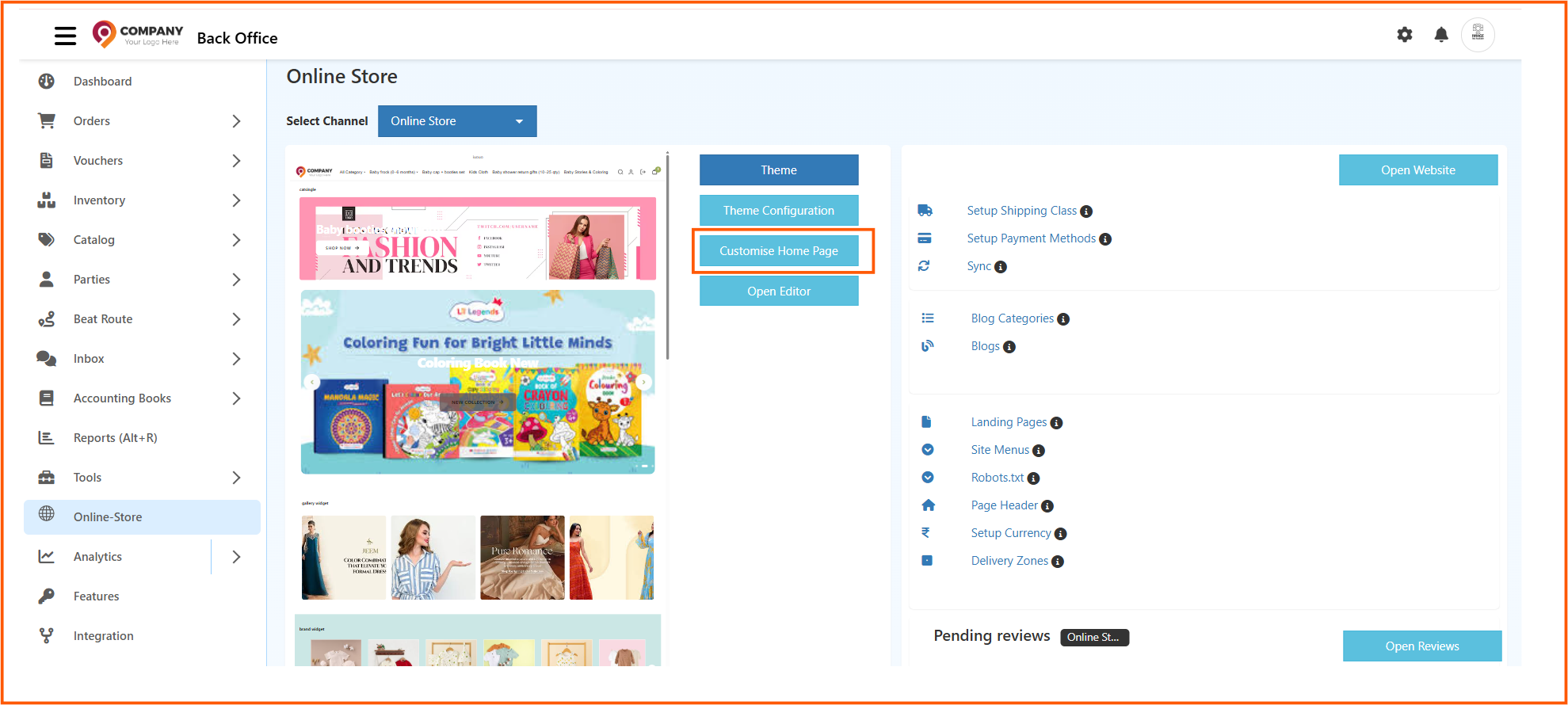
    2. From the sidebar, go to Online Store ? Customise Home Page
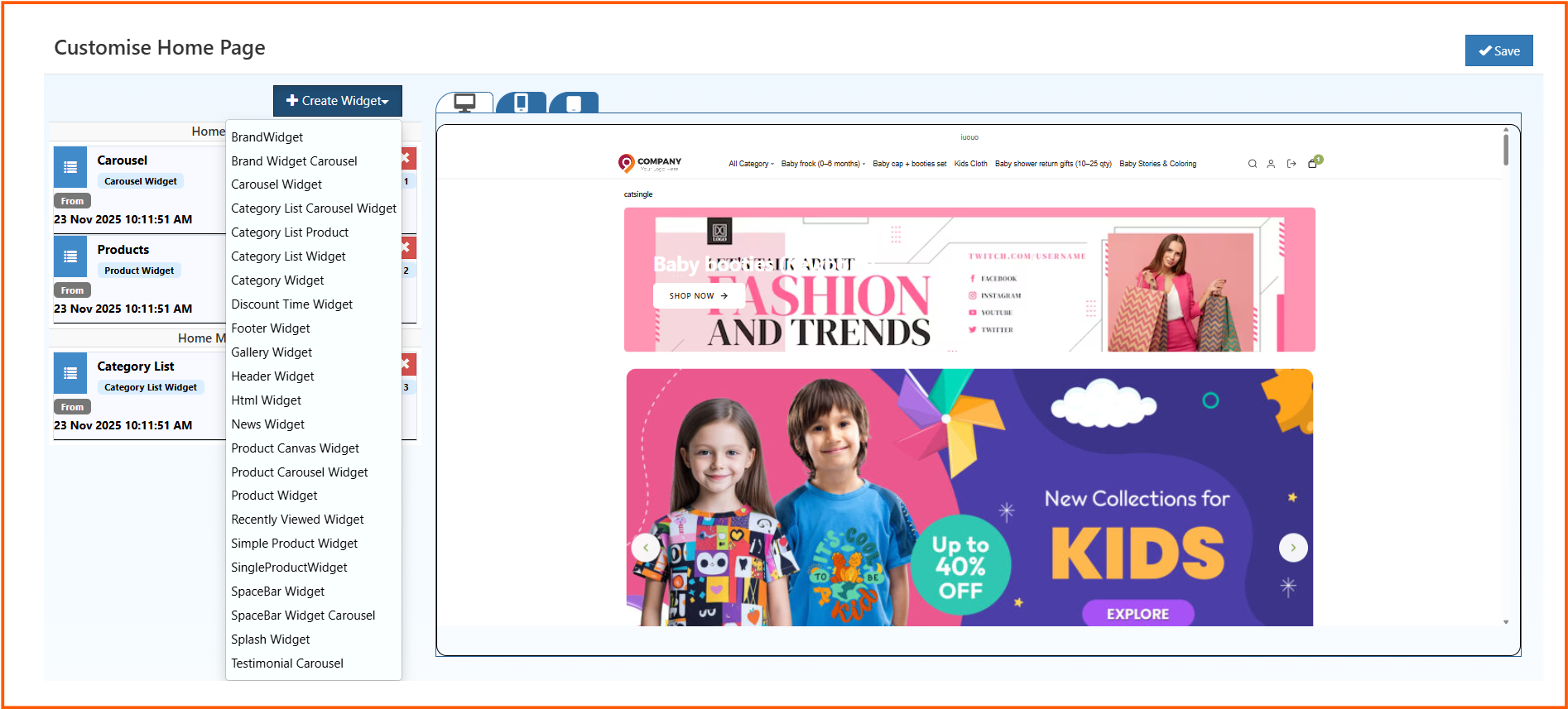
    3. Click Create Widget to add a block
    4. Drag & drop widgets into the layout
    5. Adjust margins, colors, and schedules
    6. Set priority for important content
    7. Preview and click Save
    Home Page Components - Your Friendly Guide to O2VEND eCommerce Stores

    6. Widget Zones � Know Where Things Go

    • Home Featured: Top of the page ? banners, hero content
    • Home Main Content: Below featured ? categories, trending products
    • Home After Main Content: Below main ? testimonials, logos
    • Footer Content: Bottom ? policies, contact info, social links

    7. Customizing Widgets

    • Margins: Add space around widgets
    • Background: Match your brand
    • Text color: Make it readable
    • Schedule: Decide display dates
    • Display order: Highlight the most important content first

    8. Widgets You Can Use

    O2VEND offers a wide variety of widgets to make your homepage engaging, user-friendly, and conversion-focused. Here�s a detailed guide for each widget:

    • Brand Widget:
      Display logos and colors of featured brands. Use it to:

      • Highlight partnerships or premium brands
      • Link to brand-specific pages
      • Communicate credibility and trustworthiness
        Tip: Keep logos consistent in size and resolution for a clean look.
    • Carousel Widget:
      Rotating images to showcase featured products, campaigns, or testimonials.
      Use it for:

      • Seasonal promotions like �Summer Sale�
      • Highlighting new product launches
      • Displaying customer reviews visually
        Best Practice: Limit to 5�7 slides to maintain page speed and attention.
    • Category List Widget:
      Lists all product categories in a clear, navigable format.
      Purpose:

      • Makes it easy for customers to jump to their preferred category
      • Reduces friction in navigation
        Tip: Group categories logically (e.g., by product type or collection) for smoother browsing.
    • Category Widget:
      Focuses on a single category to highlight special campaigns.
      Use Cases:

      • Seasonal collections like �Winter Wear�
      • Limited-time promotions
        Tip: Pair with banners or product displays to boost visibility.
    • Discount Timer Widget:
      Displays a live countdown for limited-time offers.
      Benefits:

      • Creates urgency and encourages quicker purchases
      • Drives engagement during sales
        Best Practice: Combine with clear CTAs like �Shop Now� to maximize conversions.
    • Footer Widget:
      Customize your footer with links, menus, or HTML content.
      Common Uses:

      • Policy pages (Privacy, Shipping, Returns)
      • Contact information and social links
      • Secondary navigation
        Tip: Keep it organized and uncluttered; too many links can overwhelm visitors.
    • Gallery Widget:
      Clickable image galleries to showcase products or campaigns.
      Use it for:

      • Lifestyle images to inspire customers
      • Product showcases with multiple angles
        Best Practice: Ensure images are web-optimized for fast loading and quality.
    • HTML Widget:
      Add custom HTML content for advanced designs.
      Use Cases:

      • Unique banners or interactive elements
      • Custom layouts not covered by standard widgets
        Tip: Test across devices to ensure responsiveness.
    • News Widget:
      Share latest announcements, products, or blog posts.
      Purpose:

      • Keep returning visitors engaged
      • Highlight company updates or promotions
        Tip: Update regularly to keep content fresh.
    • Product Canvas Widget:
      Add clickable tags on images linking directly to products.
      Benefits:

      • Creates interactive visual shopping experiences
      • Helps customers explore multiple products from a single image
        Best Practice: Use high-quality images and clearly visible tags.
    • Product Carousel Widget:
      Sliding product showcases for featured items.
      Use it for:

      • Highlighting trending or best-selling products
      • Cross-selling related items
        Tip: Limit to 8�10 products per carousel to maintain focus.
    • Product Display Widget:
      Highlight selected products from specific categories.
      Purpose:

      • Curate special collections or seasonal offerings
      • Direct attention to high-margin or promoted products
        Tip: Pair with banners or discount timers to boost clicks.
    • Recently Viewed Widget:
      Shows items a visitor has browsed previously.
      Benefits:

      • Improves user experience and encourages repeat clicks
      • Helps customers resume shopping without searching
        Tip: Keep this widget visible but not intrusive; usually near the bottom or side.
    • Simple Product Widget:
      Displays curated products in a clean, minimal layout.
      Use it for:

      • Quick promotions
      • Highlighting featured products
        Best Practice: Keep images consistent and avoid overcrowding.
    • Spacebar Widget:
      Displays trust badges, certifications, or loyalty graphics.
      Purpose:

      • Builds credibility and customer trust
      • Shows social proof and brand reliability
        Tip: Place near checkout or high-visibility areas for maximum effect.
    • Splash Widget:
      Pop-up welcome screens or promotions.
      Use Cases:

      • First-time visitor greetings
      • Announcing special campaigns or discounts
      • Collecting email signups
        Best Practice: Avoid overuse to prevent annoying repeat visitors.

    9. Seasonal & Promotional Banners

    Banners grab attention and drive campaigns.

    Why They Work

    • Customers notice festive or seasonal visuals
    • Keeps your store feeling fresh and active

    Adding Banners in O2VEND

    1. Open Banner Manager
    2. Upload high-quality images
    3. Link banners to products, categories, or pages
    4. Set start and end dates

    Design Tips:

    • Bold, easy-to-read text
    • Contrasting colors
    • Show urgency (�Limited Time Offer�)
    • Highlight discounts

    Pro Tip: Combine with countdown widgets for major sales to boost conversions.

    10. Personalizing Your Homepage

    Tailor your homepage to visitor behavior and preferences.

    Why It Matters

    • Increases engagement and conversion
    • Shows customers you value them

    How to Personalize in O2VEND

    • Dynamic Recommendations: �Top Picks for You�
    • Returning Greetings: Welcome repeat visitors by name
    • Geo-Targeted Offers: Show region-specific deals
    • Behavior-Based Offers: Highlight items based on browsing

    Best Practices:

    • Keep personalization subtle
    • Mix with trending or seasonal products
    • Test different approaches for best results

    Pro Tip: Combine personalization with loyalty programs for repeat purchases.

    Grow Your Business with O2VEND

    Launch your store in minutes. Sell smarter. Start today!

    Home Page Components - Your Friendly Guide to O2VEND eCommerce Stores

    In this article
    Back to top _includes/footer.html
    © 2019–2026 Jeyan Technologies Private Limited • www.o2vend.com • Create your own store