O2VEND Retail ERP
  • Getting Started
  • Ecommerce
  • Back Office
  • POS
  • Agent App
  • PIM
  • Communication
  • CMS
  • OMS
  • WMS
  • O2C
  • Accounting
  • Reports
  • Themes and Apps
Search Results for

    Show / Hide Table of Contents
    • Overview
    • Features
      • Product Management Features
        • Product Management
        • Product Attributes
        • Product Variations
        • SKU Length for Variations
        • Product Pricing
        • Product Margin Settings
        • Product Cost Configuration
        • Product Tax Settings
        • Additional Tax Setup
      • Inventory Management Features
        • Inventory Management
        • Stock Management
        • GRN (Goods Receipt Note)
        • GDN (Goods Delivery Note)
        • Disable Lot Popup Option
      • Order & Sales Features
        • Order Management
        • Point of Sale (POS)
        • Credit Sales & Invoice Return
        • Outstanding Management
        • Voucher Management
        • Guest Checkout Option
      • Marketing & SEO Features
        • SEO Optimization
        • URL Configuration
        • Schema Markup Setup
        • Segmentation
      • Communication & Notification Features
        • Email Settings
        • Communication Settings
        • Notifications
        • Web Notifications
      • System & Security Features
        • Application Settings
        • General Settings
        • Date Configuration
        • IP Restrictions
        • White Listing
        • Print Configuration
        • Option Settings
    • Integrations
      • Marketplace Integrations
        • Amazon Integration
        • Flipkart Integration
        • Myntra Integration
        • Shopify Integration
        • Unicommerce Integration
      • Payment Gateway Integrations
        • Razorpay Integration
        • PayU Integration
        • Paytm Integration
        • PhonePe Integration
        • Cashfree Integration
        • Stripe Integration
        • Paypal Integration
      • Shipping & Logistics Integrations
        • Shiprocket Integration
        • Shipway Integration
        • eShipper Integration
        • Amazon Shipping Integration
        • XpressBees Integration
        • GetDelivered Integration
      • Communication Integrations
        • WhatsApp Integration
        • MSG91 Integration
        • SendGrid Integration
        • Amazon SES Integration
        • Email Integration
      • Marketing & CRM Integrations
        • HubSpot Integration
        • Typesense Integration
      • Tax & Compliance Integrations
        • e-Invoice Integration
        • e-Way Bill Integration
        • Tax Configuration
      • Security & Technical Integrations
        • reCAPTCHA Integration
        • Webhook Integration
        • Custom CDN Domain Setup
      • Inventory & Store Integrations
        • Inventory Integration
        • Storefront Integration
        • Display Configuration
        • General Settings
    • Product Enhancements
      • Affiliate Program Management
      • Back Office Management System
      • Checkout Process Settings
      • Coupon Code Management
      • Currency Configuration Settings
      • Delivery Zone Configuration
      • Discount Management System
      • Product Display Settings
      • Geo IP Location Detection
      • GTIN Product Code Management
      • Invoice Management System
      • Marketing & Campaign Tools
      • Menu Management Settings
      • Pricing Rule Configuration
      • Purchase Management Module
      • Referral Program Settings
      • Return Management Process
      • Sales Management System
      • Shipment & Delivery Tracking
      • SMS Notification Settings
      • Sub Location Management
      • Vendor Management System
      • Product Video Integration
      • Web Store Configuration
      • WhatsApp Integration Settings
    • Blog Categories Setup
    • Blog Management
    • Email Settings
    • Home Page Components
    • Main Menu Management
    • Newsletter Subscription Settings
    • SMS Settings
    • WhatsApp Settings
    • Communication Template Setup
    • Page Header Settings
    • Site Menu Management
    • Site Pages Management

    Show Product Variations Dropdown in Web Store Product Lists

    This feature allows product variations such as Size, Color, Model, or Pack Size to be shown directly on the product listing pages of the web store. Customers can select the required variation without opening the product detail page.
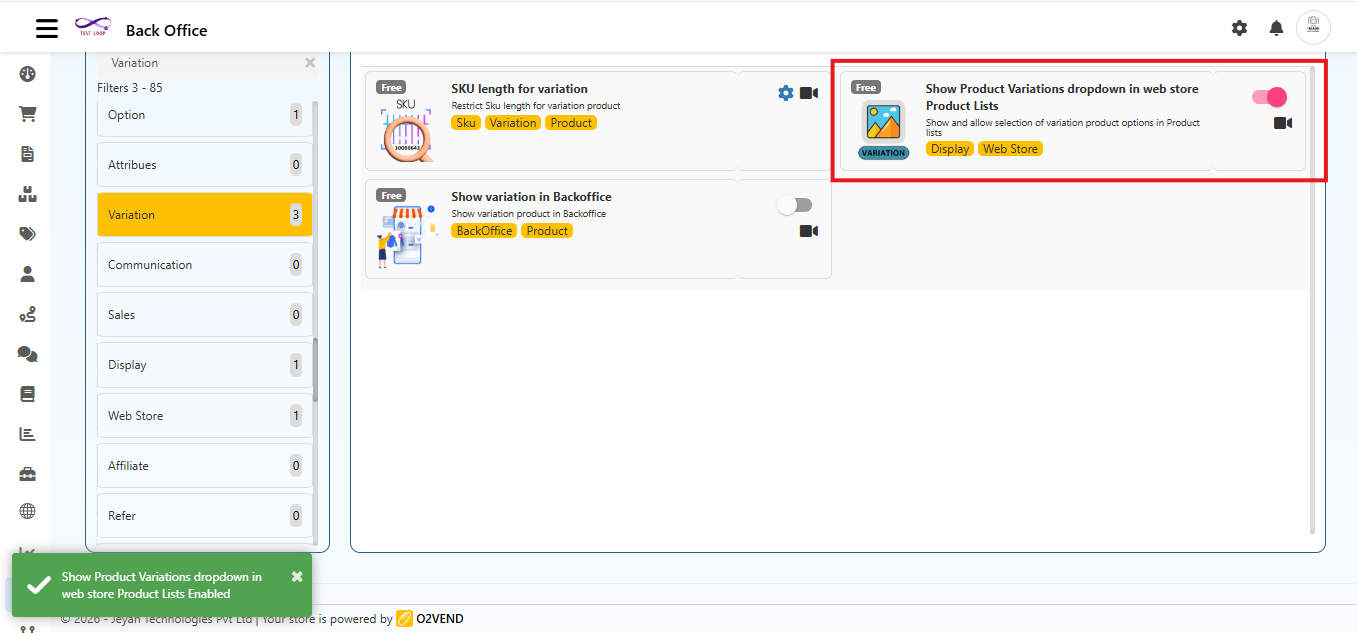
    Navigation Path

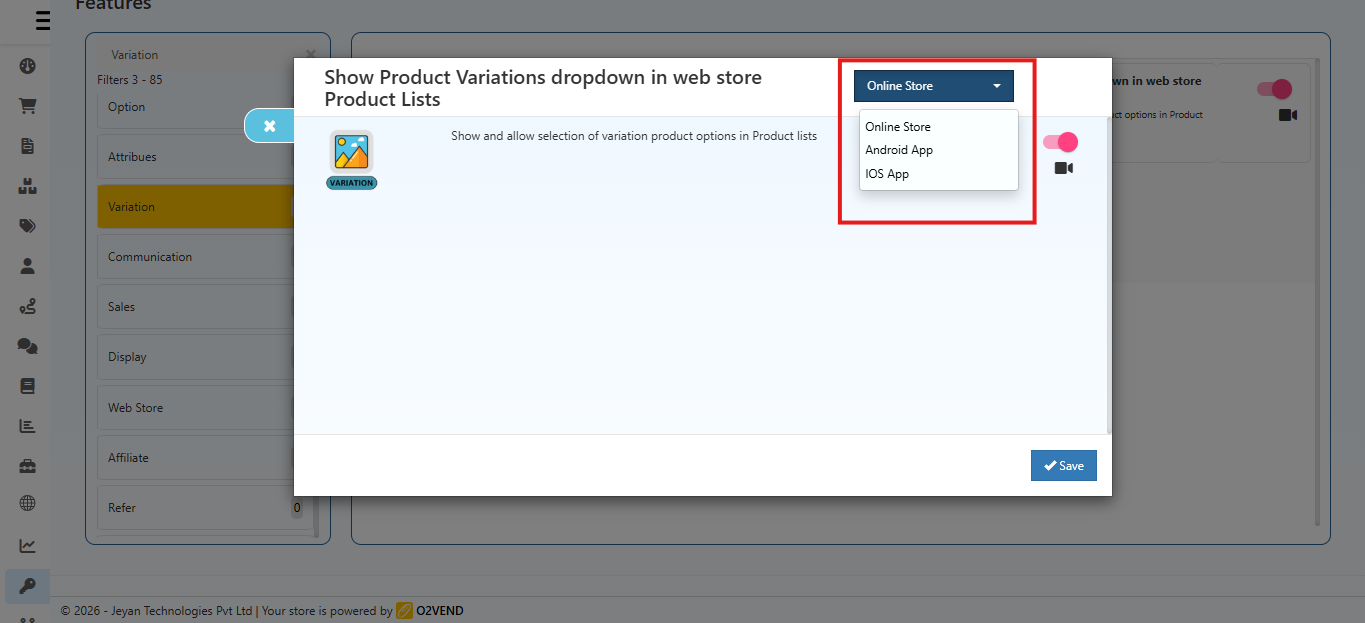
    Back Office → Features → Variation → Show Product Variations dropdown in Web Store Product Lists

    Show Product Variations Dropdown in Web Store Product Lists

    Why This Feature Is Useful

    This feature improves the Ecommerce shopping experience by showing variations directly in the product list.

    • Customers can see all available variations instantly
    • Fewer clicks are needed to select a product
    • Shopping experience becomes quicker and easier
    • Helps customers compare options directly from the list page

    Examples

    • T-shirts with Size and Color
    • Mobile phones with Storage options
    • Shoes with different sizes
    • Grocery items with pack sizes

    How to Enable This Feature

    1. Open Back Office

    2. Go to Features → Variation

    3. Click Show Product Variations dropdown in Web Store Product Lists

    4. In the popup that appears:

      • Use the channel selector at the top-right to choose the platform (e.g., Online Store, Android App, iOS App) where this feature should be applied.
      • Turn the toggle ON to enable the feature for the selected channel.
    5. Click Save

    Show Product Variations Dropdown in Web Store Product Lists

    Channel Selection

    Use the channel selector at the top?right to choose which platform this feature applies to. Each channel has independent settings, including:

    • Online Store (Ecommerce)
    • Android App
    • iOS App

    The feature will take effect only on the selected channel.

    What Customers Will See

    If Enabled

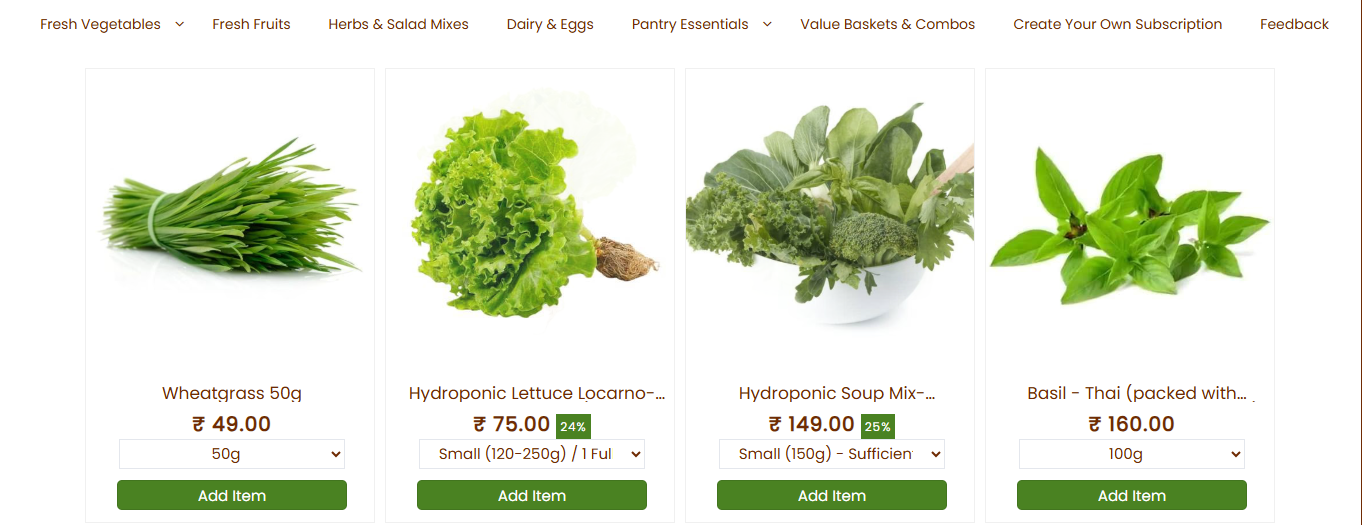
    • Each product shows a variation dropdown

    • Customers can:

      • The variation dropdown appears on the product thumbnail in the listing.
      • View available sizes, colors, or models
      • Select the option directly
      • Add the correct variant to cart quickly
    Show Product Variations Dropdown in Web Store Product Lists

    If Disabled

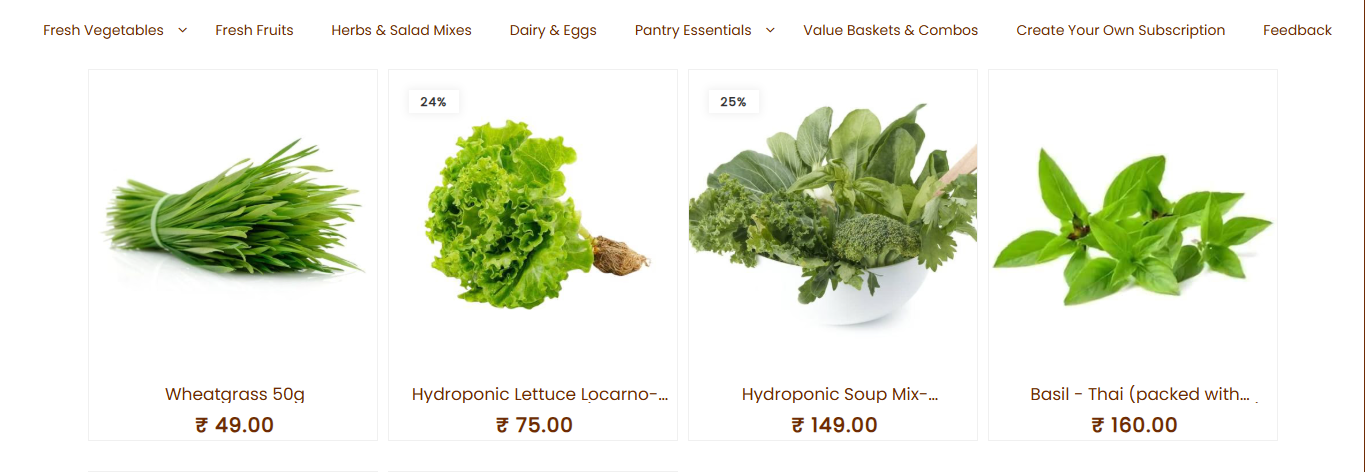
    • Only the main product is shown in the list
    • Customers must open the product page to choose variations
    Show Product Variations Dropdown in Web Store Product Lists

    How It Works

    This feature applies to product listing thumbnails across the Ecommerce store, including category pages, search results, and other product list views.

    When the feature is turned ON:

    • A dropdown box appears under each product in the web store list
    • All available variations are shown inside the dropdown
    • Customers can choose the required option immediately
    • The product page does not need to be opened to select a variation

    This works on:

    • Category pages
    • Search result pages
    • All product listing views
    In this article
    Back to top _includes/footer.html
    © 2019–2026 Jeyan Technologies Private Limited • www.o2vend.com • Create your own store