O2VEND Retail ERP
  • Getting Started
  • Ecommerce
  • Back Office
  • POS
  • Agent App
  • PIM
  • Communication
  • CMS
  • OMS
  • WMS
  • O2C
  • Accounting
  • Reports
  • Themes and Apps
Search Results for

    Show / Hide Table of Contents
    • Overview
    • Features
      • Product Management Features
        • Product Management
        • Product Attributes
        • Product Variations
        • SKU Length for Variations
        • Product Pricing
        • Product Margin Settings
        • Product Cost Configuration
        • Product Tax Settings
        • Additional Tax Setup
      • Inventory Management Features
        • Inventory Management
        • Stock Management
        • GRN (Goods Receipt Note)
        • GDN (Goods Delivery Note)
        • Disable Lot Popup Option
      • Order & Sales Features
        • Order Management
        • Point of Sale (POS)
        • Credit Sales & Invoice Return
        • Outstanding Management
        • Voucher Management
        • Guest Checkout Option
      • Marketing & SEO Features
        • SEO Optimization
        • URL Configuration
        • Schema Markup Setup
        • Segmentation
      • Communication & Notification Features
        • Email Settings
        • Communication Settings
        • Notifications
        • Web Notifications
      • System & Security Features
        • Application Settings
        • General Settings
        • Date Configuration
        • IP Restrictions
        • White Listing
        • Print Configuration
        • Option Settings
    • Integrations
      • Marketplace Integrations
        • Amazon Integration
        • Flipkart Integration
        • Myntra Integration
        • Shopify Integration
        • Unicommerce Integration
      • Payment Gateway Integrations
        • Razorpay Integration
        • PayU Integration
        • Paytm Integration
        • PhonePe Integration
        • Cashfree Integration
        • Stripe Integration
        • Paypal Integration
      • Shipping & Logistics Integrations
        • Shiprocket Integration
        • Shipway Integration
        • eShipper Integration
        • Amazon Shipping Integration
        • XpressBees Integration
        • GetDelivered Integration
      • Communication Integrations
        • WhatsApp Integration
        • MSG91 Integration
        • SendGrid Integration
        • Amazon SES Integration
        • Email Integration
      • Marketing & CRM Integrations
        • HubSpot Integration
        • Typesense Integration
      • Tax & Compliance Integrations
        • e-Invoice Integration
        • e-Way Bill Integration
        • Tax Configuration
      • Security & Technical Integrations
        • reCAPTCHA Integration
        • Webhook Integration
        • Custom CDN Domain Setup
      • Inventory & Store Integrations
        • Inventory Integration
        • Storefront Integration
        • Display Configuration
        • General Settings
    • Product Enhancements
      • Affiliate Program Management
      • Back Office Management System
      • Checkout Process Settings
      • Coupon Code Management
      • Currency Configuration Settings
      • Delivery Zone Configuration
      • Discount Management System
      • Product Display Settings
      • Geo IP Location Detection
      • GTIN Product Code Management
      • Invoice Management System
      • Marketing & Campaign Tools
      • Menu Management Settings
      • Pricing Rule Configuration
      • Purchase Management Module
      • Referral Program Settings
      • Return Management Process
      • Sales Management System
      • Shipment & Delivery Tracking
      • SMS Notification Settings
      • Sub Location Management
      • Vendor Management System
      • Product Video Integration
      • Web Store Configuration
      • WhatsApp Integration Settings
    • Blog Categories Setup
    • Blog Management
    • Email Settings
    • Home Page Components
    • Main Menu Management
    • Newsletter Subscription Settings
    • SMS Settings
    • WhatsApp Settings
    • Communication Template Setup
    • Page Header Settings
    • Site Menu Management
    • Site Pages Management

    Page Header

    The O2VEND platform allows you to add custom CSS styles and JavaScript to the webpages of your ecommerce site by configuring the page headers feature. This can help you to further customize and enhance the appearance and functionality of your site.

    You can insert custom CSS styles by going to the page headers feature and then to the theme section, where you can find the option to add custom CSS styles. You can also make use of the page header section of the platform to add the CSS code. Once you have added the custom CSS styles, before publishing them ensure that they are correct and that they look the way you want them to.

    You can also insert custom JavaScript to the webpages of your site by using the custom code section or the footer section of the platform. This can help to enhance the functionality of your site by adding additional features or interactivity. You should be careful while adding custom Javascript as it can break the site if not implemented correctly. It's better to consult with a developer before adding any javascript.

    By configuring the page headers feature, you can add custom CSS styles and JavaScript to your ecommerce site, which can help to improve the appearance and functionality of your site. This can help to create a more visually appealing and user-friendly design and increase the overall experience for your customers.

    Example:

    Google Analytics is a popular web analytics service that can provide valuable insights into the traffic and behavior of your ecommerce site. To add Google Analytics to your site using O2VEND platform, you can use the custom code feature in the page headers section of the platform.

    Here's an example of how you can add the Google Analytics tracking code to your ecommerce site in O2VEND platform:

    Go to the page headers section in the O2VEND platform.

    Navigate to the custom code or footer section.

    Copy the tracking code provided by Google Analytics. This code will begin with .

    Paste the code in the custom code section or the footer section of O2VEND platform.

    Save the changes and publish the code to your site.

    Verify the installation of the code by logging in to your Google Analytics account.

    Once you've added the Google Analytics tracking code to your site, you'll be able to see detailed analytics data on the behavior of your visitors. This can help you to gain insights into how people are using your site, which can help you to improve the user experience and increase conversions. You can also set up different goals, conversion, and funnels in the GA to track the visitors activities, conversions and behavior.

    It's important to note that you need to have a Google Analytics account and a tracking code generated to be able to implement it to your website. Also, keep in mind to verify the installation after adding the code and make sure that it's working properly.

    For example, a customer selects some items, adds the item to their cart, confirms, and proceeds to the checkout, but then for some reason, the sale never actually happens. Web analytics makes it possible for store owner to dig through the exact data to figure out what happened and how to correct their sales process to help for avoid this in the future.

    Page Header

    How to add page header

    1. Open Back Office.
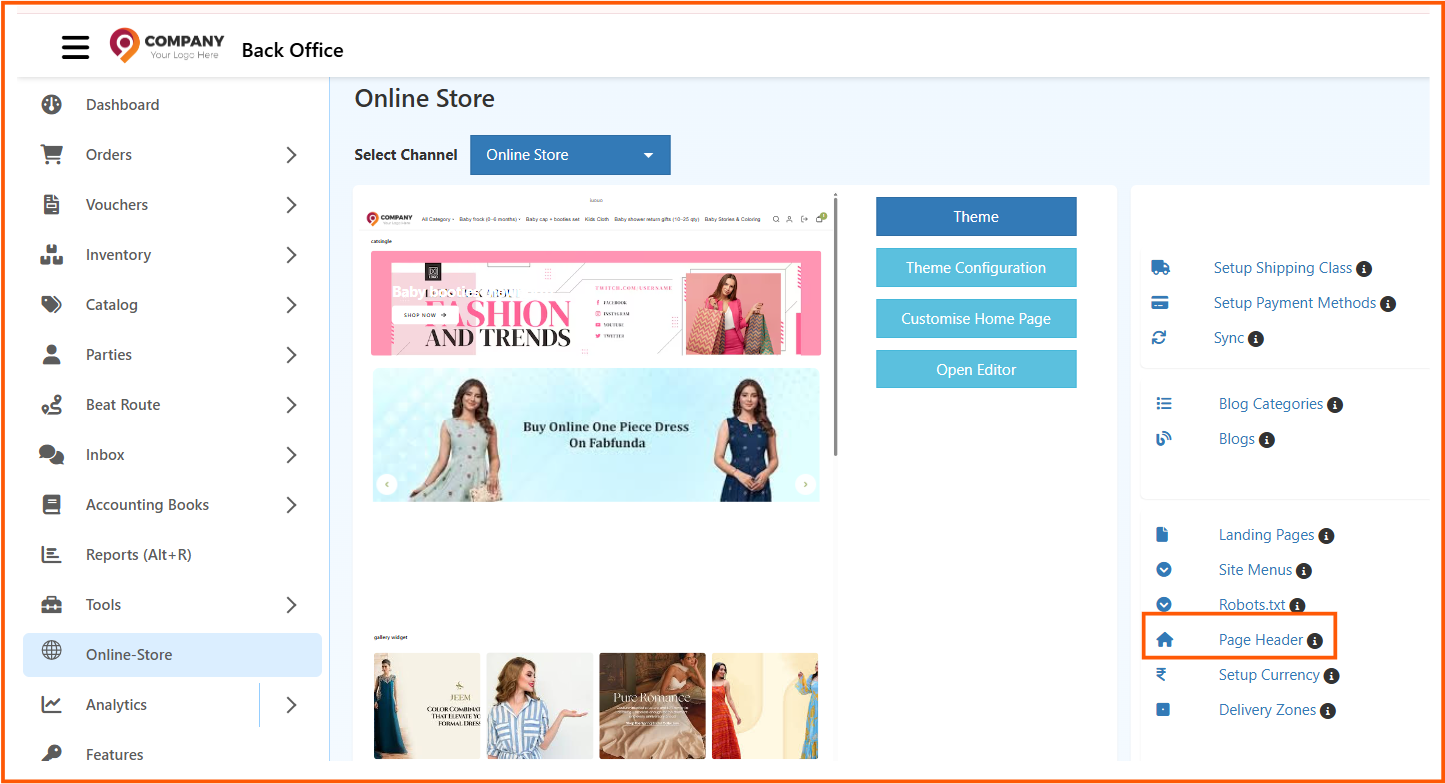
    2. Go to the Settings menu and see Page Header in the web store content.
    3. Click and open Page Header.
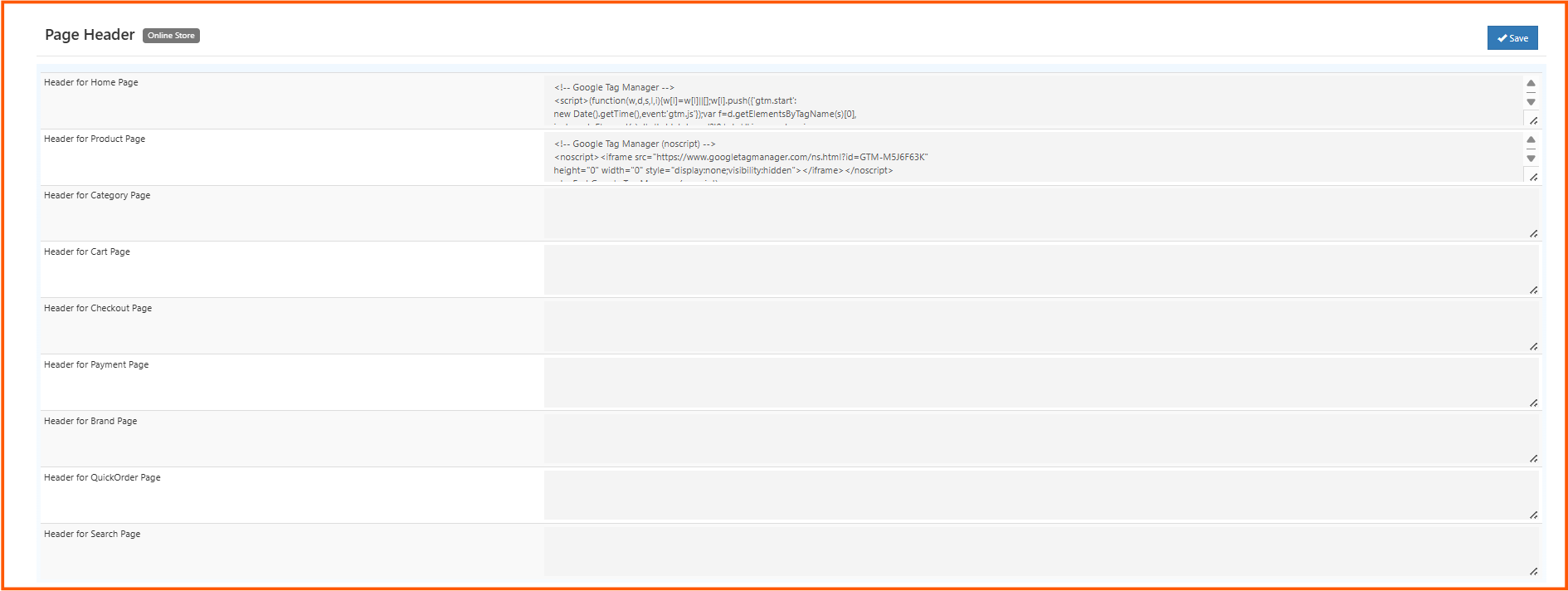
    4. Insert the analytics code in this section. For example Hotjar
    5. Our o2vend page header helps to insert a styles, google analytics, hotjar and html tag.
    6. When you want to track site search results or catagory as events then it provides deeper insights into which specific products or category people looking for in your store.
    Page Header
    In this article
    Back to top _includes/footer.html
    © 2019–2026 Jeyan Technologies Private Limited • www.o2vend.com • Create your own store