O2VEND Retail ERP
  • Getting Started
  • Ecommerce
  • Back Office
  • POS
  • Agent App
  • PIM
  • Communication
  • CMS
  • OMS
  • WMS
  • O2C
  • Accounting
  • Reports
  • Themes and Apps
Search Results for

    Show / Hide Table of Contents
    • Overview
    • Features
      • Product Management Features
        • Product Management
        • Product Attributes
        • Product Variations
        • SKU Length for Variations
        • Product Pricing
        • Product Margin Settings
        • Product Cost Configuration
        • Product Tax Settings
        • Additional Tax Setup
      • Inventory Management Features
        • Inventory Management
        • Stock Management
        • GRN (Goods Receipt Note)
        • GDN (Goods Delivery Note)
        • Disable Lot Popup Option
      • Order & Sales Features
        • Order Management
        • Point of Sale (POS)
        • Credit Sales & Invoice Return
        • Outstanding Management
        • Voucher Management
        • Guest Checkout Option
      • Marketing & SEO Features
        • SEO Optimization
        • URL Configuration
        • Schema Markup Setup
        • Segmentation
      • Communication & Notification Features
        • Email Settings
        • Communication Settings
        • Notifications
        • Web Notifications
      • System & Security Features
        • Application Settings
        • General Settings
        • Date Configuration
        • IP Restrictions
        • White Listing
        • Print Configuration
        • Option Settings
    • Integrations
      • Marketplace Integrations
        • Amazon Integration
        • Flipkart Integration
        • Myntra Integration
        • Shopify Integration
        • Unicommerce Integration
      • Payment Gateway Integrations
        • Razorpay Integration
        • PayU Integration
        • Paytm Integration
        • PhonePe Integration
        • Cashfree Integration
        • Stripe Integration
        • Paypal Integration
      • Shipping & Logistics Integrations
        • Shiprocket Integration
        • Shipway Integration
        • eShipper Integration
        • Amazon Shipping Integration
        • XpressBees Integration
        • GetDelivered Integration
      • Communication Integrations
        • WhatsApp Integration
        • MSG91 Integration
        • SendGrid Integration
        • Amazon SES Integration
        • Email Integration
      • Marketing & CRM Integrations
        • HubSpot Integration
        • Typesense Integration
      • Tax & Compliance Integrations
        • e-Invoice Integration
        • e-Way Bill Integration
        • Tax Configuration
      • Security & Technical Integrations
        • reCAPTCHA Integration
        • Webhook Integration
        • Custom CDN Domain Setup
      • Inventory & Store Integrations
        • Inventory Integration
        • Storefront Integration
        • Display Configuration
        • General Settings
    • Product Enhancements
      • Affiliate Program Management
      • Back Office Management System
      • Checkout Process Settings
      • Coupon Code Management
      • Currency Configuration Settings
      • Delivery Zone Configuration
      • Discount Management System
      • Product Display Settings
      • Geo IP Location Detection
      • GTIN Product Code Management
      • Invoice Management System
      • Marketing & Campaign Tools
      • Menu Management Settings
      • Pricing Rule Configuration
      • Purchase Management Module
      • Referral Program Settings
      • Return Management Process
      • Sales Management System
      • Shipment & Delivery Tracking
      • SMS Notification Settings
      • Sub Location Management
      • Vendor Management System
      • Product Video Integration
      • Web Store Configuration
      • WhatsApp Integration Settings
    • Blog Categories Setup
    • Blog Management
    • Email Settings
    • Home Page Components
    • Main Menu Management
    • Newsletter Subscription Settings
    • SMS Settings
    • WhatsApp Settings
    • Communication Template Setup
    • Page Header Settings
    • Site Menu Management
    • Site Pages Management

    GTIN in O2VEND

    Global Trade Item Number Overview

    GTIN (Global Trade Item Number) is a globally recognized numeric identifier used to uniquely identify products. It is commonly embedded in barcodes and plays a critical role in product tracking, inventory management, and maintaining standardized product information. In O2VEND, GTIN can be entered for each product and displayed on the product detail page for customer reference.

    GTIN Field in O2VEND

    The GTIN field is available in:

    • Product Creation Screen – When adding a new product.
    • Product Edit Screen – When updating an existing product.

    GTIN can be entered for:

    • Simple Products – A single GTIN for the normal product.
    • Variant Products – Each variant (such as size, color, or packaging) can have its own GTIN.
    GTIN in O2VEND

    Once saved, GTIN is used in workflows such as:

    • Inventory Management
    • Barcode-based operations
    • Order processing and fulfillment

    GTIN Entry Guidelines

    To ensure proper functionality, follow these guidelines when entering GTIN:

    • Enter only numeric values.
    • Do not include spaces or special characters.
    • Ensure GTIN length matches the correct format:
      • Accepted lengths: 8, 12, 13, or 14 digits.
    • Assign a unique GTIN to each product or variant.
    • Use the GTIN provided by the brand or manufacturer.
    • Avoid incorrect or duplicate GTIN values, as these may cause validation errors.

    GTIN for Variant Products

    For products with multiple variants:

    • Each variant should have its own GTIN.
    • Do not reuse the same GTIN across different variants.
    • Ensure the GTIN corresponds to the specific variant attributes (e.g., size, color).
    GTIN in O2VEND

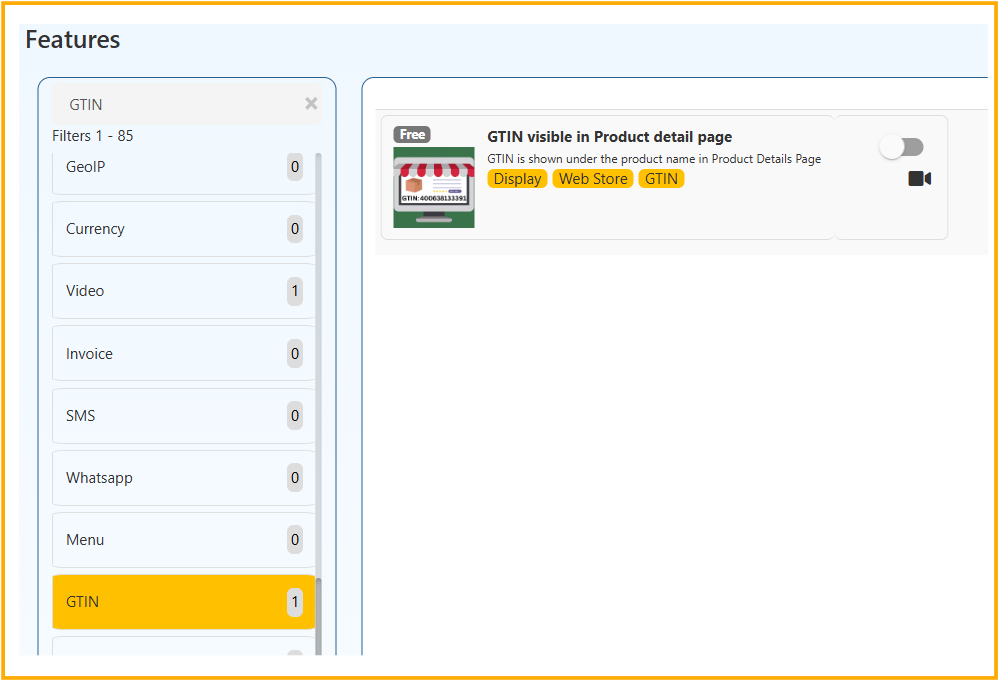
    Steps to Enable GTIN Display

    1. Log in to the Back Office.
    2. Open features from the left sidebar.
    3. Select GTIN.
    4. Switch the toggle to ON to enable GTIN display on the product detail page.
    GTIN in O2VEND

    Note:

    • GTIN must be entered in the product details for it to appear on the product page.

    Displaying GTIN on Product Detail Page

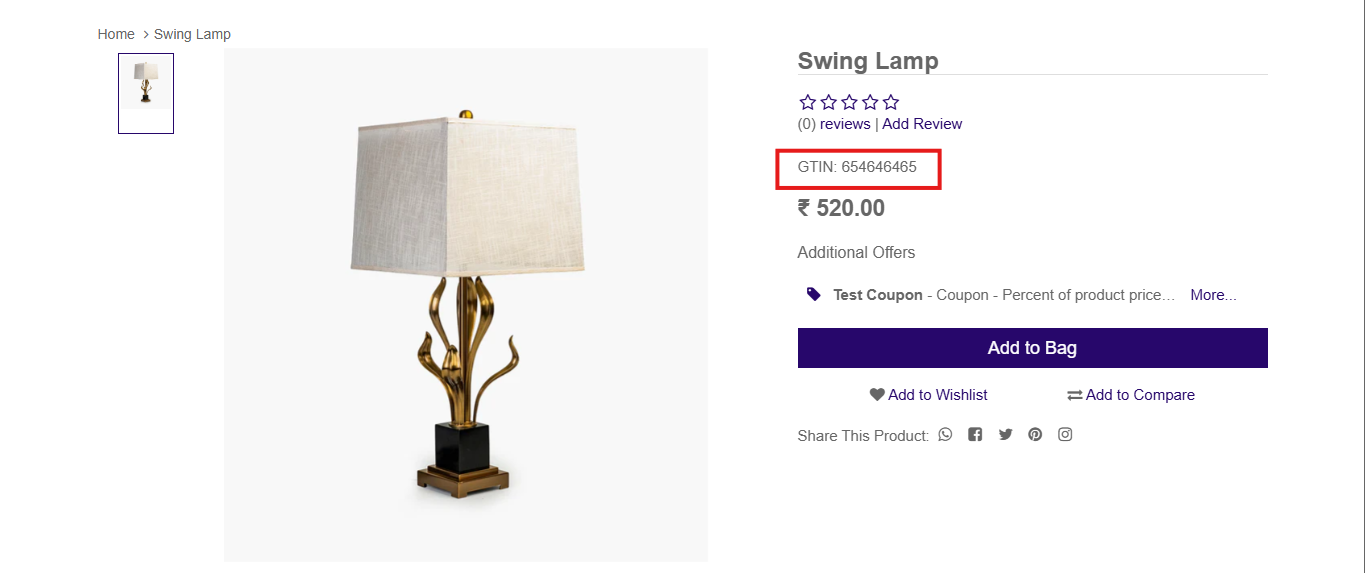
    GTIN can be displayed on the product detail page for customers. When enabled, GTIN appears under the product details section, typically below size or color options and above the price.

    Example Display:

    GTIN: 8906201362313
    
    GTIN in O2VEND

    Benefits of Using GTIN in O2VEND

    Using GTIN effectively provides multiple advantages for store operations and customer experience.

    • Transparency: Customers can verify product authenticity.
    • SEO Improvement: GTIN helps search engines identify products accurately.
    • Inventory Accuracy: Supports barcode scanning and stock management.
    • Operational Efficiency: Reduces errors in order processing and fulfillment.
    In this article
    Back to top _includes/footer.html
    © 2019–2026 Jeyan Technologies Private Limited • www.o2vend.com • Create your own store