Sales Book Report in O2VEND | Monthly Sales Summary, GST & Audit Records
The Sales Book Report in O2VEND ERP provides a clear month-wise record of sales transactions. It includes opening balances, monthly sales totals, debit/credit adjustments, and closing balances. This ensures accurate tracking for GST compliance and audit requirements.
Purpose
- Monitor monthly sales and balances
- Compare debit/credit adjustments
- Track opening and closing balances
- Consolidate sales across branches
- Verify records during audits
- Prepare GST filings
- Spot missing invoices or irregular entries
Benefits
- Transparent reporting
- Reliable GST documentation
- Audit-ready financial records
Accessing the Sales Book Report
- Open Back Office
- Navigate to the Reports section ? Account Reports
- Select Sales Book
- Choose the Start Date and End Date
- Select a Branch or choose Consolidated
- The report updates automatically based on the selected filters
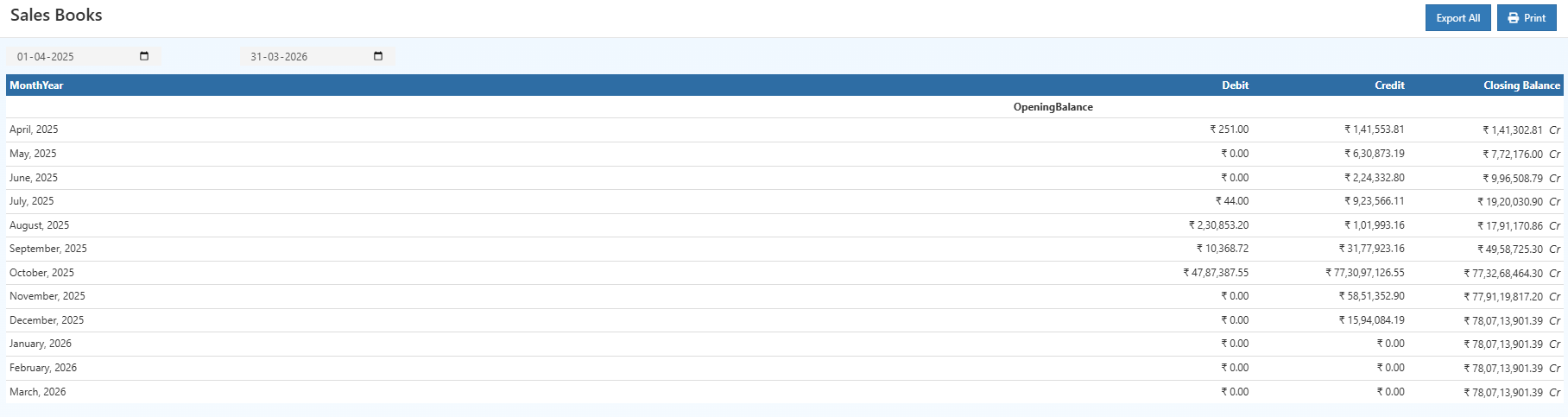
Month-wise Sales Breakdown
The Sales Book organizes data under Month-Year headings to present:
- High and low-performing sales periods
- Variations in debit adjustments
- Changes in closing balances over time
- Seasonal and business-cycle trends
Each period includes:
- Opening Balance – Carried from the previous month
- Debit Entries – Returns or negative adjustments
- Credit Entries – Total recorded sales for the month
- Closing Balance – Net financial value after all entries
This format supports detailed financial analysis and simplifies monthly reviews.
Consolidated Financial Summary
A consolidated summary at the bottom of the report includes:
- Opening Balance
- Total Debit Amount
- Total Credit Amount
- Closing Balance

This summary is widely used for:
- Monthly financial statements
- GST and tax filing documentation
- Internal or external audits
- Management performance reporting
- Multi-branch consolidated financial reviews
- Year-end closing and balance verification
Key Columns
1. Month-Year
Displays the chronological sales period.
2. Opening Balance
Represents the starting balance brought forward from earlier periods.
3. Debit
Lists negative adjustments, product returns, or corrections.
4. Credit
Represents the total sales for the period.
5. Closing Balance
Calculated after applying credits and debits.
Useful Actions
Tip
Use the PRINT button to generate a PDF version of the Sales Book.
Tip
Select Export All to download the complete report in CSV format for Excel, accounting tools, or GST preparation.