Balance Sheet Report in O2VEND
Track Assets, Liabilities & Equity
View a complete financial snapshot of your business with the Balance Sheet Report in O2VEND. Monitor assets, liabilities, and equity with ease.
The Balance Sheet Report gives you a quick snapshot of your business finances — showing what you own, what you owe, and your overall equity.
It helps you understand your financial position at a glance, with both sides always balancing to ensure accuracy.
How to Access
Back Office → Reports → Accounts → Balance Sheet
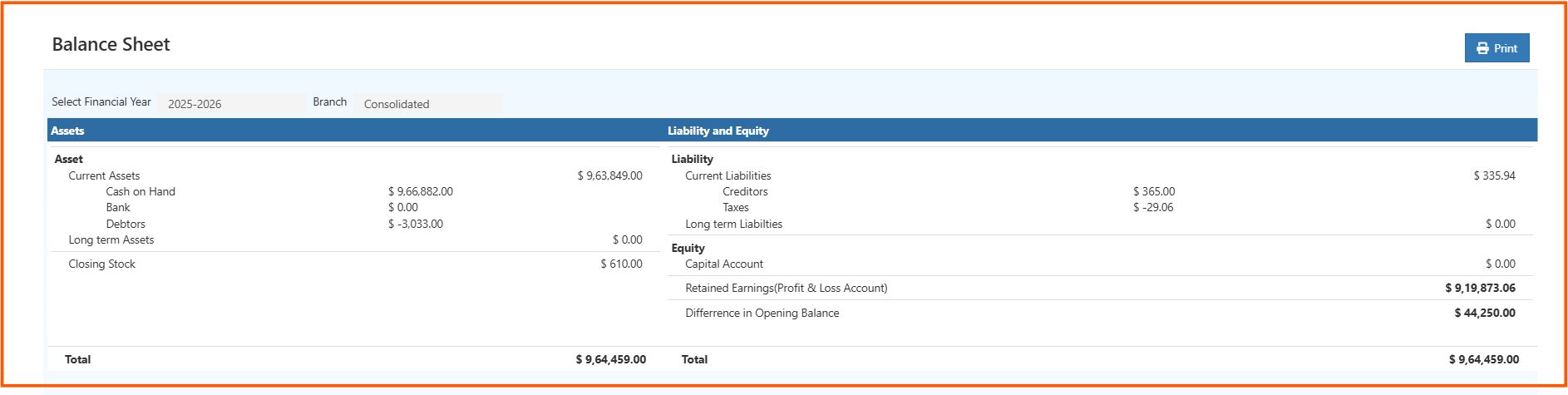
Filters
| Filter | Description |
|---|---|
| Financial Year | Select the year to view (e.g., 2025–2026) |
| Branch | Choose a specific branch or view Consolidated data |
Understanding the Report
The report is divided into two sections:
Assets
Represents what your business owns:
| Field | Description |
|---|---|
| Cash on Hand | Available physical cash |
| Bank | Balance in bank accounts |
| Debtors | Amount receivable from customers |
| Long Term Assets | Assets held for more than one year |
| Closing Stock | Value of remaining inventory |
Liabilities & Equity
Represents what your business owes and owns:
| Field | Description |
|---|---|
| Creditors | Amount payable to suppliers |
| Taxes | Outstanding tax amounts |
| Long Term Liabilities | Long-term obligations |
| Capital Account | Owner’s investment |
| Retained Earnings | Accumulated profit or loss |
| Opening Balance Difference | Any variance in starting balances |
Total Assets = Total Liabilities + Equity
If there’s a mismatch, it indicates transactions that need review.
Use the Print option (top-right) to generate a clean, shareable version of the report.