Stock Summary Report
The Stock Summary Report shows real-time stock quantity for every product, organized by branch, location, and lot. It gives you a clear view of current inventory without a date filter.
Quick Links
What Is the Stock Summary Report?
The Stock Summary Report in O2VEND shows current available inventory for every product, broken down by branch, storage location, and lot number — reflecting the exact stock position at the time of viewing.
In simple terms: what stock you have, where it is, and how much.
Useful for businesses managing multiple branches, lot-tracked products (FMCG, pharma, food, agri), and GST stock reconciliation.
Why Use It?
| Problem | How This Report Helps |
|---|---|
| Stock mismatch between store and system | Real-time quantity per branch |
| Expired lot dispatched unknowingly | Lot-wise expiry dates visible |
| Overstock here, shortage there | Branch:Location breakdown |
| Manual counting errors | Export replaces tally sheets |
| GST audit or CA review | Export-ready stock data |
How to Access
- Log in to O2VEND Back Office
- Go to Reports → Inventory Reports
- Select Stock Summary Report
The report loads automatically with live stock data — no date filter needed.
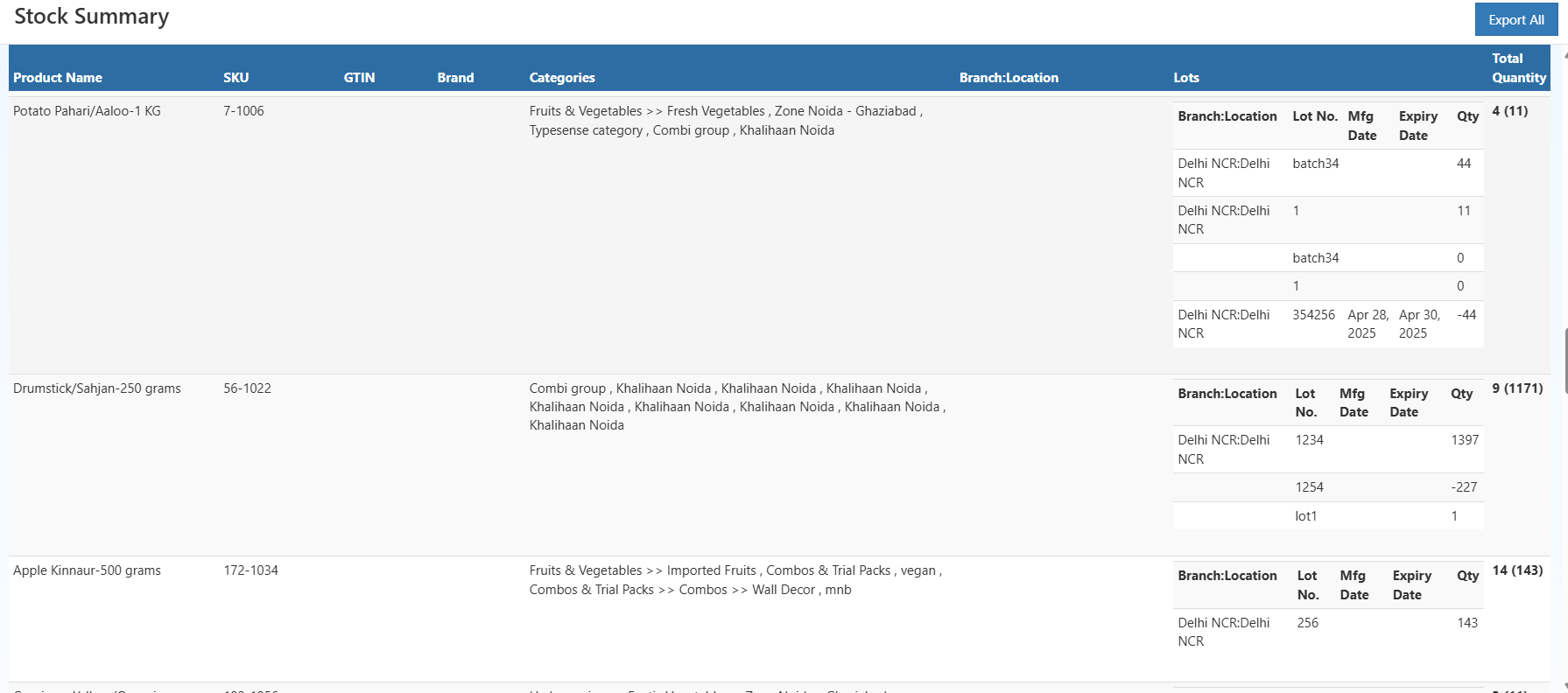
Stock Summary Report in O2VEND — live product, branch, and lot-wise inventory.
Report Table
The report has a two-level layout — a product row with expandable lot sub-rows beneath it.
| Column | What It Shows |
|---|---|
| Product Name | Name of the Product |
| SKU | Unique internal stock reference code |
| GTIN | Barcode-linked product ID; blank if not configured |
| Brand | Product brand for brand-level stock analysis |
| Categories | Full category path; one product can have multiple categories |
| Branch:Location | Branch and storage location where stock is held (e.g., Delhi NCR:Delhi NCR) |
| Lot No | Batch number for traceability (e.g., batch34); blank if no lot assigned |
| Mfg Date | Manufacturing date of the lot, if entered during GRN |
| Expiry Date | Expiry date — important for perishable stock |
| Qty | Net available quantity for that lot at that branch |
| Total Quantity | Shown as total lot count |
Exporting the Report
Click Export All (top right) to download the complete stock data — product, SKU, branch, lot details, expiry dates, and quantities — for reconciliation, GST audit, or CA review.
Related Reports in O2VEND
- Stock Movement Report — How stock moved in/out over a period
- Stock Ageing Report — Identify slow-moving or dead stock
- Stock Valuation Summary — Financial value of current inventory
Need help? Contact O2VEND support: [email protected]