Purchase Book Report
The Purchase Book Report in O2VEND Back Office is a powerful tool for managing and reviewing purchase transactions with suppliers. It provides a consolidated view of all purchase activity, grouped by supplier, and includes detailed transaction information for easy reconciliation and financial tracking.
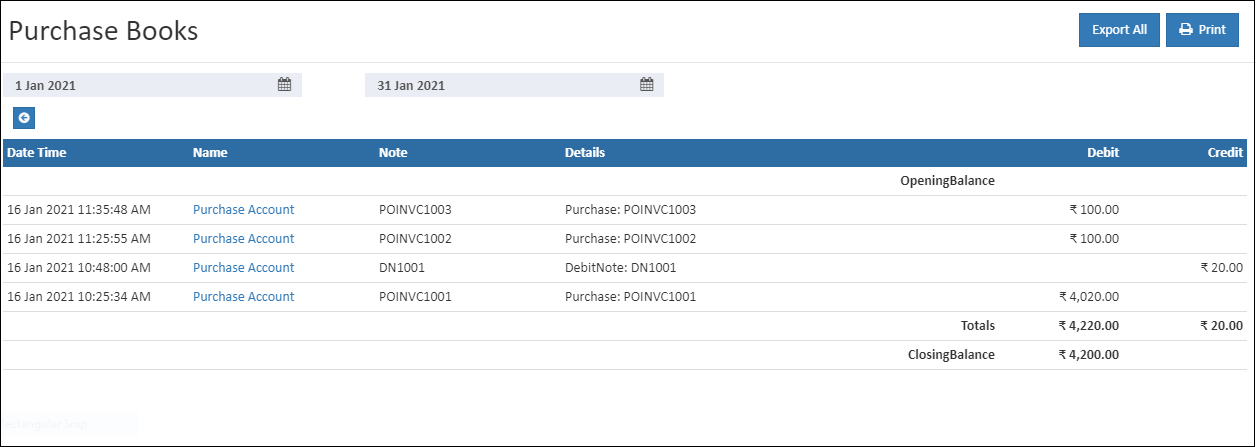
Report Overview
The Purchase Book Report displays:
- Transaction details: Purchase order number, invoice number, payment terms, discounts, and returns
- Supplier information: Supplier name, notes, and related details
- Amounts: Total purchase values, adjustments, and payable balances
This report helps businesses monitor supplier activity, validate purchase records, and maintain accurate accounts payable.
Key Features
- Grouped by Supplier → Easy supplier-level analysis
- Transaction Drill-Down → Open individual entries to view complete details (items, prices, payment terms)
- Flexible Filters → Filter by date range, supplier, purchase order number, or invoice number
- Accounting Integration → Available in the accounting module for seamless financial management
How to View the Purchase Book Report
- Open Back Office
- Navigate to the Reports section
- Select Purchase Book
- Enter the Start Date and End Date for the report
- The report automatically refreshes with updated values
Export & Print Options
Tip
Click PRINT to generate a PDF version of the report.
Tip
Use Export All to download the report in CSV format for external review or documentation.
Benefits
- Centralized view of all supplier transactions
- Simplifies reconciliation and audit processes
- Provides detailed visibility into purchase orders and invoices
- Ensures accurate tracking of discounts, returns, and payment terms
- Strengthens financial control and supplier management