Agent App Report in O2VEND | Track Agent Sales & Activity
Monitor agent performance, sales activity, and customer interactions with the Agent App Report in O2VEND.
The Agent App Report gives a complete view of an agent’s activity — from orders created to sales completed.
It combines sales data, customer interactions, and performance insights in one place, helping you understand how each agent contributes to the business.
Navigation Path
- Open Agent App
- Go to Reports
- Select Agent Report
- Apply filters (Agent, Date Range, Branch/Warehouse)
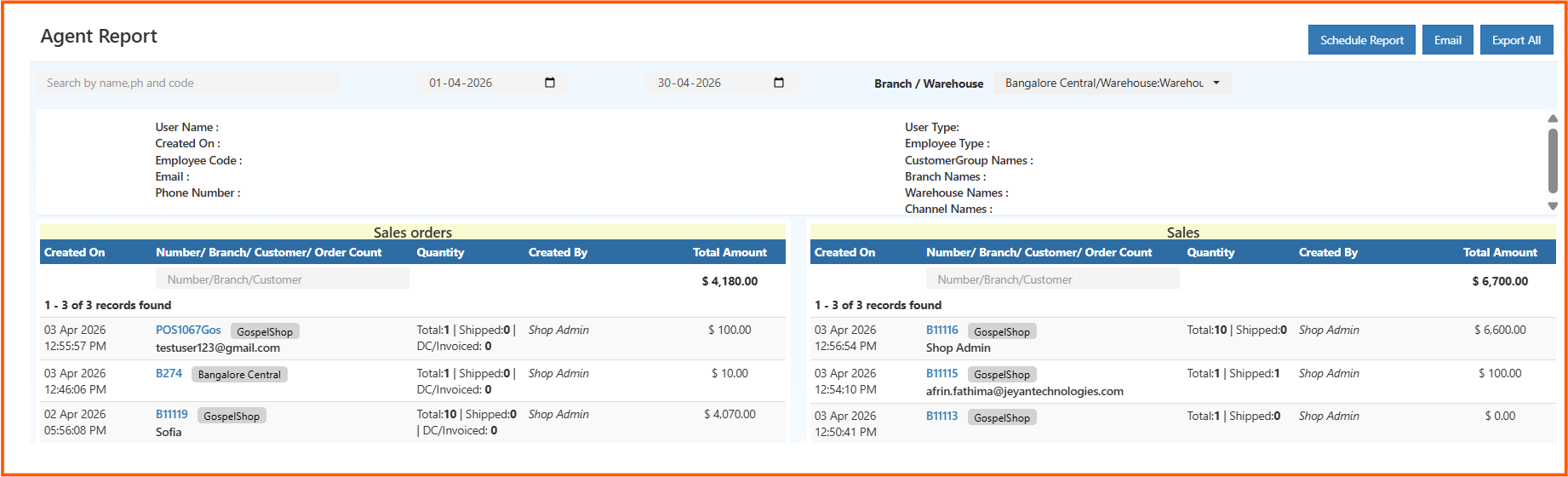
Agent Information Section
This section shows complete details about the agent, including identity, contact details, role, and branch mapping.
It helps confirm who the agent is, what role they perform, and where they operate within the business.
Sales Orders Section
Displays all orders created by the agent within the selected period.
It helps you understand:
- Number of orders handled
- Quantity of items
- Total order value
You can also track shipment and invoice progress to see how orders are moving forward.
Sales Section (Completed Transactions)
This section focuses only on completed sales.
It includes delivered and invoiced orders, giving a clear picture of actual revenue generated by the agent — not just activity.
Filters and Search
Use filters to quickly find specific data.
You can search by:
- Agent
- Customer
- Branch / Warehouse
- Order Number
- Date Range
Export & Automation
The report can be exported in Excel or CSV format for further analysis.
You can also schedule reports to be sent automatically via email, making performance tracking easier.
Purpose of the Report
This report helps you track agent performance more clearly.
You can see how many orders an agent creates, the value they generate, and how efficiently those orders are converted into actual sales.
It also helps monitor shipment progress and verify agent roles across branches or warehouses.