O2VEND Retail ERP
  • Getting Started
  • Ecommerce
  • Back Office
  • POS
  • Agent App
  • PIM
  • Communication
  • CMS
  • OMS
  • WMS
  • O2C
  • Accounting
  • Reports
  • Themes and Apps
Search Results for

    Show / Hide Table of Contents
    • Accounting Management Overview
    • Ledger Management
    • Chart of Accounts Setup
    • Day Book Report
    • Cash Book Management
    • Sales Book Report
    • Purchase Book Report
    • Account Group Management
    • Contra Entry Management
    • Journal Entry Management

    Day Book - Detailed Functional Guide

    Introduction

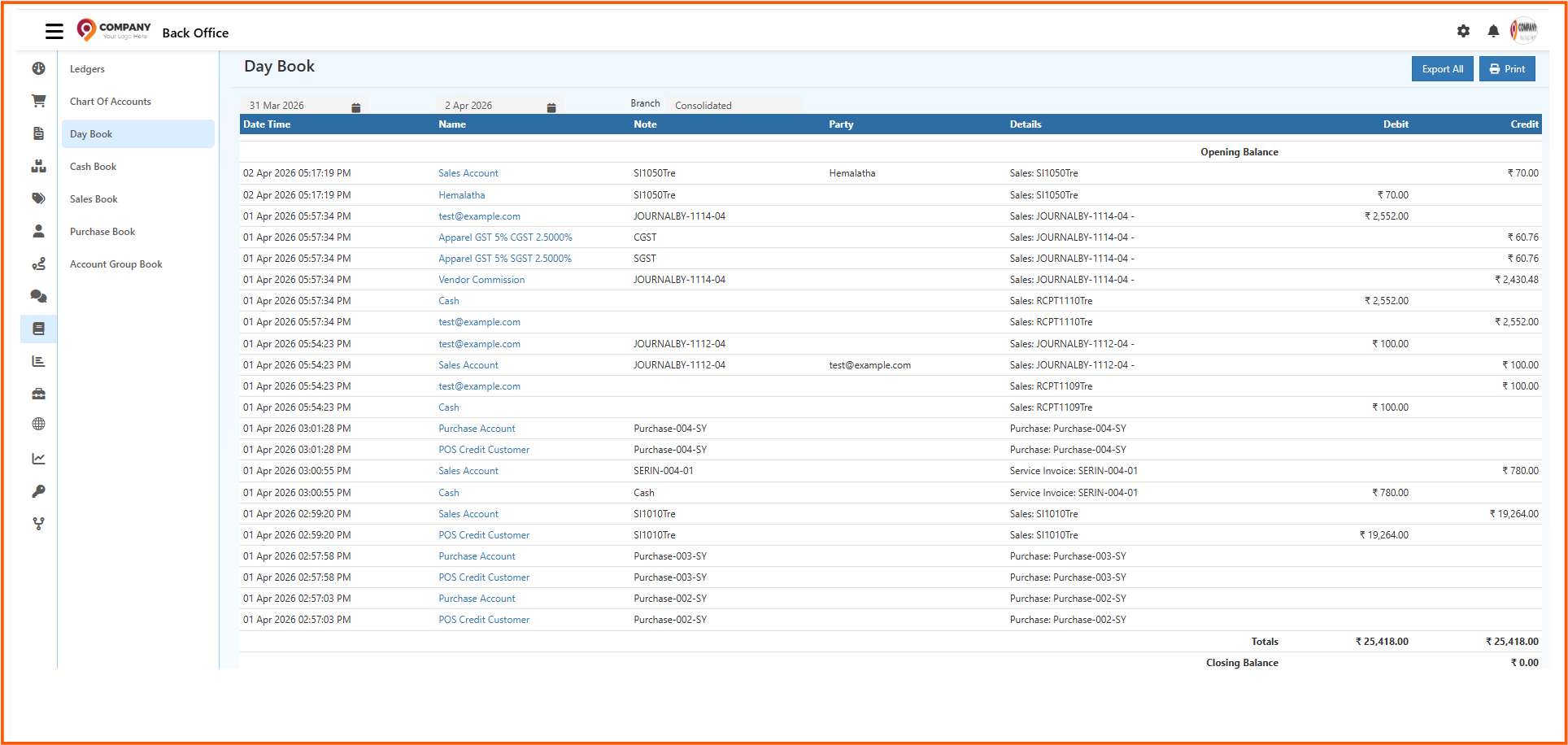
    The Day Book is a primary accounting register used to record all financial transactions in chronological order. It acts as the initial point of entry in the accounting system, providing a clear view of daily financial activity. Since every debit and credit entry is posted as it occurs, the Day Book becomes essential for review, verification, reconciliation, auditing, and daily financial monitoring. Unlike ledger reports that show balances account-wise, the Day Book displays each transaction individually, offering a complete picture of financial flow for a selected period.

    Purpose of the Day Book

    The Day Book helps maintain a continuous and transparent record of accounting entries by ensuring:

    • All financial records are captured accurately
    • Debit and credit movement is easy to trace
    • Reference documents can be cross-checked
    • Accounts remain balanced and audit-ready

    Role in the Accounting Workflow

    The Day Book acts as the foundation for all higher-level financial reports. Data recorded here flows into:

    • Ledger statements
    • Journal registers
    • Trial balance
    • Financial statements

    Accurate entries in the Day Book ensure that all subsequent reports reflect the business's true financial status.

    Accessing the Day Book

    The Day Book can be opened from the Accounting Books section of O2VEND:

    1. Open Accounting Books
    2. Select Day Book
    3. Choose a date or range
    4. Apply the filter to view entries

    All transactions within the period are displayed in chronological order.

    Information Displayed in the Day Book

    Each entry contains detailed supporting information, such as:

    • Transaction date
    • Voucher type (Sales, Purchase, Receipt, Payment, Journal, Adjustment, etc.)
    • Reference or document number
    • Ledger accounts affected
    • Debit amount
    • Credit amount
    • Narration or supporting description

    Total debit and credit figures at the bottom allow quick balance verification.

    Filtering and Data Refinement

    Filters help narrow down the displayed records for targeted analysis. Filtering options include:

    • Date or date range
    • Voucher type
    • Ledger account
    • Reference number

    These filters support focused review, such as viewing only receipts for a specific business day or isolating purchase entries.

    Drill-Down Access

    Many entries allow access to original supporting documents. This is useful during:

    • Reconciliation
    • Financial reviews
    • Month-end or year-end closing
    • Internal and external audits

    This ensures that every posting is traceable to valid transaction evidence.

    Business Use Cases

    Daily Monitoring

    Shows the entire financial activity of the day, ensuring no posting is missed.

    Internal Control

    Helps detect and correct errors early in the accounting cycle.

    Audit Preparation

    Provides a unified list of records that simplifies audit examination.

    Consistency Check

    Ensures double-entry accounting rules are followed before data flows into other reports.

    Export and Archival

    The Day Book may be exported for:

    • Accountant review
    • Statutory documentation
    • Long-term archival and compliance

    Relationship with Other Reports

    The Day Book supports consistency across other financial reports:

    • Ledger: account-wise organization
    • Journal Register: grouping by voucher type
    • Trial Balance: total credit and debit validation
    • Financial Statements: high-level business performance

    Accurate Day Book postings ensure that all these reports remain dependable.

    Advantages of the Day Book

    • Transparent view of all transaction entries
    • Quick verification of debit and credit distribution
    • Easy identification of missing or incorrect postings
    • Useful for detailed financial analysis
    • Supports fast reconciliation and audit processes
    • Improves accuracy before generating summary reports

    Conclusion

    The Day Book provides a complete, date-wise record of financial activity and plays a critical role in maintaining precise accounting data. It ensures that transactions are valid, audited, and traceable before being reflected in higher-level reports.

    In this article
    Back to top _includes/footer.html
    © 2019–2026 Jeyan Technologies Private Limited • www.o2vend.com • Create your own store