Location Summary Report | Track Stock by Location
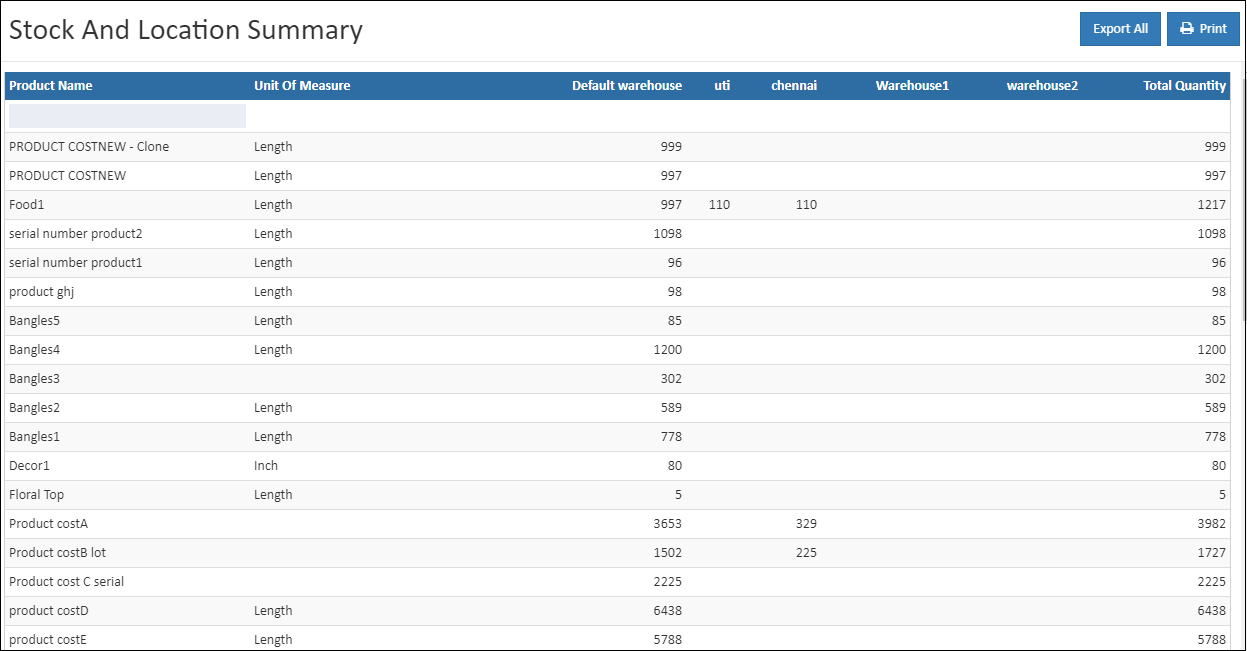
The Location Summary Report in O2VEND Back Office provides a consolidated view of inventory quantities across all business locations and sub-locations. It enables businesses to verify stock levels, reconcile inventory, and plan operations with accurate location-wise insights.
🔗 Quick Links
What is a Location Summary Report?
This report displays stock quantities by warehouse, store, or sub-location, helping businesses quickly compare inventory across different sites. It supports:
- Location-wise stock verification
- Inventory reconciliation during audits
- Operational planning and transfers
Why Location-Wise Inventory Tracking Matters
Accurate location-level tracking ensures:
- Visibility → Know exactly where stock is stored
- Accuracy → Prevent discrepancies between physical and system stock
- Audit Readiness → Simplify reconciliation during financial or compliance audits
Why use this report?
- View product stock across all locations at a glance
- Compare available vs total quantity per location
- Filter and search by product or location
- Export details for audits and planning
How to Access the Location Summary Report
Navigation Path:
Back Office → Reports → Inventory Reports → Location Summary
The report loads automatically with live stock data.
Tip
Use Export All or Export Current Page to download the report in CSV format for offline analysis.
Report Fields Explained
- Product Name → Displays product names with available stock across all locations
- Location → Shows warehouse, store, or sub-location where the product is stored
- Total Quantity → Indicates stock available at each location, highlighting shortages or excess
- Unit of Measure (UOM) → Defines the measurement unit (e.g., pieces, boxes)
How to Use the Report
- Search by Product → Enter product name or SKU to check stock distribution
- Sort by Location → Identify sites with highest or lowest stock
- Balance Stock → Detect overstocked or understocked locations for transfers
- Export & Print → Generate reports for audits and operational reviews
Common Usage Scenarios
- Product lookup for location-wise availability
- Stock balancing across multiple sites
- Planning transfers between warehouses or stores
Business Benefits
Improved Inventory Visibility
Know exactly where your stock is across all locations.
Faster Decision-Making
Compare stock balances by location to plan replenishment and transfers.
Audit-Ready Reporting
Exportable CSV ensures easy sharing with finance and audit teams.
Who Should Use This Report?
- Inventory Managers
- Warehouse Supervisors
- Operations Teams
- Finance & Audit Teams
🔗 Related Topics
- Stock Summary Report → Overall inventory balance
- Stock/Location Summary → Combined stock and location insights
- Stock Movement Summary Report → Track stock movement and planning details