Stock Projection Report
The Stock Projection Report helps you forecast inventory demand based on sales trends, current stock levels, and safety stock thresholds. It supports better purchase planning and helps reduce stockouts.
Quick Links
What is Stock Projection Report?
The Stock Projection Report provides a product-wise view of projected stock requirements by comparing sales quantity, physical quantity, and safety stock.
It summarizes inventory data at SKU level to determine reorder quantity accurately.
- Displays SKU-level stock projection.
- Compares sales, available stock, and safety thresholds.
- Highlights items requiring replenishment.
Why Stock Projection Report Is Important
This report plays a crucial role in inventory planning and control:
- Prevents stock shortages by identifying low-stock items early.
- Optimizes purchase planning using real sales data.
- Reduces excess inventory and holding costs.
- Improves order fulfillment and customer satisfaction.
Why use this report?
- Identify products that need immediate reordering.
- Plan purchase orders based on projected demand.
- Monitor safety stock compliance.
- Adjust stock levels manually when required.
- Support data-driven inventory decisions.
How to Access the Stock Projection Report
Navigation Path:
Back Office -> Reports -> Inventory -> Stock Projection Report
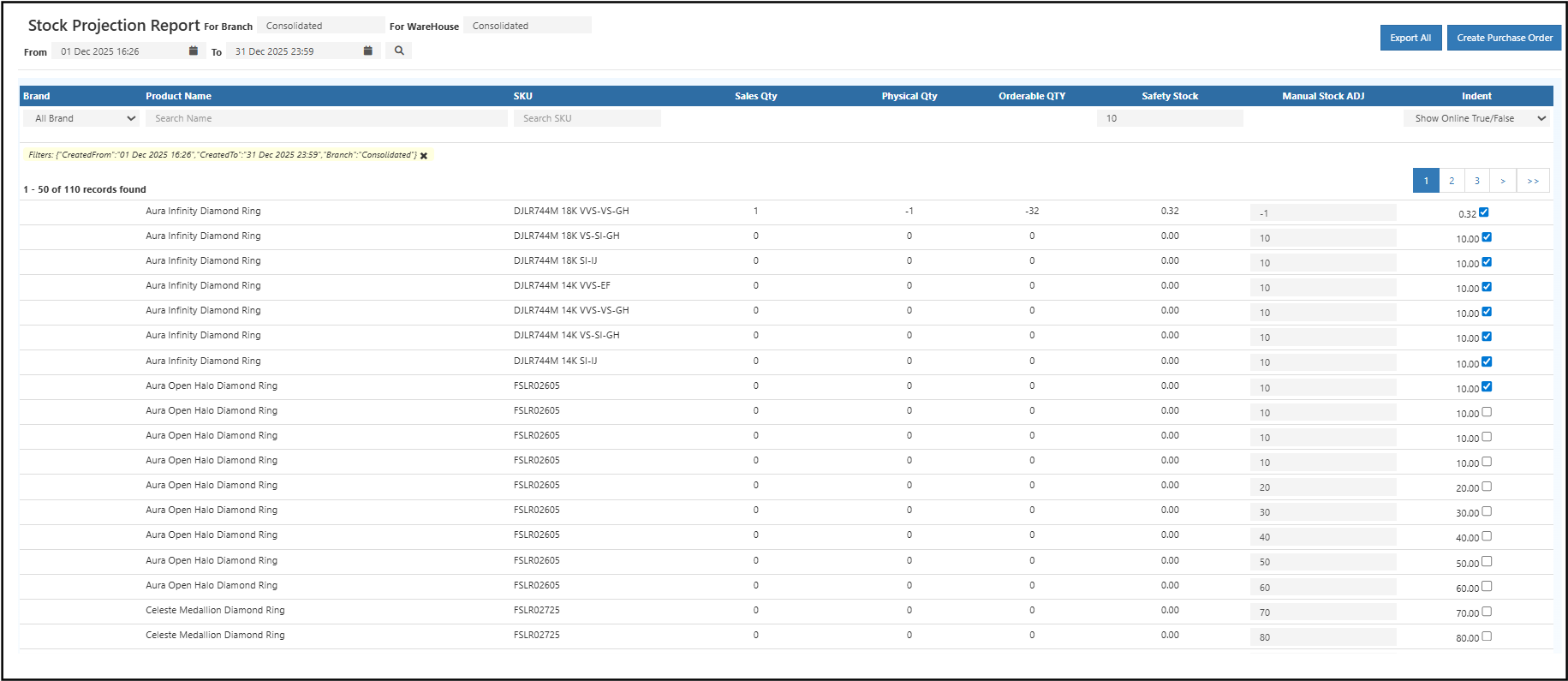
Filters & Controls
- Date Range: Select from and to dates to analyze sales trends for projection.
- Branch: View stock projection branch-wise or consolidated.
- Warehouse: Analyze warehouse-level or consolidated inventory.
- Brand / Product / SKU: Filter by brand name, product name, or SKU.
- Safety Stock: Set minimum stock threshold for projection.
- Indent / Online Toggle: Show or hide items based on indent or online status.
Report View Explained
Summary Table
The summary table provides a detailed SKU-wise projection:
- Brand: Product brand.
- Product Name: Item name.
- SKU: Unique product identifier.
- Sales Qty: Quantity sold during the selected period.
- Physical Qty: Current available stock.
- Orderable Qty: Quantity required to meet demand and safety stock.
- Safety Stock: Minimum stock level to be maintained.
- Manual Stock ADJ: Editable field to adjust required quantity.
- Indent: Checkbox to mark items for purchase planning.
How to Use the Stock Projection Report
- Open the Stock Projection Report from Inventory reports.
- Select the required date range for sales analysis.
- Choose branch and warehouse (or consolidated view).
- Review sales, physical stock, and orderable quantity.
- Adjust quantities manually if needed.
- Select items using the Indent option.
- Create a Purchase Order directly from the report.
Common Usage Scenarios
- Inventory teams planning weekly or monthly reorders.
- Store managers monitoring low-stock fast-moving items.
- Purchase teams creating bulk purchase orders.
- Businesses aligning stock with demand forecasts.
Business Benefits
- Improves inventory availability by predicting stock requirements in advance.
- Reduces carrying costs by avoiding overstocking.
- Streamlines purchase planning with actionable reorder data.
- Supports demand forecasting for weekly, monthly, and seasonal planning.
- Enables multi-branch and warehouse-level stock visibility in one report.
Export & Create Purchase Order Options
- Export All: Download the report in Excel or CSV format.
- Create Purchase Order: Generate a purchase order from selected items.