O2VEND Retail ERP
  • Product
  • Solutions
  • Resources
    • Blog
    • Community
    • Partnership
    • Find Partner
    • Developer
  • Pricing
  • Docs
    • Getting Started
      • Channels
        • Sales Channel
        • O2VEND to O2VEND Channel
        • Shopify Integration Guide
    • Commerce
      • Ecommerce
      • POS
      • Agent App
      • CMS
      • Themes & Apps
      • Apps
        • Sales Navigator
    • Operations
      • OMS
      • WMS
      • O2C
      • Vendor Portal
      • Supplier Portal
    • Back Office
      • Accounting
      • Reports
      • PIM
      • Communication
      • Back Office
Search Results for

    Show / Hide Table of Contents
    • Reports and Analytics
    • Order Reports
      • Web Orders Progress Report
      • Back Order Items Report
      • Purchase Order Pending Item Report
      • Sales Order Pending Item Summary Report
      • Sales Shipping Status Report
      • Sales Order Summary
      • Sales Order Progress Report
      • Purchase Order Progress Report
      • Sales Order with Product Line Item Report
      • Sales Order Packing Sheet Report
      • Back Order Report
      • Purchase Order Summary
      • Sales Order Shipment Report
      • Sales Order Shipping Address Report
      • Sales Order Pending Item Reports
      • Unpaid Orders
    • Sales/Purchase Reports
      • Sales Invoice Report
      • Sales Invoice Summary
      • Sales Items Summary
      • Purchase Invoice Report
      • Purchase Invoice Summary
      • Purchase Items Summary
      • Receipt Report
      • Daily Settlement Report
      • Contribution Margin Report
      • Agent Sales Report
      • Agent Report
      • Employee Sales Report
      • Employee Report
      • Employee Product Sales & Commission Report
    • Supplier Reports
      • Supplier Report
      • Supplier Purchase Report
      • Supplier Detail Report
    • Inventory Reports
      • Stock Summary
      • Stock Valuation Summary
      • Stock Ageing Report
      • Location Summary
      • Stock Ledger Report
      • Stock/Location Summary
      • Stock Movement And Valuation Summary
      • Stock Movement Summary Report
      • Stock Summary Detail
    • Products
      • Sold Product Categories
      • Product Category Summary
      • Product Sale Summary
      • Category Sale Summary
      • Brand Sale Summary
      • Reordering Stock Summary
      • Price Movement
      • Product Seasonal Demand
      • Product Stock Analysis Report
      • Stock Projection Report
      • Low Stocks
    • Pos Reports
      • Cash Register Summary
      • Current Cash Registers
    • Account Reports
      • Day Book
      • Ledger
      • Cash Book
      • Sales Books
      • Purchase Books
      • Daily Sales and Payment Report
      • Balance Sheet
      • Profit and Loss Report
      • Trial Balance
    • Miscellaneous Reports
      • Output Detailed Tax Report
      • Output Tax Report Summary
      • Account Receivable Report
      • Gross Profit Report
      • Daily Tax Report
      • GSTR-1 Report
      • External API Logs
      • Benefit Usage
      • Offers Usage
      • Coupon Usage
      • Channel Report
      • Configuration Change History
      • VisitLog

    Ledger Report in O2VEND ERP

    Track Customer & Supplier Transactions & Balances

    The Ledger Report in O2VEND ERP is your single source of truth for customer and supplier transactions. It ensures accurate balances, GST compliance, and audit-ready statements—all in one consolidated view.

    Explore Ledger Report in O2VEND →


    What Is the Ledger Report?

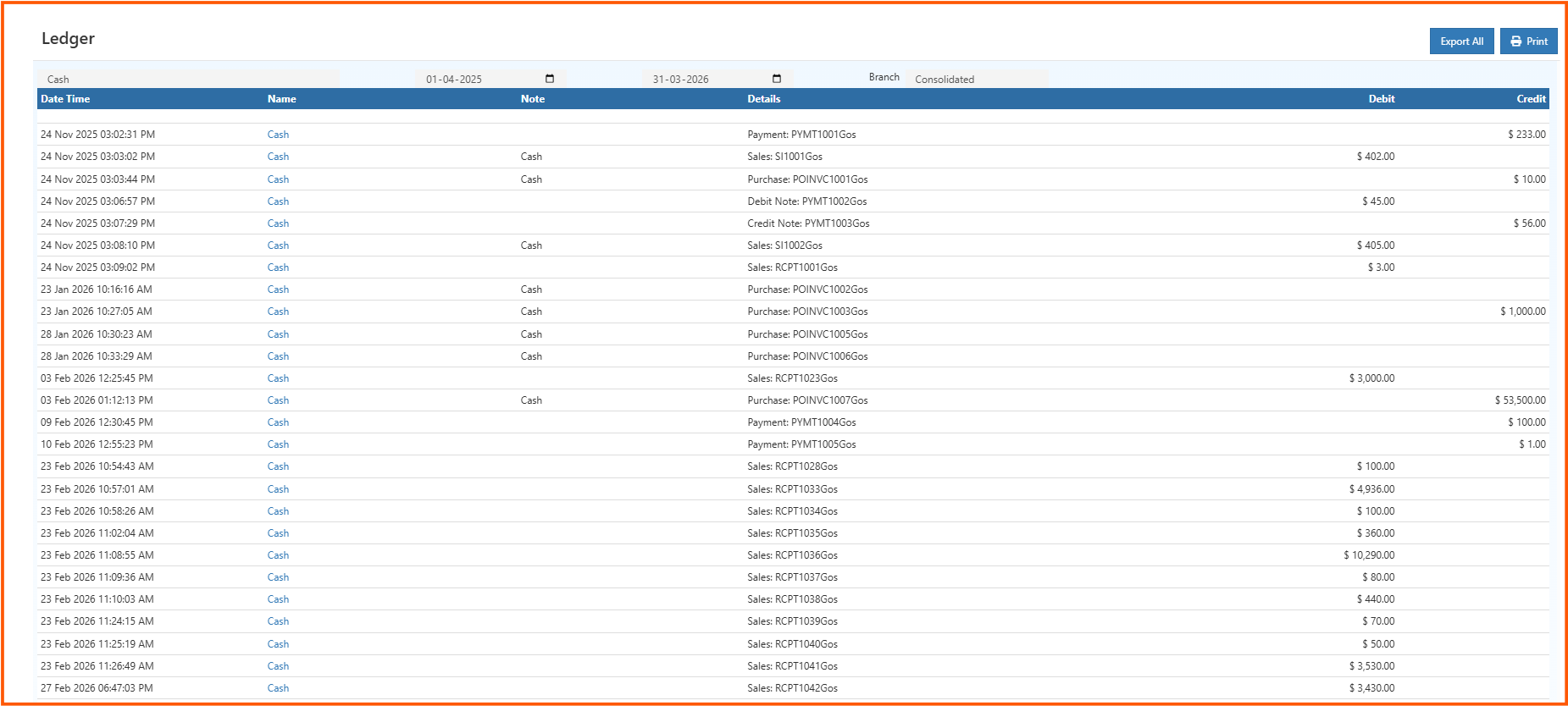
    A Ledger Report is a financial summary showing all transactions for a selected account within a chosen date range.

    Includes:

    • Sales & purchase transactions
    • Receipts & payments
    • Returns & adjustments
    • Opening & closing balances

    Purpose: Deliver a clear, audit-ready account summary for accurate decision-making.


    How to Access the Ledger Report

    1. Login to O2VEND Back Office
    2. Navigate to Reports → Account Books → Ledger Report
    3. Select Account Type (Customer or Supplier)
    4. Set Date Range
    5. Optionally select a Branch
    6. Click View Report
      • Displays opening balance, transactions, and closing balance
    7. Export or Print
      • Export All → Excel/PDF for GST-ready statements
      • Print → Clean, audit-friendly copy

    ledgerreport

    Tip

    Regular reviews prevent missed payments, ensure GST compliance, and reduce reconciliation errors.


    Ledger Report Fields Explained

    Field Meaning Why It Matters
    Date & Time Transaction timestamp Provides audit trail
    Name Customer or supplier Identifies impacted account
    Note Reference number (e.g., invoice ID) Cross-verification
    Details Transaction type & linked document Clarifies debit/credit
    Debit Outgoing amount Reduces balance
    Credit Incoming amount Increases balance
    Opening Balance Balance at start Reconciliation baseline
    Totals Total debit & credit Quick activity overview
    Closing Balance Balance at end Confirms account status

    Debit vs Credit

    • Debit → Outgoing money or expenses
    • Credit → Incoming payments or income

    Understanding this ensures accurate tracking of dues and payments.


    Export GST-Ready Ledger Reports

    • Export All → Excel/CSV for audits and analysis
    • Print → GST-compliant, printer-friendly copy

    Who Should Use This Report?

    • Business Owners → Monitor balances
    • Accountants → Prepare GST-compliant reports
    • Finance Teams → Reconcile accounts
    • Auditors → Review transaction history
    • Managers → Track overdue or advance payments

    Real-World Scenarios

    • Customer Payment Mismatch → Identify missing or duplicate payments quickly
    • Audit Preparation → Export GST-ready ledgers for compliance reviews

    🔗 Related Reports

    • Customer Management
    • Payment Methods Setup
    • Balance Sheet Report
    • Cash Book Report
    • Sales Order Summary

    Track Customer & Supplier Balances Accurately with O2VEND

    Export GST-ready ledgers, reconcile accounts, and ensure accurate financial tracking effortlessly.

    Start Free Trial Login to Dashboard

    Track Stock Movement Live – Try Free
    In this article
    O2VEND

    O2VEND Help Center for Ecommerce, Back Office, POS, Agent App, PIM, OMS, WMS, Accounting, O2C, CMS, and ERP Reports workflows.

    Get Demo Contact Sales

    Product Docs

    Ecommerce Back Office Point of Sale Agent App Warehouse (WMS)

    Module Docs

    PIM OMS Accounting Order to Cash (O2C) CMS

    Resources

    Ecommerce POS Back Office Agent App Restaurant POS Integrations

    Community and Company

    Blog Community Partnership Find Partner Developer Pricing

    © 2019-2026 Jeyan Technologies Private Limited. All rights reserved.

    Privacy Policy • Terms of Service • Cancellation & Refund