Output Tax Report Summary
The Output Tax Report Summary in O2VEND Back Office provides a consolidated view of sales tax collected during a selected period. It organizes tax data by tax rate, tax class, and HSN/SAC codes, making compliance tracking and financial audits easier.
How to Access the Output Tax Report Summary
- Open Back Office
- Navigate to the Reports section (shortcut: Alt + R)
- Select Output Tax Report Summary
- By default, the report displays data for the current date
- Adjust Start Date and End Date to view tax data for a specific period
- The report automatically refreshes with updated values
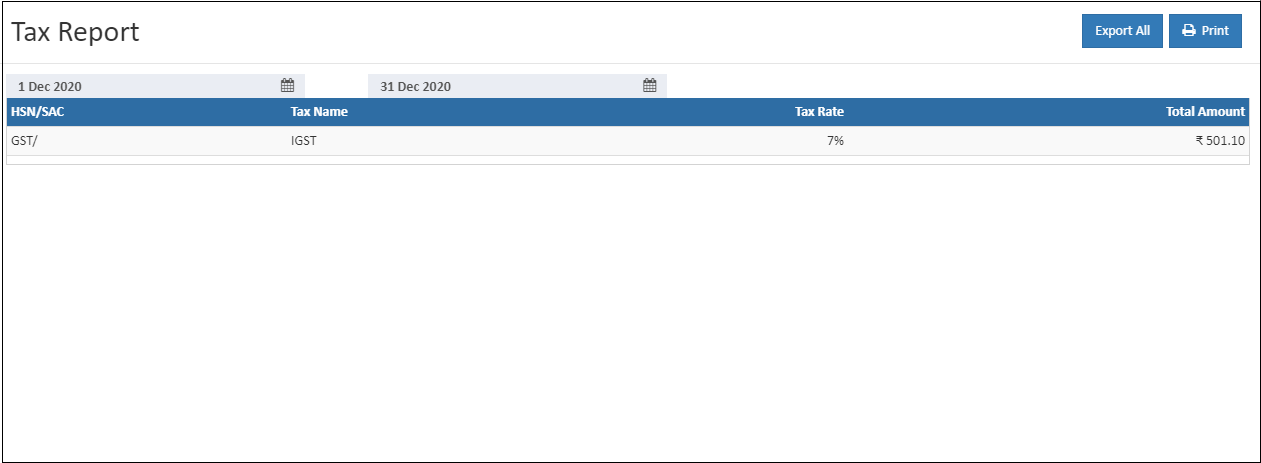
Report Overview
The report highlights key tax details:
- HSN/SAC → Codes used to classify goods and services under the GST regime in India
- Tax Name → Displays the tax class type applied
- Tax Rate → Shows the percentage rate of tax applied to sales
- Total Amount → Summarizes the total tax collected for the selected period
This structured view helps businesses maintain transparency and accuracy in tax reporting.
Export Options
Tip
Use Export All or Export Current Page to download the report in CSV format for offline analysis or compliance documentation.
Benefits
- Provides a clear summary of tax collected
- Organizes tax data by rate and class for easy review
- Supports GST compliance and filing requirements
- Helps finance teams reconcile tax amounts with sales records
- Simplifies audits and statutory reporting