O2VEND Retail ERP
  • Product
  • Solutions
  • Resources
    • Blog
    • Community
    • Partnership
    • Find Partner
    • Developer
  • Pricing
  • Docs
    • Getting Started
      • Channels
        • Sales Channel
        • O2VEND to O2VEND Channel
        • Shopify Integration Guide
    • Commerce
      • Ecommerce
      • POS
      • Agent App
      • CMS
      • Themes & Apps
      • Apps
        • Sales Navigator
    • Operations
      • OMS
      • WMS
      • O2C
      • Vendor Portal
      • Supplier Portal
    • Back Office
      • Accounting
      • Reports
      • PIM
      • Communication
      • Back Office
Search Results for

    Show / Hide Table of Contents
    • Reports and Analytics
    • Order Reports
      • Web Orders Progress Report
      • Back Order Items Report
      • Purchase Order Pending Item Report
      • Sales Order Pending Item Summary Report
      • Sales Shipping Status Report
      • Sales Order Summary
      • Sales Order Progress Report
      • Purchase Order Progress Report
      • Sales Order with Product Line Item Report
      • Sales Order Packing Sheet Report
      • Back Order Report
      • Purchase Order Summary
      • Sales Order Shipment Report
      • Sales Order Shipping Address Report
      • Sales Order Pending Item Reports
      • Unpaid Orders
    • Sales/Purchase Reports
      • Sales Invoice Report
      • Sales Invoice Summary
      • Sales Items Summary
      • Purchase Invoice Report
      • Purchase Invoice Summary
      • Purchase Items Summary
      • Receipt Report
      • Daily Settlement Report
      • Contribution Margin Report
      • Agent Sales Report
      • Agent Report
      • Employee Sales Report
      • Employee Report
      • Employee Product Sales & Commission Report
    • Supplier Reports
      • Supplier Report
      • Supplier Purchase Report
      • Supplier Detail Report
    • Inventory Reports
      • Stock Summary
      • Stock Valuation Summary
      • Stock Ageing Report
      • Location Summary
      • Stock Ledger Report
      • Stock/Location Summary
      • Stock Movement And Valuation Summary
      • Stock Movement Summary Report
      • Stock Summary Detail
    • Products
      • Sold Product Categories
      • Product Category Summary
      • Product Sale Summary
      • Category Sale Summary
      • Brand Sale Summary
      • Reordering Stock Summary
      • Price Movement
      • Product Seasonal Demand
      • Product Stock Analysis Report
      • Stock Projection Report
      • Low Stocks
    • Pos Reports
      • Cash Register Summary
      • Current Cash Registers
    • Account Reports
      • Day Book
      • Ledger
      • Cash Book
      • Sales Books
      • Purchase Books
      • Daily Sales and Payment Report
      • Balance Sheet
      • Profit and Loss Report
      • Trial Balance
    • Miscellaneous Reports
      • Output Detailed Tax Report
      • Output Tax Report Summary
      • Account Receivable Report
      • Gross Profit Report
      • Daily Tax Report
      • GSTR-1 Report
      • External API Logs
      • Benefit Usage
      • Offers Usage
      • Coupon Usage
      • Channel Report
      • Configuration Change History
      • VisitLog

    Agent Sales Report in O2VEND | Monitor Sales Team Performance

    Track agent performance, sales activity, and order handling with the Agent Sales Report in O2VEND. Improve productivity and sales insights.

    The Agent Sales Report gives you a clear picture of how each agent is performing.

    From orders handled to total sales and payment status, everything is available in one place — making it easy to track productivity and performance.

    The Agent Sales Report helps you stay on top of your sales team’s performance by giving you complete visibility into orders, revenue, and customer handling — all in one place.

    Navigation

    Back Office → Reports → Sales and Purchase Reports → Agent Sales Report
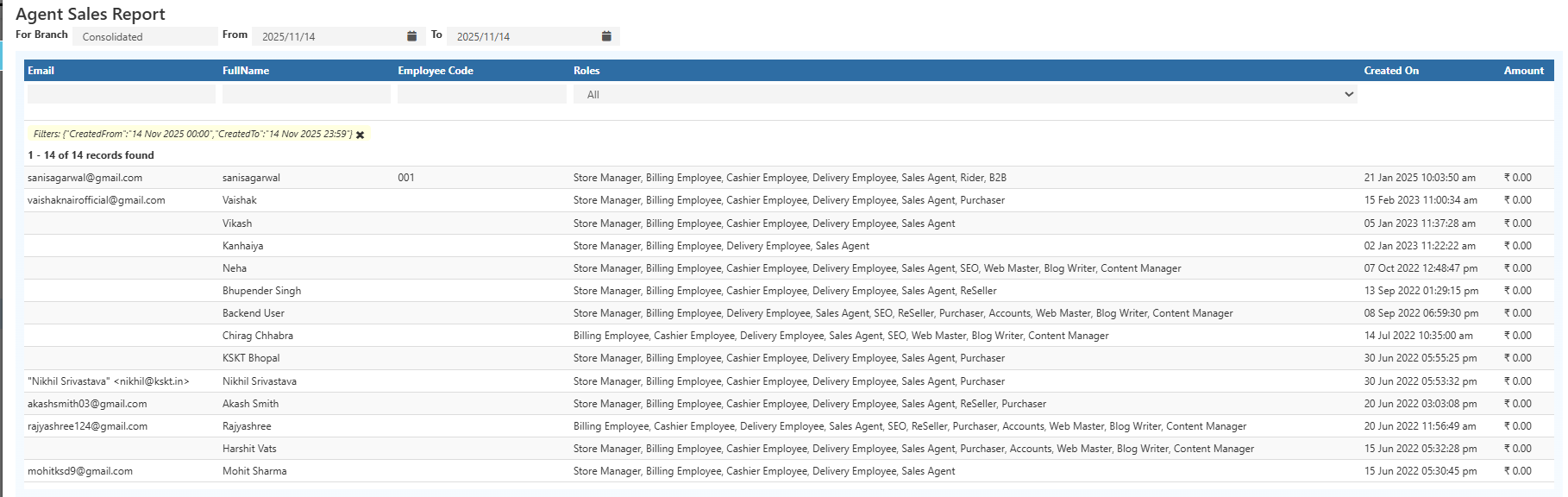
    Agent Sales Report in O2VEND | Monitor Sales Team Performance

    What This Report Shows

    • Number of orders handled by each agent
    • Total sales generated
    • Customer details and interactions
    • Payment and shipping status
    • Completed vs pending orders

    Key Fields Explained

    • Agent Name → Sales or collection agent
    • Employee Code → Unique staff ID
    • Roles → Assigned responsibilities (sales, cashier, delivery, etc.)
    • Order Count → Total orders handled
    • Total Sales → Value of orders created
    • Customer Details → Name and phone number
    • Payment Status → Paid / Partial / Pending
    • Shipping Status → Shipped / Partial / Awaiting

    Filters

    Quickly refine data using:

    • Agent name
    • Customer name
    • Phone number
    • Order date
    • Order / Payment status
    • Branch

    Export Options

    Download the report in:

    • Excel (.xlsx)
    • CSV (.csv)
    In this article
    O2VEND

    O2VEND Help Center for Ecommerce, Back Office, POS, Agent App, PIM, OMS, WMS, Accounting, O2C, CMS, and ERP Reports workflows.

    Get Demo Contact Sales

    Product Docs

    Ecommerce Back Office Point of Sale Agent App Warehouse (WMS)

    Module Docs

    PIM OMS Accounting Order to Cash (O2C) CMS

    Resources

    Ecommerce POS Back Office Agent App Restaurant POS Integrations

    Community and Company

    Blog Community Partnership Find Partner Developer Pricing

    © 2019-2026 Jeyan Technologies Private Limited. All rights reserved.

    Privacy Policy • Terms of Service • Cancellation & Refund