Stock Summary Report | Track Inventory Levels in O2VEND
View real-time stock summary in O2VEND. Analyze product-wise, branch-wise, and lot-wise inventory availability from a single, consolidated report.
What Is the Stock Summary Report?
The Stock Summary Report in O2VEND gives you an item-wise overview of current stock quantities across branches, locations, and lots — showing your available inventory position at the time of viewing.
It's ideal for daily stock checks, branch-level inventory reviews, and lot-wise verification.
Why Use It?
- Monitor current stock availability across all products
- Review inventory by branch and location
- Track lot-wise quantities for better stock control
- Identify zero or adjusted stock quantities
- Keep system stock aligned with physical stock
Key Features
Inventory Visibility View total available quantity for each product along with lot-level stock details.
Branch-Level Control See real-time stock holdings across different branches and locations.
Lot-Wise Accuracy Track inventory by lot number, manufacturing date, expiry date, and quantity where applicable.
Faster Decisions Make informed replenishment, transfer, and sales decisions using live stock data.
How to View the Stock Summary Report in O2VEND
The Stock Summary Report can be accessed directly from the O2VEND Back Office.
- Open the O2VEND Back Office
- Navigate to Reports -> Inventory Reports
- Select Stock Summary
- The Stock Summary Report opens with the latest available inventory data
- Review product-wise, branch-wise, and lot-wise stock details in the table
The report loads automatically and displays all available stock records based on the current inventory status.
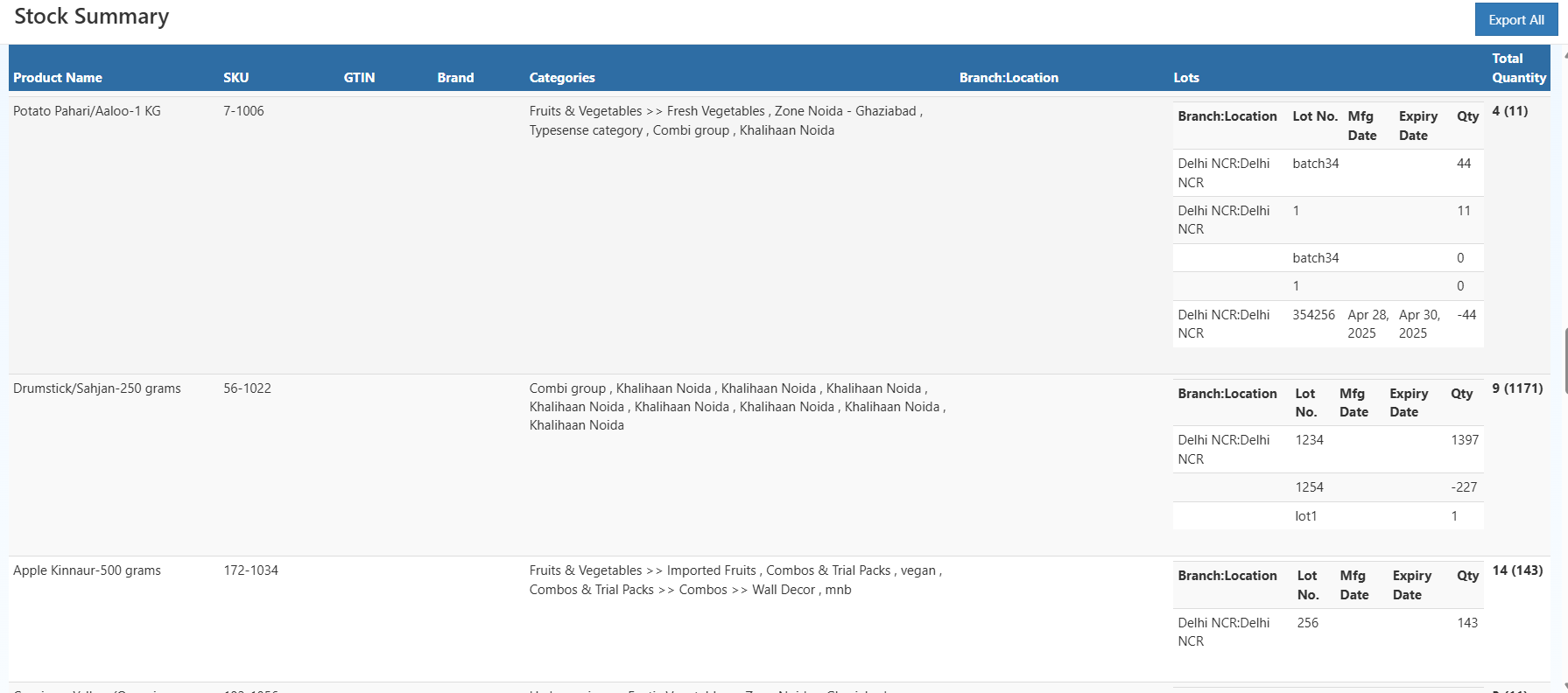
Stock Summary Table Overview
The Stock Summary screen displays inventory data in a structured table with the following visible columns:
- Product Name
- SKU
- GTIN
- Brand
- Categories
- Branch:Location
- Lots
- Total Quantity
Each product appears as a main row, with expandable lot-wise details shown beneath it.
| Column Name | Explanation |
|---|---|
| Product Name | Name of the product as configured in backoffice. Each row represents a product. |
| SKU | Stock Keeping Unit used as the internal reference across inventory transactions. |
| GTIN | Global Trade Item Number for standardized product identification. |
| Brand | Product’s brand for brand-level stock analysis. |
| Categories | Product category hierarchy; multiple values possible. |
| Branch:Location | Branch and location where stock is available; lists each combination. |
| Lots | Indicates lot-managed inventory; expandable to view lot details. |
| Lot No | Batch/lot number for tracking and traceability. |
| Manufacturing Date | Manufacturing date of the lot, if available. |
| Expiry Date | Expiry date for time-sensitive stock. |
| Quantity | Available quantity at the lot level, including adjustments. |
| Total Quantity | Total stock across all lots and branches, with lot count. |
Exporting the Stock Summary Report
The Export All button allows users to download the complete Stock Summary Report.
The export includes all visible product rows, branch locations, lot details, and quantities for offline review or audits.
How to Use the Stock Summary Report Effectively
- Use Product Name or SKU to identify items quickly
- Review Branch:Location to understand stock distribution
- Check lot-wise quantities for batch-level accuracy
- Monitor expiry dates for better stock utilization
- Export the report when reconciliation or sharing is required
Why the Stock Summary Report Is Important
It brings together product-level, branch-wise, and lot-wise stock data into a single view, enabling businesses to maintain accurate inventory records, reduce errors, and operate with confidence.
Related Inventory Reports
- Stock Ageing Report – View complete stock movement and audit trails
- Stock Valuation Summary Report – Analyze inventory value for financial planning
- Stock Movement Summary Report – Identify items that require replenishment