O2VEND Retail ERP
  • Getting Started
  • Ecommerce
  • Back Office
  • POS
  • Agent App
  • PIM
  • Communication
  • CMS
  • OMS
  • WMS
  • O2C
  • Accounting
  • Reports
  • Themes and Apps
Search Results for

    Show / Hide Table of Contents
    • Accounting Management Overview
    • Ledger Management
    • Chart of Accounts Setup
    • Day Book Report
    • Cash Book Management
    • Sales Book Report
    • Purchase Book Report
    • Account Group Management
    • Contra Entry Management
    • Journal Entry Management

    Cash Book - Detailed Functional Guide

    Introduction

    The Cash Book is a core accounting register that tracks all cash-related financial transactions within an organization. It records every cash receipt and cash payment in chronological order and acts both as a journal and ledger for cash transactions. By maintaining a clear view of cash movement, the Cash Book helps monitor liquidity, validate financial activity, support reconciliation with physical cash, and maintain transparency in financial control.

    Unlike other accounting registers that show a wide range of financial activities, the Cash Book focuses specifically on transactions involving cash accounts, making it essential for cash-based business operations and real-time tracking of available funds.

    Purpose of the Cash Book

    The Cash Book ensures that:

    • All cash receipts and payments are recorded accurately
    • The business maintains a clear and traceable history of cash movement
    • Actual cash balance can be matched with the system-generated balance
    • Financial discrepancies, if any, are detected early
    • Audit and control requirements are fulfilled

    The Cash Book contributes to maintaining strong operational and financial discipline in daily business activities.

    Importance in Accounting Workflow

    The Cash Book forms a foundational element of the accounting cycle. The transactions recorded here directly impact:

    • Ledger valuations
    • Trial balance accuracy
    • Cash flow statements
    • Overall financial reporting

    Ensuring accurate entries in the Cash Book guarantees that all related financial reports remain reliable and reflect true business performance.

    Accessing the Cash Book

    To view the Cash Book in O2VEND:

    1. Open Accounting Books
    2. Select Cash Book
    3. Choose the required date or date range
    4. Apply the filter to load the report

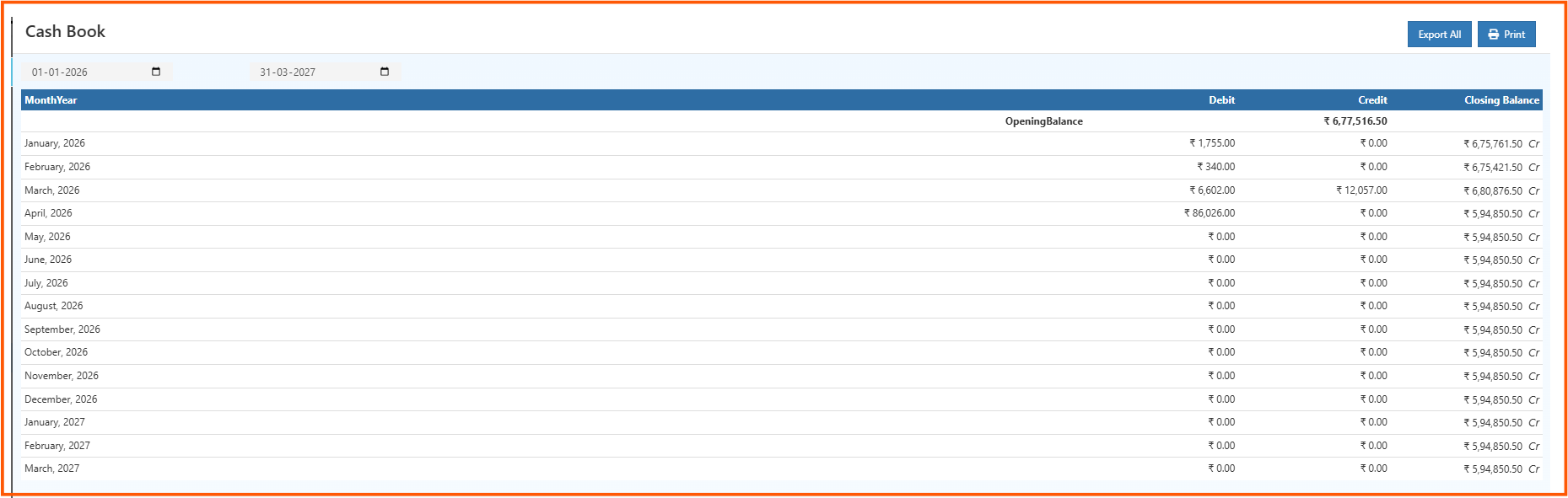
    Once executed, the system displays all cash transactions within the specified time period.

    Information Displayed in the Cash Book

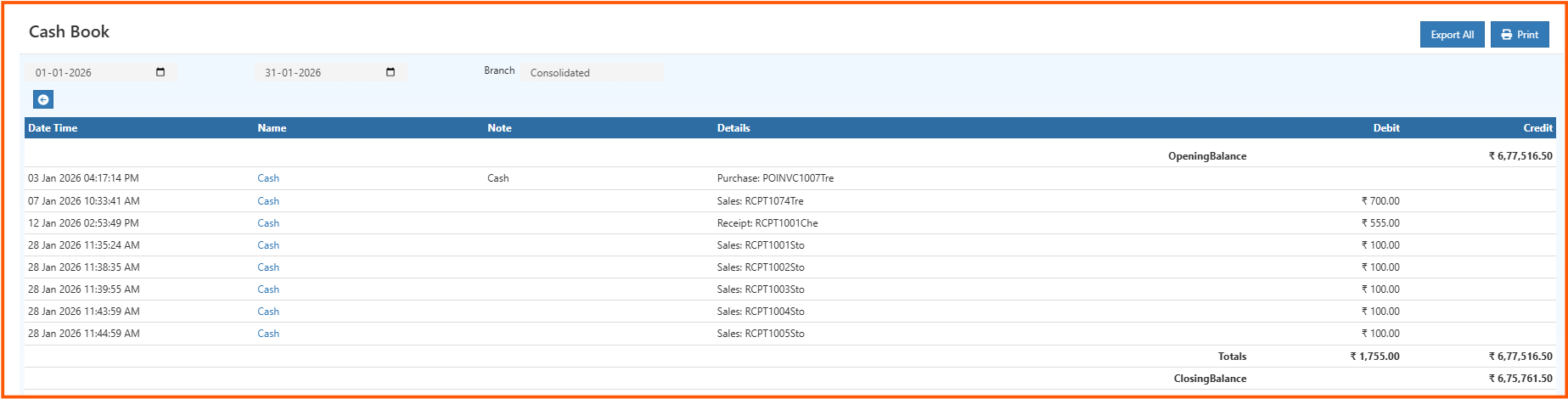
    Each entry in the Cash Book provides a detailed view of a cash transaction, including:

    • Transaction date
    • Voucher type (Receipt, Payment, Journal, Adjustment, etc.)
    • Reference or voucher number
    • Ledger accounts involved
    • Cash received amount
    • Cash paid amount
    • Narration or additional notes

    The closing balance of the cash account is also displayed, helping verify available cash at any point.

    Types of Cash Book Entries

    Cash Receipts

    These represent incoming cash transactions, such as:

    • Sales collected in cash
    • Customer advance payments
    • Refunds received
    • Other cash deposits or collections

    Cash Payments

    These represent outgoing cash transactions, including:

    • Supplier or vendor payments
    • Operating expenses
    • Salary payments
    • Other cash withdrawals

    The Cash Book ensures both receipt and payment entries are posted in a structured and auditable format.

    Filtering and Data Refinement

    The Cash Book offers filter options that allow users to isolate and review specific entries. Filters can be applied based on:

    • Date or date range
    • Voucher category
    • Ledger account
    • Transaction reference number

    These filters support targeted analysis, such as viewing only cash payments for a specific period or reviewing cash movement against a particular ledger.

    Cash Balance Verification

    One of the primary functions of the Cash Book is validating cash balance. It allows businesses to:

    • Compare system cash balance with physical cash on hand
    • Detect missing or incorrect entries
    • Identify duplicate postings or unrecorded payments
    • Ensure the business follows proper financial control

    If the closing balance does not match expected cash figures, further inspection can be carried out through ledger statements, transaction drill-down, or supporting documents.

    Drill-Down Access

    Transactions in the Cash Book may permit drill-down access to source vouchers or invoices. This capability supports:

    • Audit review
    • Expense validation
    • Receipt confirmation
    • Month-end reconciliation
    • Detailed examination of payment or receipt entries

    This ensures that every amount posted in the Cash Book can be traced back to a proper supporting record.

    Business Use Cases

    Daily Cash Monitoring

    Provides instant clarity on the day's cash transactions and ensures no inflow or outflow is missed.

    Operational Spending Control

    Helps track cash expenses and prevents overspending by maintaining real-time visibility into cash balance.

    Audit and Compliance

    Organizes cash transactions in a structured, report-ready format, making compliance checks easier.

    Liquidity Analysis

    Supports quick evaluation of cash availability needed for:

    • Purchases
    • Operational expenses
    • Financial commitments

    Fraud Prevention

    A clean, consistent Cash Book reduces the risk of unrecorded or unauthorized cash movement.

    Export and Documentation

    Depending on system configuration, the Cash Book can be exported for:

    • Accounting review
    • Compliance reports
    • Auditing purposes
    • Record keeping

    Exporting helps maintain long-term official documentation of cash movement.

    Relationship with Other Reports

    • Ledger: shows account-wise impact of cash transactions
    • Journal Register: groups entries based on voucher type
    • Day Book: shows all transactions including cash and non-cash
    • Trial Balance: validates debit and credit totals system-wide
    • Financial Statements: high-level view of cash position and overall business health

    Accurate Cash Book posting ensures consistency across all dependent financial reports.

    Advantages of the Cash Book

    • Continuous and transparent tracking of cash movement
    • Helps maintain accurate cash balance at any point
    • Supports error detection before affecting major financial reports
    • Essential for financial control, reconciliation, and auditing
    • Improves decision-making by providing real-time liquidity awareness
    • Builds accountability and traceability of cash transactions

    Conclusion

    The Cash Book is essential in maintaining accurate and controlled financial operations. By providing a chronological, detailed record of cash receipts and payments, it ensures that cash balances remain reliable, auditable, and aligned with business accounting standards. It forms the backbone of cash management and supports critical financial reporting across the organization.

    In this article
    Back to top _includes/footer.html
    © 2019–2026 Jeyan Technologies Private Limited • www.o2vend.com • Create your own store