Stock Ageing Report in O2VEND
The Stock Ageing Report in O2VEND helps track how long products stay in inventory. It gives a clear view of stock ageing, making it easier to manage slow-moving items and improve stock planning.
Inventory is grouped into ageing periods like 0–30, 30–60, 60–90, and 90+ days, along with quantity and value for each range.
This report helps businesses:
- Identify slow or non-moving stock
- Improve purchasing decisions
- Reduce excess inventory and holding costs
- Manage warehouse space better
- Support audit and financial tracking
How to view the Stock ageing Report
- Open Back Office
- Click Reports Section or use shortcut key (Alt+R) the reports section willbe open.
- Click Stock/Location Summary to view the report.
- The Stock/Location Summary will be shown for the current date.
- Change Start Date and End Date.
- The report will be automatically refreshed with the values for new dates selected.
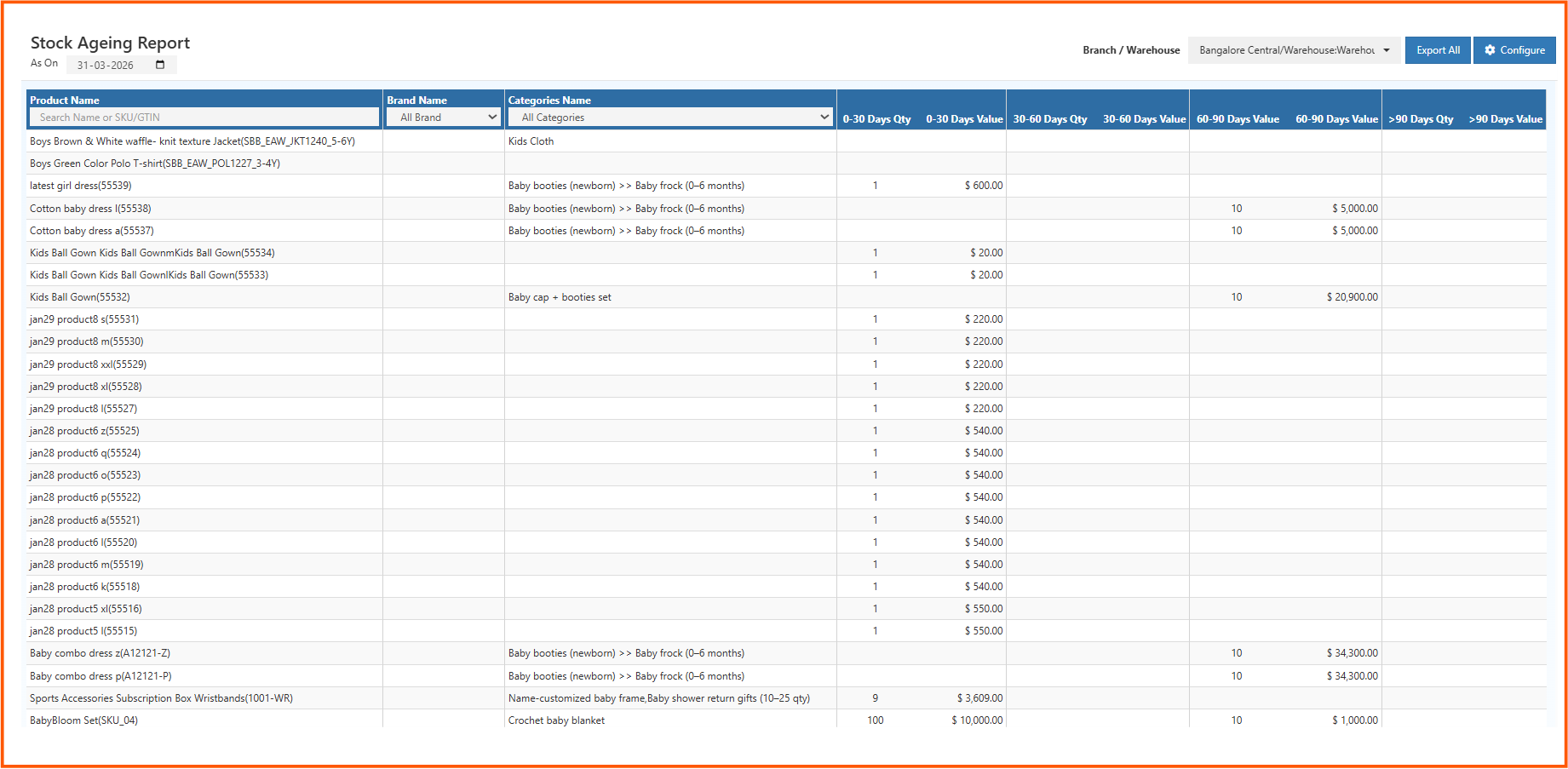
The main goal of this report is to show how long each product has been in stock. This helps teams take timely action, avoid overstocking, and keep inventory moving efficiently.
1. Filters & Parameters
Filters refine stock ageing results to provide precise analytical insights.
Product Search
Filters the report by:
- Product name
- SKU code
- GTIN / Barcode
Ideal for isolating individual products in large catalog environments.
Brand Filter
Displays ageing values by brand.
Useful for evaluating:
- Brandwise stock rotation
- Vendor efficiency
- Ageing trends for specific product families
Category Filter
Supports multi-level category segmentation:
Main Category → Subcategory → Sub-subcategory
Provides clarity on category-level ageing behavior, aiding strategic assortment planning.
Branch / Warehouse Selector
Displays ageing results specific to:
- Individual branches
- Central warehouses
- Online vs. offline storage locations
Warehouse-level ageing prevents mixing of stock timelines across locations.
2. Report Data Columns – Full Professional Explanation
Each column contributes to accurate valuation and ageing segmentation.
Product Name
Represents the registered product name from the inventory master.
Brand Name
Indicates the associated brand of the product.
Assists in brand-level forecasting, vendor returns, and clearance planning.
Categories Name
Shows the category hierarchy mapped to the product.
Useful for analysing ageing patterns within entire product groups.
3. Ageing Buckets – Detailed Insights (Qty & Value)
Ageing buckets divide inventory into clear time-based segments.
Each bucket contains:
- Qty → The number of units in that age group
- Value → Total cost value of those units
Buckets display as follows:
0–30 Days
Represents newly added stock.
Ideal for regular rotation and standard sales cycles.
30–60 Days
Displays moderately aged stock.
May indicate slower movement for seasonal or less popular items.
60–90 Days
Represents significantly aged stock.
Requires close monitoring due to potential storage and holding costs.
> 90 Days
Critical segment indicating:
- Dead stock
- Stagnant inventory
- Possible obsolescence
- High capital blockage
Items in this category usually need immediate clearance strategies.
4. Age Bucket Configuration
The Configuration Panel allows customization of ageing ranges.
Default setup: First Quarter: 0 → 30 days Second Quarter: 30 → 60 days Third Quarter: 60 → 90 days Fourth Quarter: > 90 days
5. Export Features
The Export All option generates a downloadable file containing:
- Complete ageing data
- Warehouse-level breakdown
- SKU-level valuation
- Category-wise summaries
Benefits include:
- Integration into accounting audits
- Independent financial analysis
- Vendor performance evaluation
- Archival for compliance and records
6. Advanced Business Insights from Ageing Data
Slow-Moving Stock Detection
Ageing segments (especially 60–90 and 90+) help identify stock needing promotional or clearance actions.
Stock Valuation & Financial Health
Ageing determines asset value accuracy for financial statements and audits.
Warehouse Efficiency Improvement
Aged inventory occupies valuable storage space.
Ageing data guides warehouse optimization and shelf allocation.
Strategic Purchase Planning
Ageing trends indicate:
- Products that should be reordered less
- Products needing limited quantities
- High-risk stock groups
Inventory Turnover Enhancement
Reducing >90-day ageing improves overall turnover ratio, benefiting operational cash flow.
7. Industry-Specific Use Cases
Jewellery & Fashion
Trend-based industries rely heavily on ageing to prevent outdated stock.
Electronics
Ensures products do not lose value due to rapid technological shifts.
FMCG & Supermarkets
Supports FEFO (First Expired First Out) planning and expiry management.
Manufacturing
Tracks ageing of raw materials, components, and finished goods.