Stock Movement Summary Report | Real-Time Stock Ageing & Inventory Tracker
The Stock Movement Summary Report in O2VEND gives you a clear snapshot of inventory movement for every product — showing opening stock, inward, outward, and closing balance in one view.
It helps you quickly identify fast-moving, slow-moving, and non-moving stock to make better inventory decisions.
Why Use It?
- Track opening, inward, outward, and closing balances per product
- Spot slow-moving or dead stock before it becomes a problem
- Plan purchases based on actual movement data
- Simplify stock audits and reconciliation
- Understand demand trends across your product range
Automate Reports & Get Email Alerts
Set up scheduled reporting in O2VEND to receive inventory, sales, and stock movement summaries directly in your email — no manual downloads needed.
How to Access Stock Movement Summary in O2VEND
Navigation Path:
O2VEND Backoffice → Reports → Inventory Reports → Stock Movement Summary
The interface is structured for quick access to report tools, filters, and data grids.
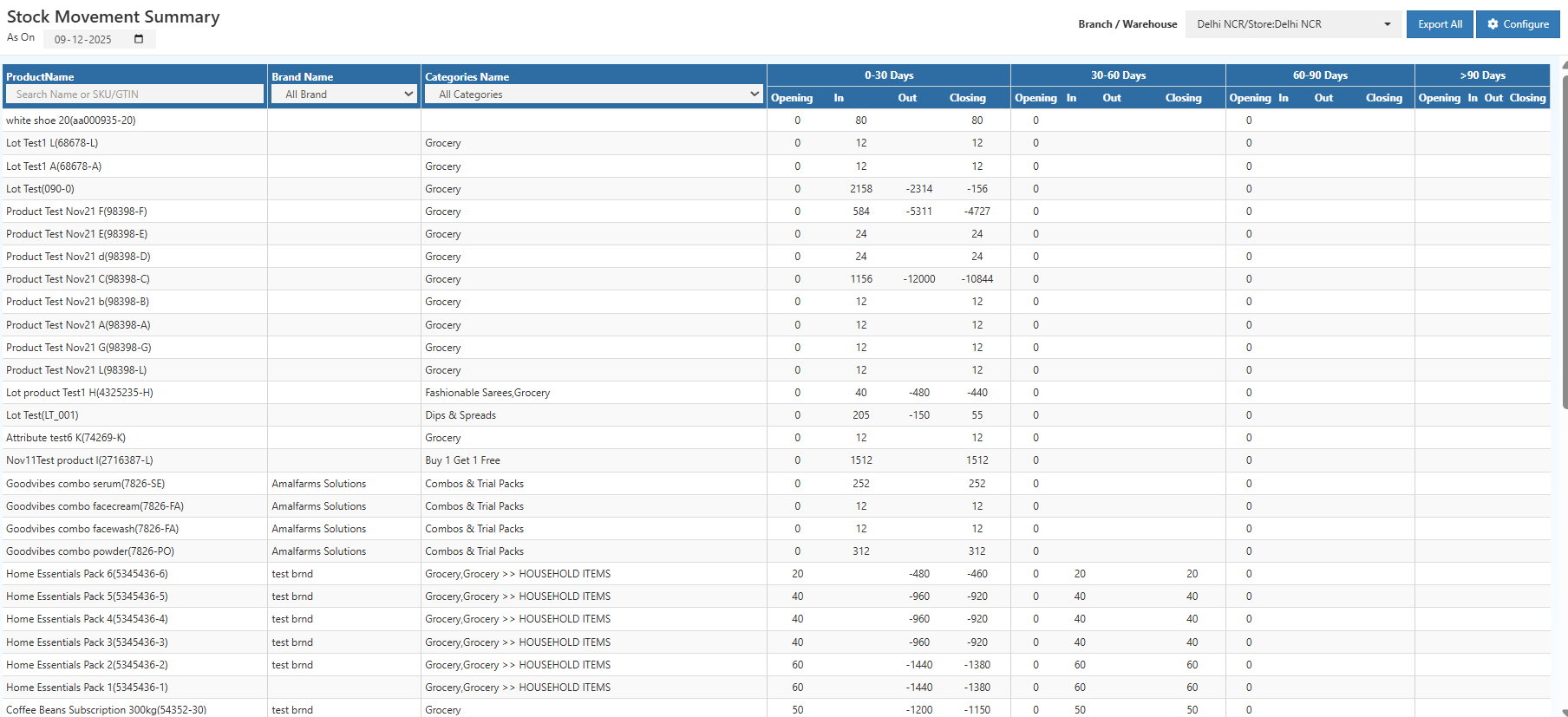
Options Section | Configure Stock Report in O2VEND
The Options section allows quick management of key actions:
- As On Date: Sets the reference date for stock calculation; ageing and movement data are computed accordingly
- Branch / Warehouse Selector: Filter stock movement for a specific branch or warehouse
- Export All Button: Download the full report in Excel or PDF for offline analysis
- Configure Button: Customize report layout, visible columns, and display settings
Product Filters | Narrow Inventory Data
Filters help focus on specific items:
- Product Search: Search by product name, SKU, or GTIN
- Brand Filter: Display stock movement for selected brands only
- Category Filter: Narrow results by product category or subcategory
Filters make it easier to analyze inventory trends and manage warehouse efficiency.
Stock Data Grid | Real-Time Stock Ageing Overview
The Stock Data Grid shows inventory in tabular format.
Product Details
- Product Name – Identifies each item
- Brand Name – Provides brand segmentation
- Category Name – Groups products by category for analysis
Ageing Analysis
Stock is segmented into ageing buckets:
- 0–30 Days
- 30–60 Days
- 60–90 Days
- >90 Days
Each bucket shows:
- Opening Stock – Inventory at the start of the period
- Inward Stock – Quantity added
- Outward Stock – Quantity issued or sold
- Closing Stock – Inventory remaining
This helps identify fast-moving, slow-moving, and obsolete inventory, optimize replenishment, and improve warehouse performance.
How to Track Inventory
- Open the Stock Movement Summary screen
- Select the As On Date
- Choose the relevant Branch
- Apply optional filters: Product Name, Brand, or Category
- Review stock levels across ageing buckets
The system automatically calculates stock movement and ageing, providing real-time insights into inventory flow.
Understanding Stock Values | Inward & Outward Movements
- Positive Values: Available stock
- Negative Values: Stock adjustments or pending corrections
- Zero Values: No stock movement during the period
Repeated zero or negative stock in >90 Days indicates slow-moving or obsolete inventory needing attention.
Benefits of Stock Movement Report | Optimize Warehouse & Inventory
- Track Ageing Inventory – Quickly identify slow-moving or stagnant products
- Plan Replenishment – Highlight fast-moving items for timely procurement
- Detect Overstock – Prevent excess stock and reduce carrying costs
- Audit & Compliance – Maintain accurate stock records for verification
Prevent Stockouts & Overstocks with Smart Forecasting
Use simple forecasting tools in O2VEND to balance demand and supply, reduce stockouts, and eliminate excess inventory — keeping stock levels just right.
Operational Benefits
- Higher inventory turnover
- Lower carrying and holding costs
- Efficient warehouse utilization
- Improved supply chain and procurement planning
- Better financial forecasting
Related O2VEND Reports | Ledger, Sales, Cash & Inventory Insights
- Ledger Report – Track account-level entries
- Day Book – Daily transaction summary
- Cash Book Report – Track daily cash accurately
- Outstanding Report – Monitor receivables & payables
- Receipt Report – Track all receipts for sales & payments
- Sales Book – Monitor daily sales transactions
- Location Summary – Overview of stock per location
Optimize Warehouse & Inventory with O2VEND | Real-Time Stock Insights
Optimize Warehouse & Inventory with O2VEND
Get real-time stock visibility, track ageing, and generate GST-ready inventory reports effortlessly.
Track Stock & Optimize Inventory
Use the Stock Movement Summary Report in O2VEND to monitor stock ageing, track inward/outward movements, and optimize inventory across warehouses in real time.