O2VEND Retail ERP
  • Product
  • Solutions
  • Resources
    • Blog
    • Community
    • Partnership
    • Find Partner
    • Developer
  • Pricing
  • Docs
    • Getting Started
      • Channels
        • Sales Channel
        • O2VEND to O2VEND Channel
        • Shopify Integration Guide
    • Commerce
      • Ecommerce
      • POS
      • Agent App
      • CMS
      • Themes & Apps
      • Apps
        • Sales Navigator
    • Operations
      • OMS
      • WMS
      • O2C
      • Vendor Portal
      • Supplier Portal
    • Back Office
      • Accounting
      • Reports
      • PIM
      • Communication
      • Back Office
Search Results for

    Show / Hide Table of Contents
    • Reports and Analytics
    • Order Reports
      • Web Orders Progress Report
      • Back Order Items Report
      • Purchase Order Pending Item Report
      • Sales Order Pending Item Summary Report
      • Sales Shipping Status Report
      • Sales Order Summary
      • Sales Order Progress Report
      • Purchase Order Progress Report
      • Sales Order with Product Line Item Report
      • Sales Order Packing Sheet Report
      • Back Order Report
      • Purchase Order Summary
      • Sales Order Shipment Report
      • Sales Order Shipping Address Report
      • Sales Order Pending Item Reports
      • Unpaid Orders
    • Sales/Purchase Reports
      • Sales Invoice Report
      • Sales Invoice Summary
      • Sales Items Summary
      • Purchase Invoice Report
      • Purchase Invoice Summary
      • Purchase Items Summary
      • Receipt Report
      • Daily Settlement Report
      • Contribution Margin Report
      • Agent Sales Report
      • Agent Report
      • Employee Sales Report
      • Employee Report
      • Employee Product Sales & Commission Report
    • Supplier Reports
      • Supplier Report
      • Supplier Purchase Report
      • Supplier Detail Report
    • Inventory Reports
      • Stock Summary
      • Stock Valuation Summary
      • Stock Ageing Report
      • Location Summary
      • Stock Ledger Report
      • Stock/Location Summary
      • Stock Movement And Valuation Summary
      • Stock Movement Summary Report
      • Stock Summary Detail
    • Products
      • Sold Product Categories
      • Product Category Summary
      • Product Sale Summary
      • Category Sale Summary
      • Brand Sale Summary
      • Reordering Stock Summary
      • Price Movement
      • Product Seasonal Demand
      • Product Stock Analysis Report
      • Stock Projection Report
      • Low Stocks
    • Pos Reports
      • Cash Register Summary
      • Current Cash Registers
    • Account Reports
      • Day Book
      • Ledger
      • Cash Book
      • Sales Books
      • Purchase Books
      • Daily Sales and Payment Report
      • Balance Sheet
      • Profit and Loss Report
      • Trial Balance
    • Miscellaneous Reports
      • Output Detailed Tax Report
      • Output Tax Report Summary
      • Account Receivable Report
      • Gross Profit Report
      • Daily Tax Report
      • GSTR-1 Report
      • External API Logs
      • Benefit Usage
      • Offers Usage
      • Coupon Usage
      • Channel Report
      • Configuration Change History
      • VisitLog

    Sales Invoice Report

    The Sales Invoice Report provides a consolidated view of all sale invoices across different channels (physical stores, POS, back office, and webstore). It helps businesses track payments, monitor cash flow, and analyze sales performance over a selected date range.

    The report can be filtered by:

    • Date Range (Start Date – End Date)
    • Branch (e.g., Consolidated or specific branch)
    • Channel (e.g., Consolidated, POS, Online Store, BackOffice)

    It is divided into two main sections:

    1. Payments Summary
    2. Sales Summary

    Payments Summary Section

    The Payment Summary shows the total payments received by method (Cash, Card, Credit Sale) for the selected period.

    Example values:

    • Cash: $10,40,737.00
    • Card: $1,107.00
    • Credit Sale: $21,503.00
    • Total: $10,63,347.00

    Additionally, a Cash & Cash Equivalent section is displayed, which combines cash and card totals:

    • Cash: $10,40,737.00
    • Card: $1,107.00
    • Total: $10,41,844.00

    This breakdown helps businesses quickly understand liquidity and outstanding credit sales.


    Sales Summary Section

    The Sales Summary lists all invoices created between the selected dates, across all channels. Each entry includes:

    • Date & Time of invoice creation
    • Invoice Number & Channel (e.g., BackOffice, POS, Online Store)
    • Payment Details (Cash, Card, Credit Sale, or $0.00 for unpaid)
    • Party/Customer Group (e.g., Shop Admin, specific customer email)
    • Created By / Sales Employee
    • Amount

    This section provides granular visibility into each transaction.


    How to View the Sales Invoice Report

    1. Open Back Office.
    2. Navigate to the Reports section (shortcut: Alt+R).
    3. Select Sales Report.
    4. By default, the report shows the current date’s summary.
    5. Adjust the Start Date and End Date to view historical data.
    6. The report refreshes automatically with updated values.
    7. Use Branch and Channel filters to refine the report further.
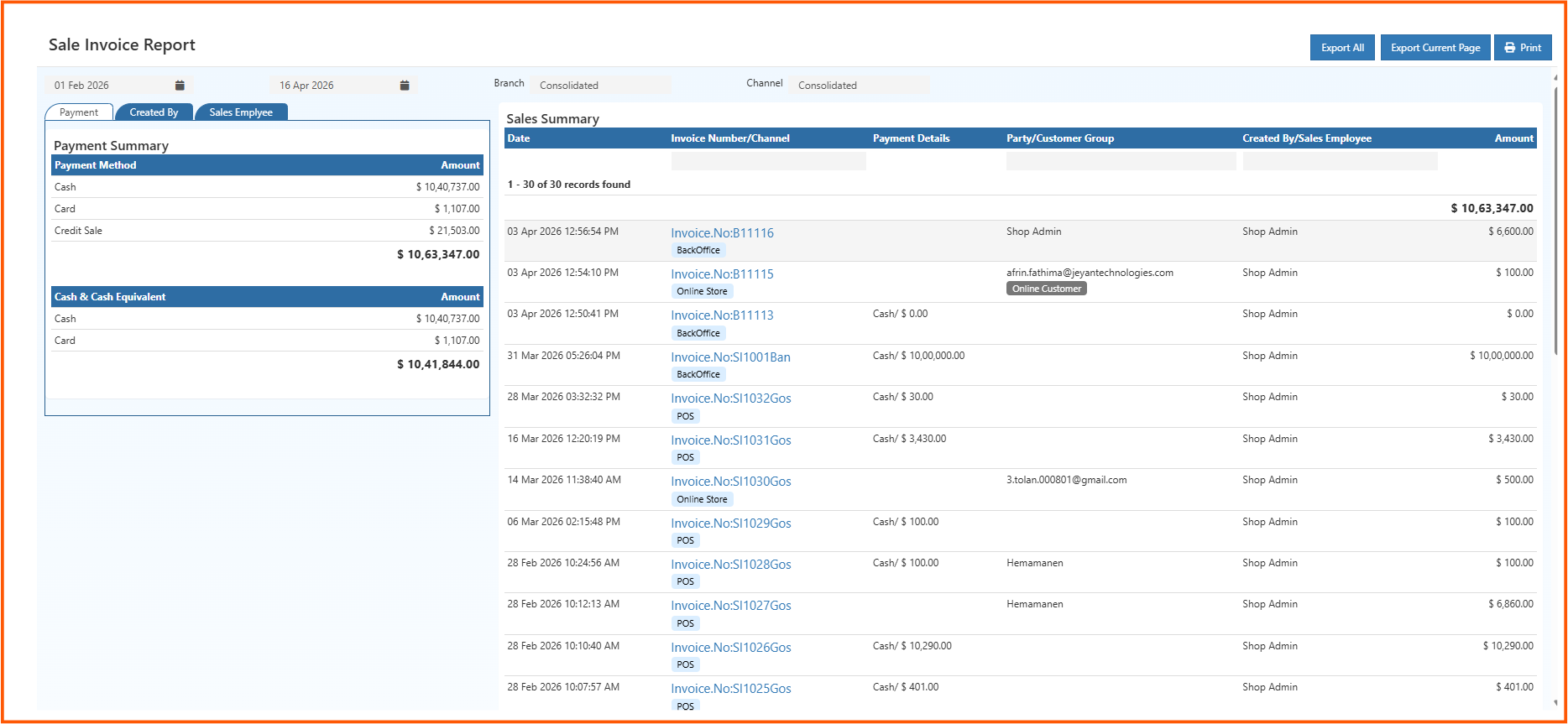
    salesinvoicereport


    Exporting & Printing Options

    At the top right of the report, you’ll find:

    • Export All → Export the entire report into a CSV file.
    • Export Current Page → Export only the visible page of data.
    • Print → Generate a printable version of the report.
    Tip

    Use Export All when you need a complete dataset for analysis, and Export Current Page for quick reviews or sharing specific transactions.

    In this article
    O2VEND

    O2VEND Help Center for Ecommerce, Back Office, POS, Agent App, PIM, OMS, WMS, Accounting, O2C, CMS, and ERP Reports workflows.

    Get Demo Contact Sales

    Product Docs

    Ecommerce Back Office Point of Sale Agent App Warehouse (WMS)

    Module Docs

    PIM OMS Accounting Order to Cash (O2C) CMS

    Resources

    Ecommerce POS Back Office Agent App Restaurant POS Integrations

    Community and Company

    Blog Community Partnership Find Partner Developer Pricing

    © 2019-2026 Jeyan Technologies Private Limited. All rights reserved.

    Privacy Policy • Terms of Service • Cancellation & Refund