Retail Seasonal Demand Report
The Retail Seasonal Demand Report in O2VEND Back Office helps businesses understand how product demand changes across different seasons. It highlights peak, normal, and off-season sales trends, enabling better stock planning and ensuring products are available when customers need them most.
What is Product Seasonal Demand?
Not all products sell at the same pace throughout the year. Seasonal events like Christmas, Diwali, Black Friday, Summer, and Winter create fluctuations in demand.
This report predicts future sales by analyzing past seasonal patterns, helping businesses prepare inventory accordingly.
Key Features
- View product sales during peak, normal, and off-season
- Identify which products sell more during peak demand
- Compare product performance across different seasons
- Track maximum sales quantities for better forecasting
How to Access the Report
- Open Back Office
- Go to the Reports section (shortcut: Alt + R)
- Select Product Seasonal Demand
- The report displays the average seasonal demand of your store
- Apply filters for branch, brand, category, SKU, or product name
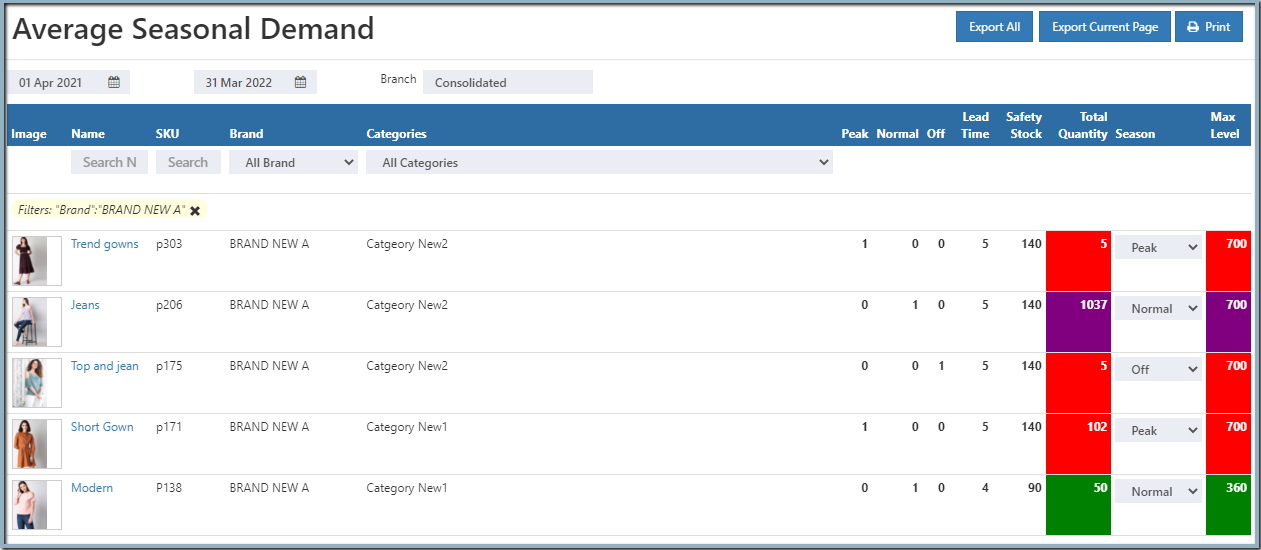
Report Insights
- Peak Season → Products with highest demand
- Normal Season → Regular sales levels
- Off Season → Low or minimal demand
If stock levels are insufficient, the report highlights quantities in different colors, making it easy to spot shortages.
Adding Lead Time & Safety Stock
You can configure lead time and safety stock in Back Office Settings:
- Open Back Office
- Go to Settings (shortcut: Alt + S)
- Navigate to Branch/Location/Stock
- Open Stock Levels
- Enter values for Lead Time and Safety Stock
- Lead Time → Number of days between placing an order and receiving items
- Safety Stock → Extra stock held to prevent shortages
Adding Special Attributes to Products
To define seasonal attributes for products:
- Open Back Office
- Go to the Catalog section
- Select Product → Create or Edit
- Open the Attributes tab
- Add attributes for Peak Season, Normal Season, Off Season
- Assign values (e.g., enter month number → November = 11)
Export Options
Tip
Use Export All or Export Current Page to download the report in CSV format for further analysis.
Benefits
- Anticipates seasonal demand shifts
- Prevents stockouts during peak seasons
- Reduces excess inventory in off seasons
- Improves forecasting and purchasing decisions
- Supports smooth operations during seasonal events