Reordering Stock Summary
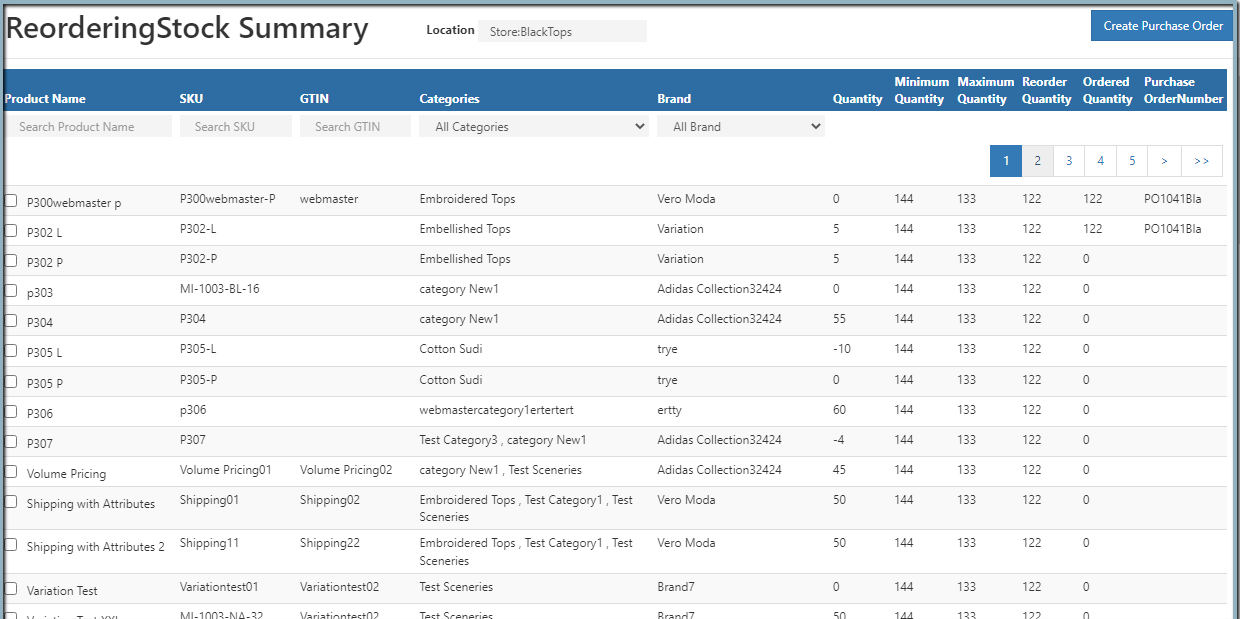
The Reordering Stock Summary Report provides a clear overview of products that need replenishment based on their current stock levels. It helps warehouse and inventory managers ensure that stock is maintained at optimal levels and prevents shortages.
What the Report Shows
- Product details: Name, identification, brand
- Stock levels: Current quantity vs. minimum/reorder levels
- Reorder information: Required units to reach reorder level
- Additional data: Location, branch, and lead time
When a product’s stock falls below its minimum or reorder level, it is flagged in this report.
Key Features
- Displays products with stock below minimum quantity
- Allows users to create a Purchase Order directly from the report
- Updates ordered quantity and purchase order number once saved
- Provides branch and location filters for targeted analysis
How to view the ReorderingStock Summary
- Open Back Office
- Click Reports Section or use the shortcut key (Alt+R).
- Click ReorderingStock Summary to view the report. ( Inventory section)
- Reordering Stock Summary will be displayed on the current date.
- Use the fillers based on the branches, location and product name.
Export Options
Tip
Use Export All or Export Current Page to download the report as a CSV file for further analysis.