O2VEND Retail ERP
  • Product
  • Solutions
  • Resources
    • Blog
    • Community
    • Partnership
    • Find Partner
    • Developer
  • Pricing
  • Docs
    • Getting Started
      • Channels
        • Sales Channel
        • O2VEND to O2VEND Channel
        • Shopify Integration Guide
    • Commerce
      • Ecommerce
      • POS
      • Agent App
      • CMS
      • Themes & Apps
      • Apps
        • Sales Navigator
    • Operations
      • OMS
      • WMS
      • O2C
      • Vendor Portal
      • Supplier Portal
    • Back Office
      • Accounting
      • Reports
      • PIM
      • Communication
      • Back Office
Search Results for

    Show / Hide Table of Contents
    • Reports and Analytics
    • Order Reports
      • Web Orders Progress Report
      • Back Order Items Report
      • Purchase Order Pending Item Report
      • Sales Order Pending Item Summary Report
      • Sales Shipping Status Report
      • Sales Order Summary
      • Sales Order Progress Report
      • Purchase Order Progress Report
      • Sales Order with Product Line Item Report
      • Sales Order Packing Sheet Report
      • Back Order Report
      • Purchase Order Summary
      • Sales Order Shipment Report
      • Sales Order Shipping Address Report
      • Receipt Summary
      • Sales Order Pending Item Reports
      • Unpaid Orders
    • Sales/Purchase Reports
      • Sales Invoice Report
      • Sales Invoice Summary
      • Sales Items Summary
      • Purchase Invoice Report
      • Purchase Invoice Summary
      • Purchase Items Summary
      • Receipt Report
      • Daily Settlement Report
      • Contribution Margin Report
      • Agent Sales Report
      • Agent Report
      • Employee Sales Report
      • Employee Report
      • Employee Product Sales & Commission Report
    • Supplier Reports
      • Supplier Report
      • Supplier Purchase Report
      • Supplier Detail Report
    • Inventory Reports
      • Stock Summary
      • Stock Valuation Summary
      • Stock Ageing Report
      • Location Summary
      • Stock Ledger Report
      • Stock/Location Summary
      • Stock Movement And Valuation Summary
      • Stock Movement Summary Report
      • Stock Summary Detail
    • Products
      • Sold Product Categories
      • Product Category Summary
      • Product Sale Summary
      • Category Sale Summary
      • Brand Sale Summary
      • Reordering Stock Summary
      • Price Movement
      • Product Seasonal Demand
      • Product Stock Analysis Report
      • Stock Projection Report
      • Low Stocks
    • Pos Reports
      • Cash Register Summary
      • Current Cash Registers
    • Account Reports
      • Day Book
      • Ledger
      • Cash Book
      • Sales Books
      • Purchase Books
      • Daily Sales and Payment Report
      • Balance Sheet
      • Profit and Loss Report
      • Trial Balance
    • Miscellaneous Reports
      • Output Detailed Tax Report
      • Output Tax Report Summary
      • Account Receivable Report
      • Gross Profit Report
      • Daily Tax Report
      • GSTR-1 Report
      • External API Logs
      • Benefit Usage
      • Offers Usage
      • Coupon Usage
      • Configuration Change History
      • VisitLog

    Sales Order Pending Item Summary Report

    The Sales Order Pending Item Summary Report in O2VEND provides a complete overview of all sales orders that are not yet fulfilled. This report helps analyze unprocessed items, pending quantities, and manage purchase requirements to maintain smooth operations.


    Purpose of the Report

    he report provides key insights for sales and inventory management. It assists in identifying items that are pending delivery or currently unavailable in stock.

    Key Objectives:

    • Inventory Monitoring: Displays pending quantities and item details across all sales channels.
    • Order Fulfillment: Helps track products awaiting dispatch or replenishment.
    • Procurement Support: Enables quick creation of purchase orders for pending items.
    • Business Insights: Provides brand- and category-wise pending summaries for better planning.

    Key Report Fields

    The Sales Order Pending Item Summary Report displays essential data to help track pending sales orders and manage inventory effectively. The report includes the following key columns:

    • Category: Identifies the product category for better organization and reporting.
    • Brand: Shows the brand name of the product to analyze brand-wise performance.
    • Product Name: Displays the specific product that has pending quantities in sales orders.
    • SKU: The Stock Keeping Unit, used for quick internal product identification.
    • GTIN: Global Trade Item Number for standardized barcode-based product tracking.
    • Current Quantity: Indicates how many units of the item are currently available in stock.
    • Pending Quantity: Represents the total quantity of items yet to be fulfilled from existing orders.
    • To Order Quantity: Suggests the number of units that need to be reordered to meet pending demand.
    • Expected Received Date: Shows when the stock is expected to arrive at the warehouse or store.
    • Select All: Allows selecting multiple products to perform bulk operations such as creating purchase orders.

    How to View the Sales Order Pending Item Summary Report

    1. Open Back Office.
    2. Navigate to Reports ? Order Reports.
    3. Click Sales Order Pending Item Summary.
    4. Use filters such as Branch, Category, Product Name, SKU, GTIN, and Brand Name to refine results.
    5. View or export the report as needed.

    Tip: Use Export All or Export Current Page to download the data in CSV format for analysis.
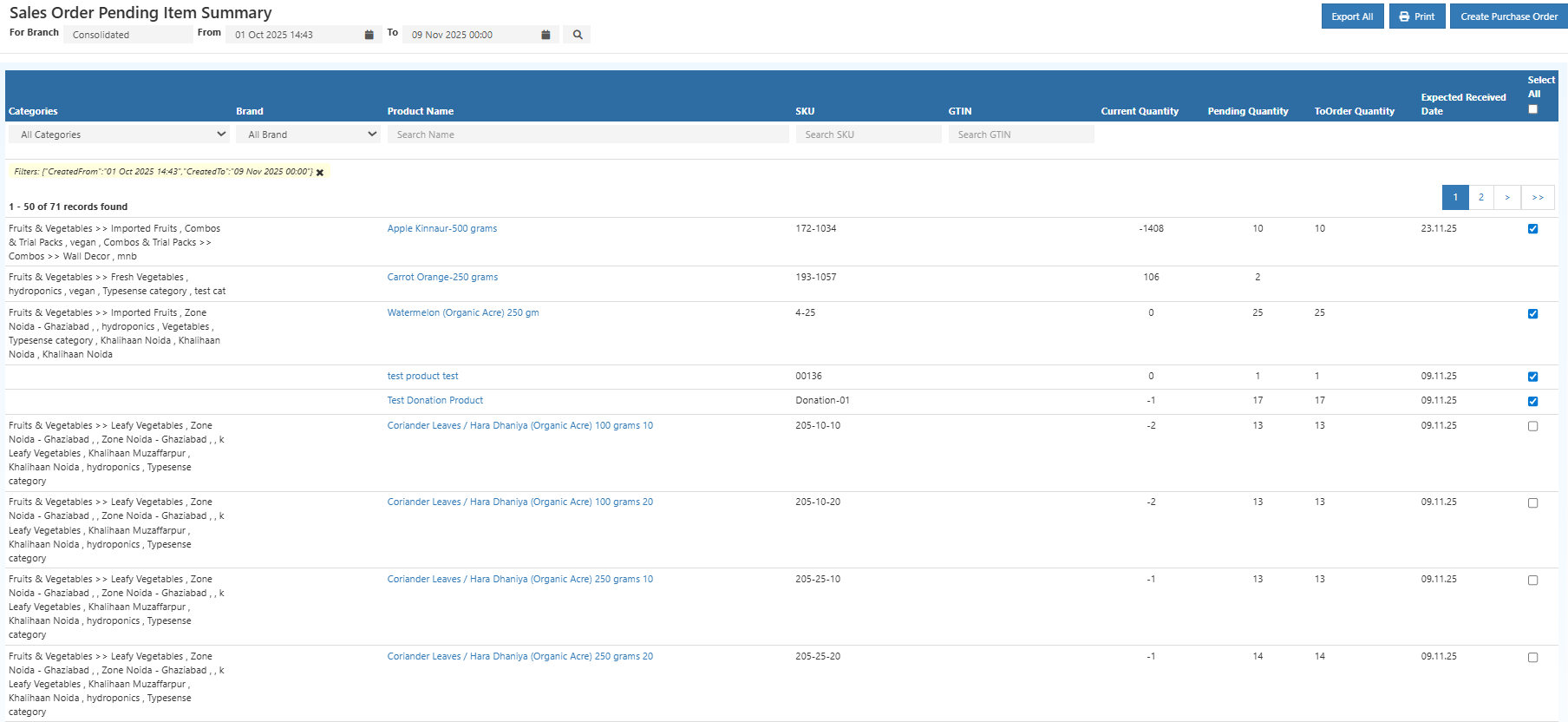
    Sales Order Pending Item Summary Report ---

    Create Purchase Order from Pending Items

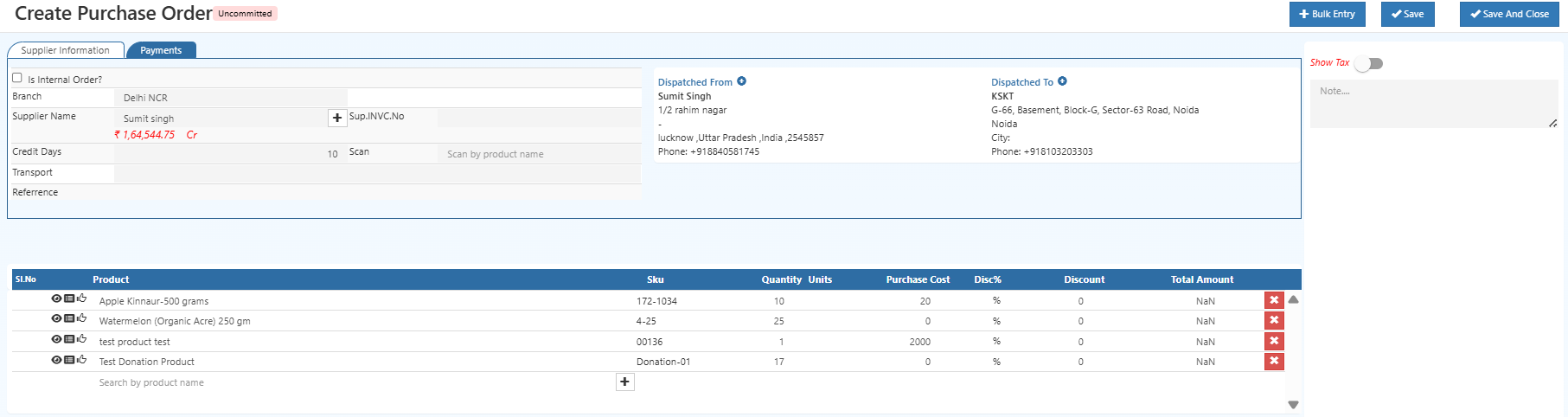
    Users can click the Create Purchase Order button to generate purchase orders directly for selected products.
    This feature simplifies replenishment and ensures timely fulfillment of pending sales orders.

    Steps:

    1. Select the products from the list that need to be reordered.
    2. Click on the Create Purchase Order button.
    3. The system automatically prepares a purchase order draft for selected products.
    4. Review and confirm the order to initiate procurement.

    This reduces manual entry and helps procurement teams act instantly on low-stock or pending sales orders. Sales Order Pending Item Summary Report
    Business Benefits

    • Reduces pending orders by identifying stock gaps early.
    • Enhances visibility across brands, categories, and product lines.
    • Improves procurement speed through the “Create Purchase Order” shortcut.
    • Increases customer satisfaction with faster order fulfillment.
    • Simplifies coordination between sales, warehouse, and purchasing teams.

    Example Use Case

    A store manager notices multiple pending orders for Brand X - T-shirt (SKU123). Using the report, they quickly generate a purchase order from the pending summary screen. This ensures timely restocking and uninterrupted order fulfillment.

    Related Reports

    • Back Order Indent Report
    • Purchase Order Pending Report

    In this article
    O2VEND

    O2VEND Help Center for Ecommerce, Back Office, POS, Agent App, PIM, OMS, WMS, Accounting, O2C, CMS, and ERP Reports workflows.

    Get Demo Contact Sales

    Product Docs

    Ecommerce Back Office Point of Sale Agent App Warehouse (WMS)

    Module Docs

    PIM OMS Accounting Order to Cash (O2C) CMS

    Resources

    Ecommerce POS Back Office Agent App Restaurant POS Integrations

    Community and Company

    Blog Community Partnership Find Partner Developer Pricing

    © 2019-2026 Jeyan Technologies Private Limited. All rights reserved.

    Privacy Policy • Terms of Service • Cancellation & Refund