Payment Methods Setup | Configure Web Store Payment Methods in O2VEND
Learn how to view and configure payment methods in O2VEND Online Store. This tutorial explains where to open the payment methods section, how to enable or disable payment options, and how to configure a payment gateway such as PhonePe.
What Is Payment Methods Setup?
The Payment Methods Setup section helps you manage the payment options available in your online store.
It is useful for:
- enabling or disabling payment methods
- configuring payment gateway settings
- offering multiple payment options to customers
- controlling checkout payment availability
- managing online store payment setup from one place
Navigation Path
Back Office -> Online Store -> Setup Payment Methods
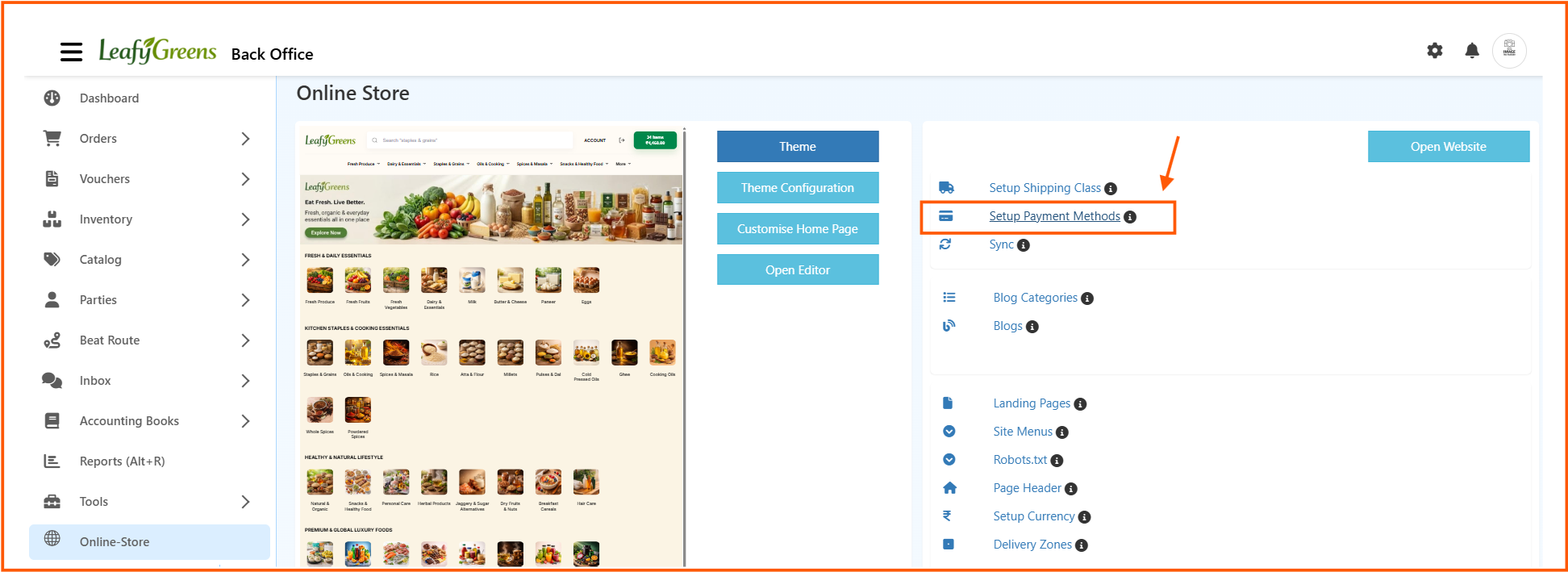
From the Online Store page, click Setup Payment Methods to open the payment methods screen.
Web Store Payment Methods Page
The Web Store - Payment Methods page shows all available payment methods for the selected channel.
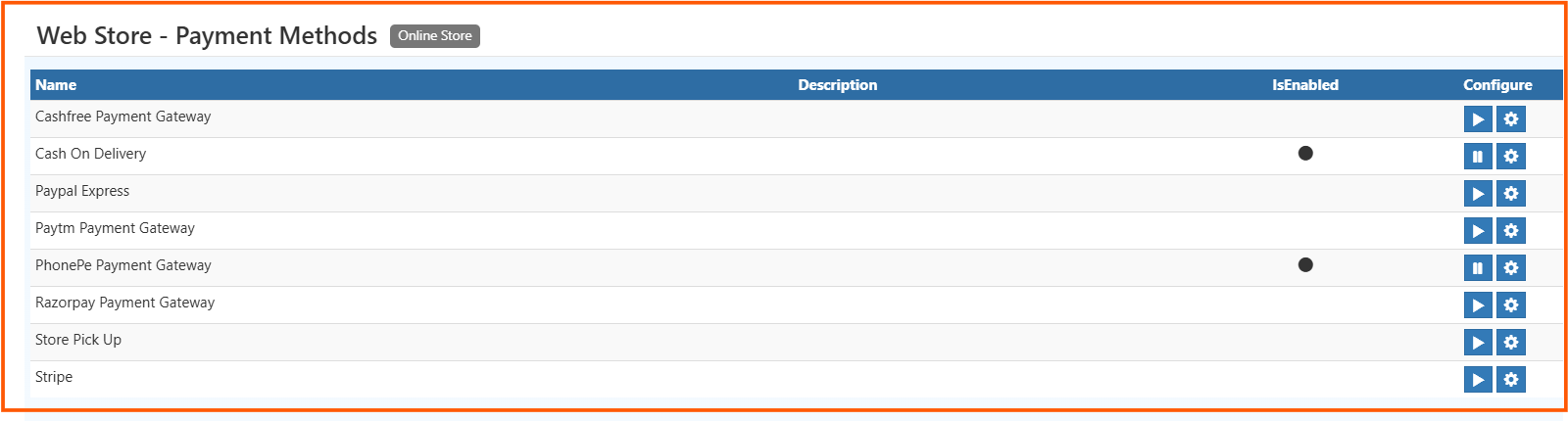
The list page includes columns such as:
- Name
- Description
- IsEnabled
- Configure
Common payment methods shown in the screen include:
- Cashfree Payment Gateway
- Cash On Delivery
- Paypal Express
- Paytm Payment Gateway
- PhonePe Payment Gateway
- Razorpay Payment Gateway
- Store Pick Up
- Stripe
From this page, you can:
- enable a payment method
- disable a payment method
- open the configuration screen using the settings icon
How to Configure Payment Methods
- Open Back Office
- Go to Online Store
- Click Setup Payment Methods
- View the list of available payment methods
- Enable or disable the required payment method
- Click the Settings icon to configure a gateway
- Enter the required gateway details
- Click Save
Payment Methods List Explained
Name
Shows the name of the payment method.
Description
Shows a short explanation about the payment option if available.
IsEnabled
Shows whether the payment method is currently enabled.
If a payment method is enabled, customers can use it during checkout.
Configure
The Configure column contains the settings icon used to open the payment gateway setup screen.
Example: PhonePe Settings
The PhonePe Settings screen is used to connect PhonePe payment gateway with your O2VEND store.
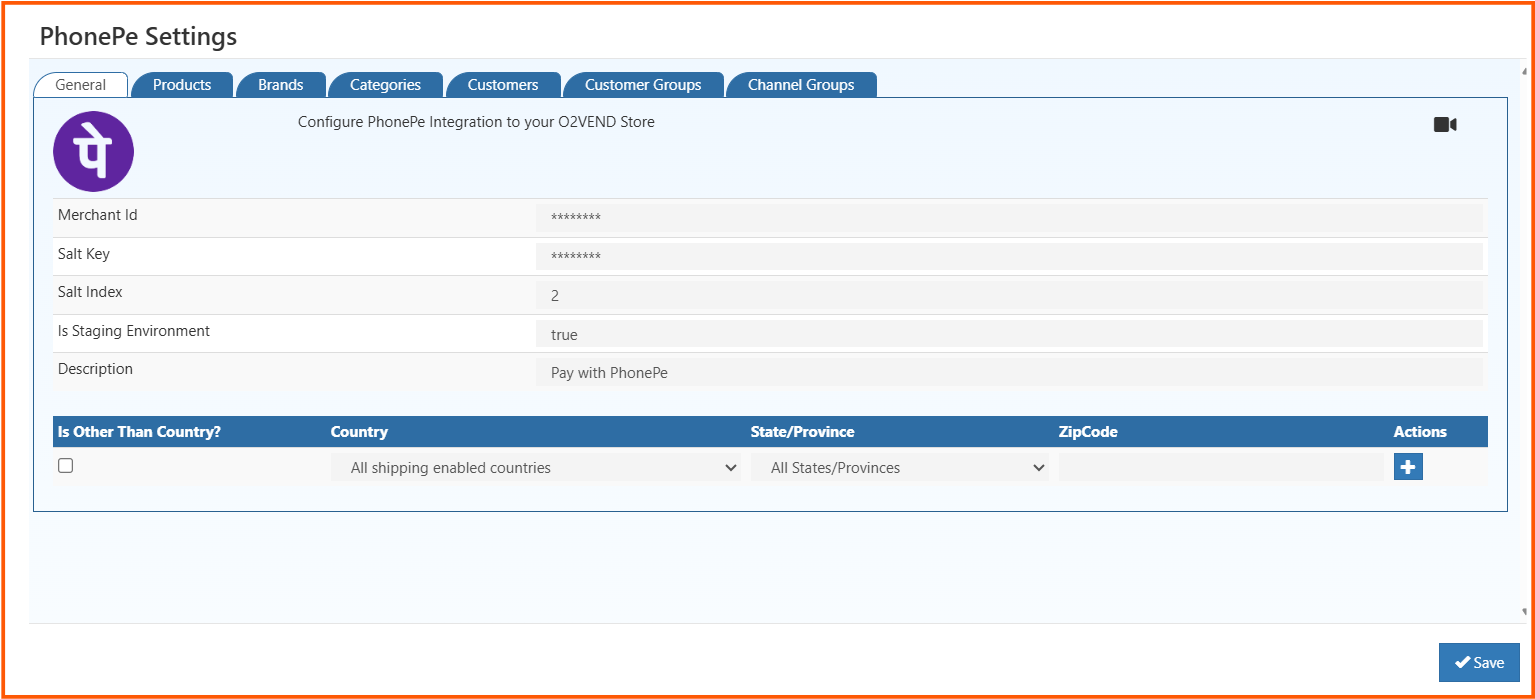
The screen includes multiple tabs such as:
- General
- Products
- Brands
- Categories
- Customers
- Customer Groups
- Channel Groups
These tabs help you configure both general gateway settings and related conditions if required.
PhonePe Settings Field Explanation
Merchant Id
Enter the merchant ID provided for your PhonePe account.
Salt Key
Enter the salt key used for secure gateway communication.
Salt Index
Enter the salt index value required for the integration.
Is Staging Environment
Set this to true when testing the integration in a staging or test environment.
Description
Enter the description shown for the payment method.
Example: Pay with PhonePe
Country
Select the country where this payment method should apply.
State/Province
Select the required state or province if location-based setup is needed.
ZipCode
Enter the zip code if you want to control payment availability by postal area.
Actions
Use the add action to include the selected location rule.
Save
After entering the required details, click Save to store the payment gateway configuration.
Benefits of Payment Methods Setup
Using the payment methods section in O2VEND helps you:
- offer multiple payment options to customers
- control which payment methods are active
- configure gateway settings easily
- support better checkout experience
- manage payment setup in an organized way