O2VEND Back Office Dashboard
The O2VEND Back Office dashboard gives you a single-pane view of the store's most important operational and sales metrics.
At the top of the dashboard, you can select the active Branch and Channel filters. These controls let you view consolidated figures or drill down into a specific branch or sales channel.
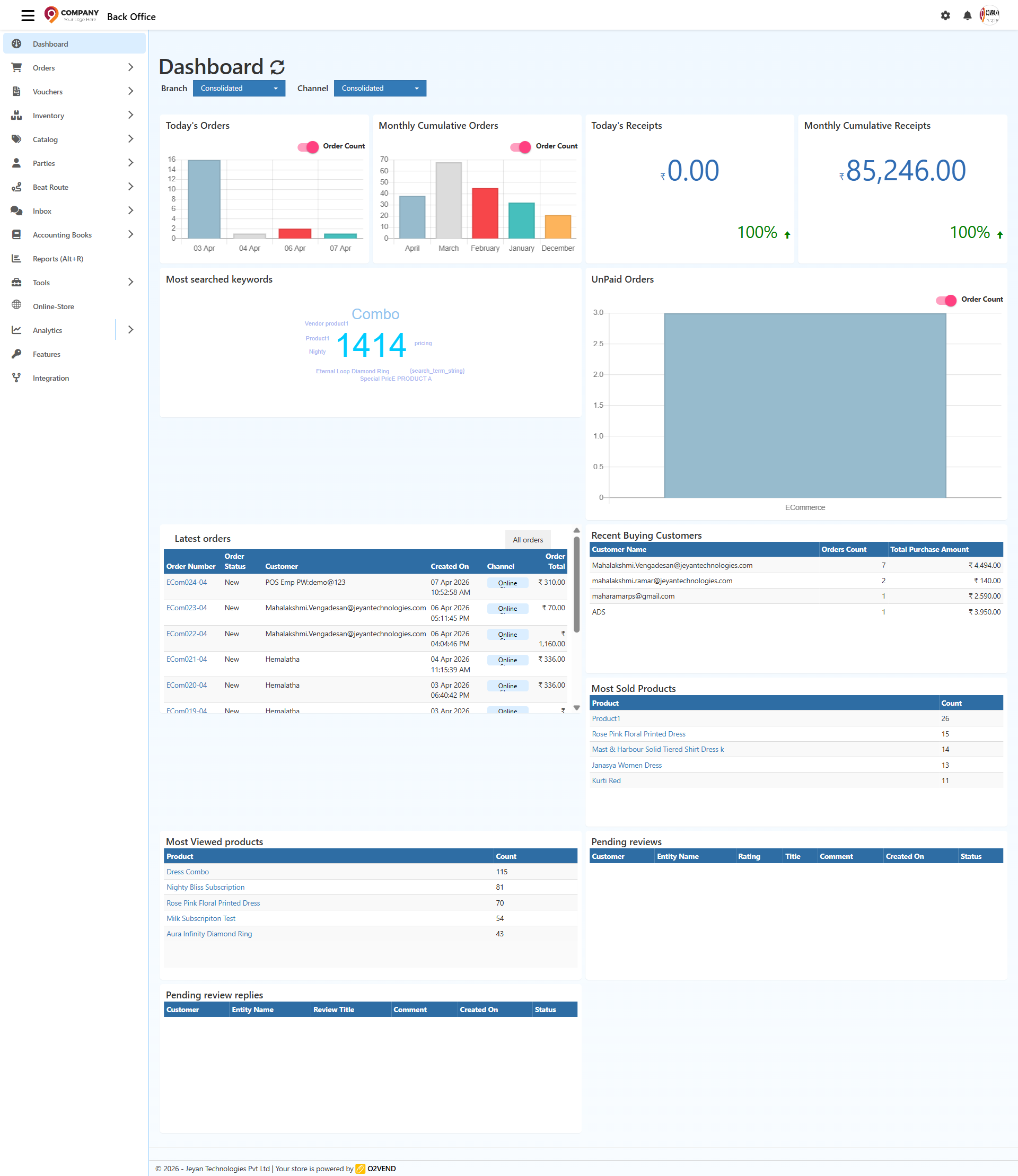
Dashboard Overview
The primary dashboard screen is divided into summary widgets and action panels:
- Today's Orders: A bar chart that shows order volume over the last few days. The chart is designed to help you compare daily order counts at a glance.
- Monthly Cumulative Orders: A month-by-month bar chart that displays cumulative order totals for the recent months. Use it to track order trends and identify peak months.
- Today's Receipts: A quick-value tile showing the total receipts collected today. This widget also shows the current performance trend.
- Monthly Cumulative Receipts: A larger value card that shows the total receipts for the current month, with a trend indicator to highlight progress.
- Most searched keywords: A keyword cloud that highlights the top search terms customers are using in the store.
- UnPaid Orders: A bar chart showing unpaid order volume by channel, helping you identify where follow-up is needed.
Sales and Customer Panels
Below the summary widgets are detailed tables and lists for the latest activity:
- Latest Orders: A live order list showing the most recent orders, including order number, status, customer, created date, channel, and order total.
- Recent Buying Customers: A table of customers who recently purchased, with order count and total purchase amount.
- Most Sold Products: A ranked list of top-selling products and sold quantity.
- Most Viewed Products: A list of products with the highest views, giving you insight into customer interest.
- Pending reviews: A panel for reviews that still need approval.
- Pending review replies: A panel for replies to reviews that require action.
Using the Dashboard
- Open the Back Office.
- Select the Dashboard menu item.
- Choose the desired Branch and Channel filters to update the displayed data.
The dashboard is built to help you monitor orders, receipts, product demand, customer activity, and outstanding review tasks from a single screen.
Key Benefits
- Quickly compare daily and monthly order performance.
- Track receipts and revenue for today and the current month.
- Monitor popular search terms and product interest.
- Spot unpaid orders that need follow-up.
- Review recent customer purchases and top-selling products.
- Manage pending reviews and review replies without leaving the dashboard.
Tip: In the latest orders panel, use the All orders button to open the full sales order list and drill into individual order details.