Cash Register Summary Report – Fix POS Cash Mismatch
Opening cash doesn’t match closing balance?
Not sure which cashier caused the difference?
The Cash Register Summary Report in O2VEND helps quickly identify cash shortages, excess amounts, and user-wise discrepancies—so daily POS reconciliation becomes accurate, fast, and stress-free.
Cash Register Summary Report
Identify cash shortages, excess amounts, and cashier-wise differences.
→ Fix POS cash mismatch before it becomes a loss.
Problems This Report Solves
- Cash shortage or excess at end of day
- Disputes between cashier and store manager
- Manual cash reconciliation errors
- No visibility into who handled the cash
- Audit issues due to missing cash records
What Is the Cash Register Summary Report?
The Cash Register Summary Report shows a shift-wise and user-wise comparison of system-calculated cash vs physically counted cash in O2VEND POS.
It highlights cash differences instantly, helping businesses reconcile registers, assign responsibility, and maintain audit accuracy.
This report is essential for retail stores, POS counters, and multi-user environments where daily cash accuracy and accountability are critical.
Who Should Use the Cash Register Summary Report?
- Retail shop owners
- POS cashiers & store staff
- Store managers
- Accounts & audit teams
- Multi-branch businesses
Why Cash Register Summary Is Important
- Prevent daily cash leakage
- Hold cashiers accountable with proof
- Reduce end-of-day reconciliation time
- Maintain clean records for audits
- Identify repeat cash handling issues
Ideal for store owners, accountants, and operations managers.
How to Access Cash Register Summary in O2VEND
- Log in to O2VEND Back Office
- Navigate to Reports
- Open Point Of Sale Reports
- Select Cash Register Summary
- Apply filters (date, user, status)
- Click View Report

Filters That Make Cash Auditing Easy
O2VEND provides flexible filters to audit cash with precision:
- Date Range – View single-day or period-wise cash activity
- User Filter – Track cash handled by individual staff
- Register Status – Identify Open or Closed registers
- Store / Branch – Perfect for multi-location businesses
These filters help detect errors faster and improve accountability.
Cash Register Summary Fields Explained
Cash Register ID
Unique ID assigned to each cash register session.
Date
Shows when the register was opened.
User
Staff or cashier responsible for the register.
Opening Balance
Cash available at the beginning of the shift.
Closing Balance
Cash amount recorded when the register is closed.
Status
Indicates whether the register is Open or Closed.
Difference
Shows mismatch between system cash and actual cash (if any).
What Does Cash Difference Mean?
The Difference column shows the gap between:
System Expected Cash vs Physical Cash Counted
- ₹ 0 Difference → Perfect reconciliation
- Negative Difference → Cash shortage
- Positive Difference → Extra cash
Regular monitoring helps prevent losses and improves cashier discipline.
Cash Register Transaction Details View
Clicking a Cash Register ID opens a detailed transaction view showing:
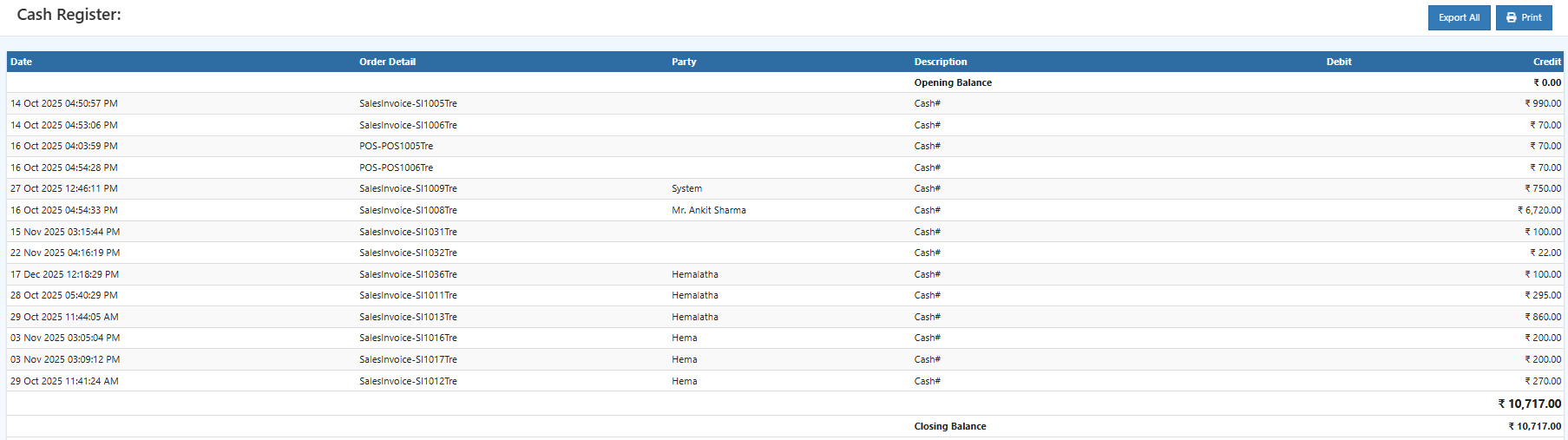
- POS sales entries
- Sales invoices
- Cash payments
- Customer details
- Debit & Credit values
- Running cash balance
This view helps verify every cash movement line by line.
Export & Print Options
You can export the Cash Register Summary as:
- Excel (.xlsx)
- CSV (.csv)
Useful for:
- Accounting review
- Cash audits
- Monthly financial summaries
- Compliance documentation
The Print option generates a clean, shareable report.
Why Use O2VEND Cash Register Reports?
Unlike manual registers or basic POS systems, O2VEND offers:
- Automatic cash calculations
- User-wise accountability
- Audit-ready export reports
This ensures accurate cash control across your business.
Related Topics
Relalted Topics
For complete daily sales verification, combine this report with the Daily Settlement Report. Cashbook Ledger Reports Sales Book
❓ Need help understanding Cash Register Summary?
Get expert assistance with cash register reports and POS reconciliation.
👉 Contact Support