O2VEND Sales Order Shipment Report | Track & Monitor Orders
The O2VEND Sales Order Shipment Report lists shipped orders from both online and POS channels, displaying shipment dates, order status, shipped quantities, pending items, and tracking numbers to monitor delivery progress and fulfillment accuracy. It also supports shipment history review and dispatch performance tracking.
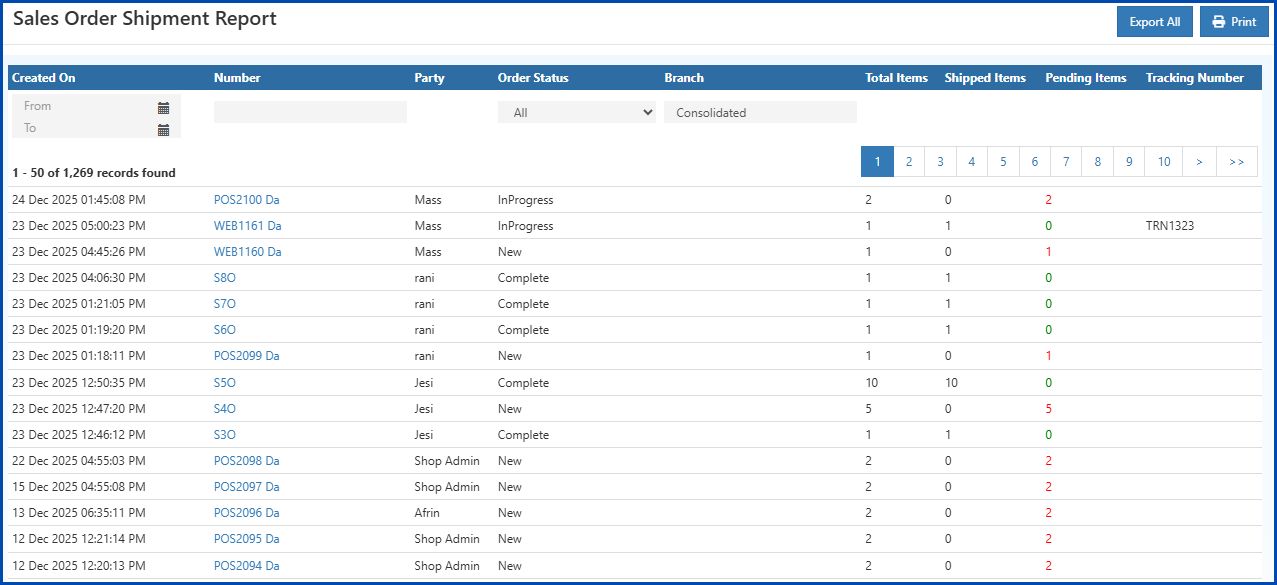
How to View and Filter the Sales Order Shipment Report
Follow these steps to open and use the Sales Order Shipment Report in O2VEND:
- Open Back Office.
- Go to the Reports menu on the left panel or simply press Alt + R as a shortcut.
- Select Order Reports – Sales Order Shipment Report.
- Set the From Date and To Date fields to choose the reporting period.
- All shipment data for the selected period will be displayed automatically.
- Use the Export button to download the report in formats such as Excel or CSV for further analysis or record-keeping.
- Scroll to the bottom of the page to view pagination controls for navigating the report.
Branch Filter
- Use the Branch filter to view Sales Order Shipment details for a specific branch.
- Once a branch is selected, the report updates automatically to show results for that branch only.
- Select Consolidated to view combined shipment data across all branches.
Field Descriptions – Sales Order Shipment Report
Created On
Displays the date and time when the shipment was created, showing exactly when each order was dispatched.
Number
Each order or shipment has a unique reference number. Clicking the number opens the Order Details page, providing a complete view of the order and its status.
Party
Shows the customer or account associated with the order, helping identify the owner of the shipment.
Order Status
Indicates the current status of the order. The Order Status filter can be used to view shipments that are pending, completed.
Total Items
Displays the total number of items in the order, providing a quick overview of shipment size.
Shipped Items
Shows the number of items already shipped, enabling monitoring of fulfillment progress.
Pending Items
Indicates the number of items pending shipment, highlighting orders that require attention.
Shipment Items
Represents the total items included in this specific shipment, providing detailed tracking for each shipment entry.
Tracking Number
For eCommerce orders, the tracking number helps customers and staff know the current shipment location and the expected delivery time. For POS orders, the tracking number may also record the delivery method (for example, Direct to Customer or Courier), so the delivery details are always stored and traceable.
Export & Print
The Export and Print options allow the Sales Order Shipment Report data to be easily downloaded or printed. Available formats include Excel and PDF, making it simple to use the report for reporting, sharing, or record-keeping.
Export – Sales Order Shipment Report
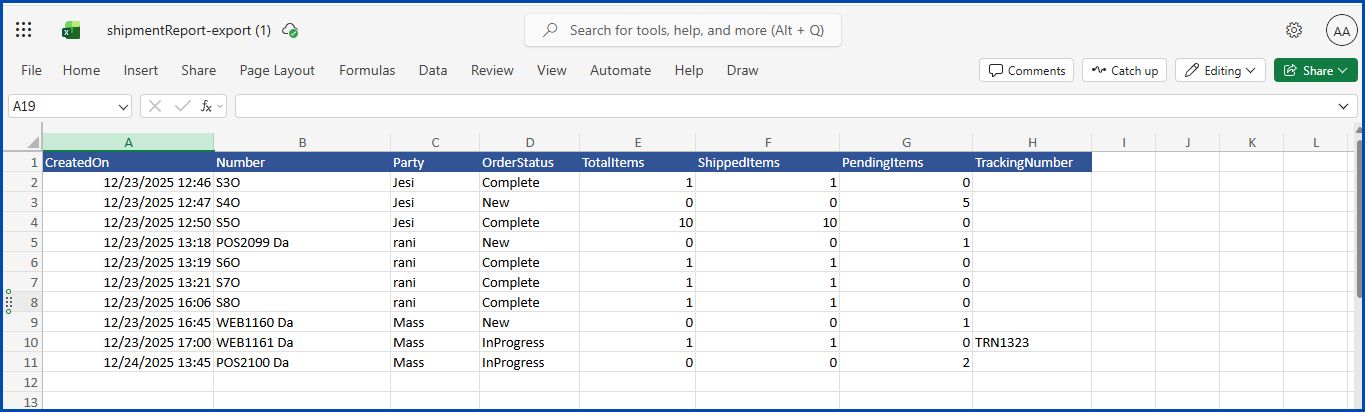
Print – Sales Order Shipment Report

Benefits of the Sales Order Shipment Report
- Real-Time Tracking – Monitor online and POS shipments instantly.
- Accurate Fulfillment – Keep track of shipped and pending items.
- Easy Reporting – Export data for analysis and insights.
- Efficient Management – Filter by branch or status to streamline orders.
Related Reports
- Sales Order Summary
- Sales Order Progress Report
- Sales Order Packing Sheet Report
- Sales Shipping Status Report
- Sales Order Shipping Address Report
Track Shipments and Monitor Orders Efficiently
Access real-time insights from the O2VEND Sales Order Shipment Report to monitor order status, track deliveries, and improve fulfillment management.
FAQ – Sales Order Shipment Report
1. What does this report show?
Shows shipped orders from online and POS channels, including order status, shipped and pending items, and tracking numbers.
2. Can I export the report?
Yes, use the Export button to download the report as Excel or CSV.
3. Can I view branch-wise shipments?
Yes, use the Branch filter to switch between Consolidated data and individual branch views.