Agent Sales Report Explained: Track Agent Performance & Sales Activity in O2VEND
The Agent Sales Report provides a detailed view of each agent’s performance, including:
- Number of orders handled
- Total sales amount
- Customer interactions
- Payment and fulfillment updates
This report is essential for businesses using O2VEND Multichannel Commerce, especially for managing:
- Field agents
- Sales representatives
- Delivery agents
- Collection agents
1. Navigation Path
To access the report:
Back office -> Reports → Sales and Purchase Reports → Agent Sales Report
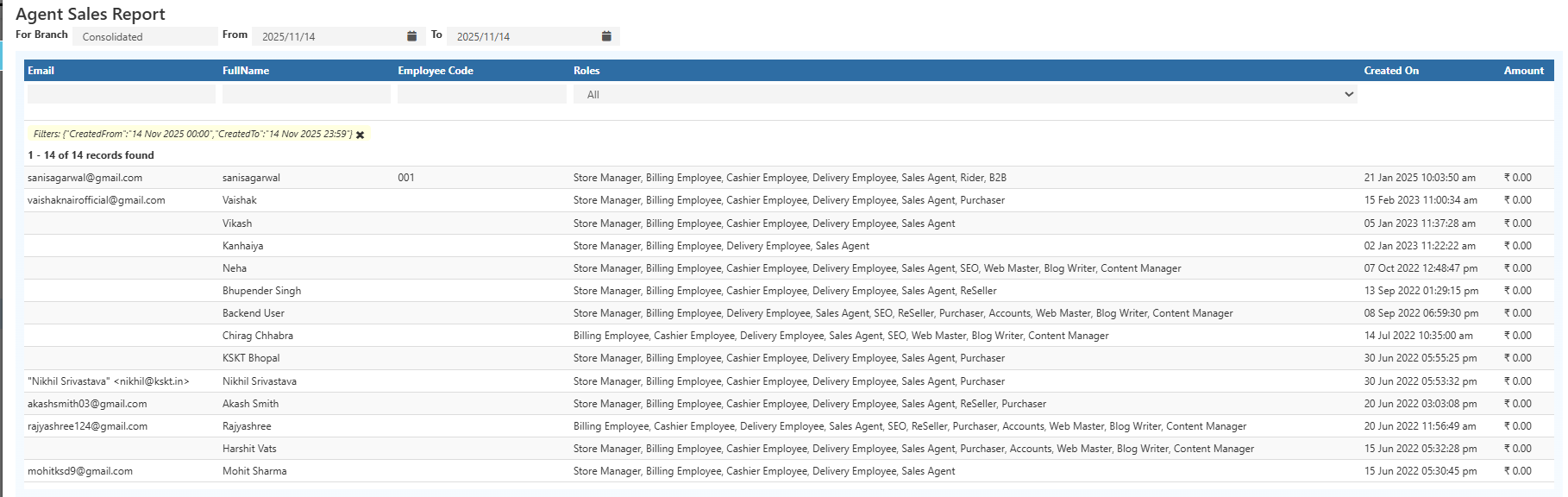
2. Purpose of the Agent Sales Report
This report helps track:
- Agent-wise sales performance
- Total number of orders handled
- Amount collected by each agent
- Completed vs pending order values
- Customer coverage and sales activity
- Comparison of top-performing agents
It provides a clear view of each agent’s contribution to overall business performance.
3. Key Columns in the Report
The Agent Sales Report typically includes the following fields:
• Agent Name
Displays the name of the sales or collection agent.
Employee Code**
A unique numeric or alphanumeric code assigned to the employee.
Often used in HR, payroll, and attendance systems for quick identification.
Roles
Lists all the roles associated with the agent employee.
Example roles include:
- Store Manager
- Billing Employee
- Cashier Employee
- Delivery Employee
- Sales Agent
- SEO
- Web Master
- Blog Writer
- Content Manager
- Purchaser
- Accounts
Multiple roles indicate cross-functional responsibilities.
• Order Count
Shows the number of sales orders assigned to the agent.
• Total Sales Amount
Represents the total value of all orders created by the agent.
• Customer Name
Lists the customers handled by the agent.
• Phone Number
Useful for customer follow-ups or verification.
• Payment Status
Indicates whether the order is:
- Paid
- Partially Paid
- Pending
• Shipping Status
Shows whether the order is:
- Shipped
- Partially Shipped
- Awaiting Shipment
Filters
The report includes powerful filtering options such as:
- Agent name
- Customer name
- Phone number
- Order date
- Order status
- Payment status
- Branch Selection
Filters help refine the report and quickly find specific records.
4. Export Options
The Agent Sales Report supports:
- Excel (.xlsx)
- CSV (.csv)
This makes it easy to share, present, and analyze data outside the system.
5. Pagination & Totals
At the bottom of the report, users can view:
- Total order count
- Total sales amount
- Pagination controls for navigating large datasets
This is especially useful for stores with high transaction volume.
6. Why This Report Is Important
The Agent Sales Report helps evaluate:
- Agent performance
- Sales conversion efficiency
- Revenue contribution
- Field activity tracking
- Customer engagement
It is especially valuable for businesses using:
- O2VEND ERP
- O2VEND Ecommerce
- O2VEND Agent App
- O2VEND Cloud POS
Real-time insights make it easier to optimize sales operations, strengthen reporting, and improve team productivity.
Summary & Insights
The Agent Sales Report is a powerful tool for analyzing and managing agent-driven sales activity.
It improves decision-making and offers clear visibility into:
- Sales performance
- Team productivity
- Order flow
- Customer handling efficiency
Use this report to track sales activities across teams, locations, and customer segments with precision.